
角2改变一个变量值会影响循环中的另一个变量。
角2改变一个变量值会影响循环中的另一个变量。
提问于 2018-01-04 05:13:04
Staff.html
<div class="teacher-lists teacher" *ngFor="let staff of TotalData">
          <div class="photo-div">
            <img *ngIf="staff?.staffImage[0]?.secure_url" [src]=staff?.staffImage[0]?.secure_url/>
          </div>
          <div class="name-div">
            <h1 class="teacher-name">{{staff.teacherName}}</h1>
          </div>
          <div class="phone-div">
            <h1 class="teacher-name">{{staff.phoneNumber}}</h1>
          </div>
          <div class="acticons students">
            <a (click)="editStaff(staff)" class="link-block-2 w-inline-block" style="cursor:pointer">
              <img src="assets/images/edit.svg" data-ix="edit-popup">
            </a>
          </div>
        </div>
staff.component.ts
export class ViewAllComponent implements OnInit {
 public TotalData: any;
 public canEditStaff: boolean = false;
 public editStaffData: any = {};
 public showLoading: boolean = false;

getStaffs(min: any = 0, limit: any = '') {

this.api.post('getAllStaffs', { role: "Teaching", limit: limit, min: min })
  .map(res => res.json())
  .subscribe(
  data => {
    this.TotalData = data;
    console.log('success', data)
  },
  error => console.log(error)
  )
}

editStaff(staff) {
this.editStaffData.staffInfo = staff;
this.canEditStaff = !this.canEditStaff;
}

closeStaff() {
this.canEditStaff = !this.canEditStaff;
}

saveStaff(registrationData, form) {
this.api.post('update-teachers', registrationData)
  .map(res => res.json())
  .subscribe(
  data => {
    if (data.success) {
      form.resetForm();
      this.getStaffs();
      this.closeStaff();
      this.showLoading = false;
    }
    console.log('success', data)
  },
  error => {
    console.log(error);
    this.showLoading = false;
  });
}

}
编辑人员弹出
<div class="edit-overlay" *ngIf="canEditStaff">
<div class="teacher-edit w-clearfix">
<a style="cursor:pointer" (click)="closeStaff()" class="close-edit w-inline-block" data-ix="colse-edit">
</a>
<div class="form-container">
  <h1 class="form-title">Edit staff</h1>
  <div class="underline"></div>
  <div class="w-form">

    <form name="email-form-2" #form="ngForm" (ngSubmit)="saveStaff(editStaffData.staffInfo,form)" class="form">
      <div class="w-row">
        <div class="w-col w-col-6">
          <div class="col-field-1">
            <label for="name" class="field-label">Teacher Name</label>
            <input type="text" pattern="[A-Z .a-z]{2,}" [(ngModel)]="editStaffData.staffInfo.teacherName" class="text-field w-input" name="name" data-name="Name" placeholder="Nmae">
          </div>
        </div>
      </div>
      <div class="w-row">
        <div class="w-row">
          <div class="w-col w-col-6">
            <div class="col-field-1 w-clearfix">
              <label for="name-6" class="field-label">Staff Photo</label>
              <input type="text" *ngIf="!editStaffData.staffInfo.staffImage.length" class="text-field w-input required" maxlength="256" name="name-2" data-name="Name 2" placeholder="Student Photo" readonly [(ngModel)]="editStaffData.photoName">
              <input type="text" *ngIf="editStaffData.staffInfo.staffImage.length>0" readonly class="text-field w-input" maxlength="256" name="name-2" data-name="Name 2" placeholder="Student Photo" [(ngModel)]="editStaffData.photoName">
              <input type="file" name="file" #fileInput id="file_input_id" (change)="upload()" [multiple]="false" accept="image/x-png,image/gif,image/jpeg" style="display:none;" />
              <label for="file_input_id" class="upload-image w-inline-block" style="cursor:pointer"></label>
              <p *ngIf="photoError" style="color:#dd2c00">{{photoError}}</p>
              <p *ngIf="photoSuccess" style="color:#42A948">Photo successfully saved</p>
            </div>
          </div>
          <div class="w-col w-col-6"></div>
        </div>
      </div>
      <div class="button-container">
        <button *ngIf="!showLoading" type="submit" [disabled]="!form.valid" class="save-button w-button">SUBMIT</button>
        <div *ngIf="showLoading" class="save-button w-button loading">Please Wait...</div>
        <p *ngIf="editStaffData.saveError" class="success-message">Please verify all fields</p>
        <p *ngIf="editStaffData.saveSuccess" class="success-message">Staff saved successfully</p>
      </div>
    </form>
    <div class="w-form-done">
      <div>Thank you! Your submission has been received!</div>
    </div>
    <div class="w-form-fail">
      <div>Oops! Something went wrong while submitting the form.</div>
    </div>
  </div>
</div>
<div class="bottom-line"></div>
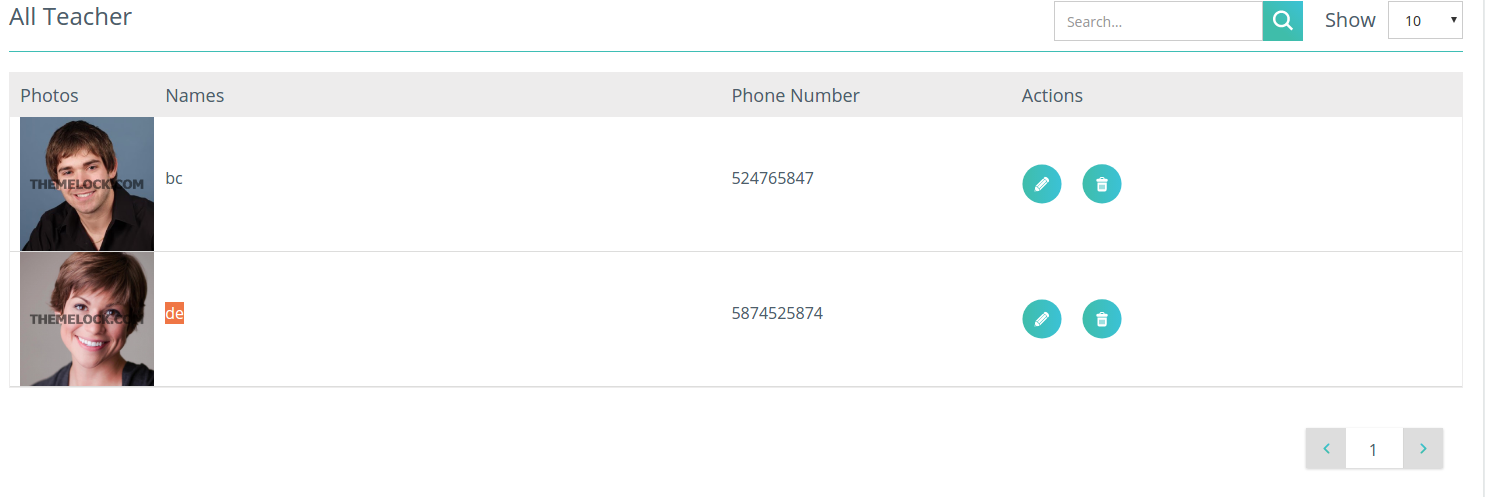
如果我们在弹出窗口中编辑任何内容,背景数据中的值也会发生变化,但在database.if中不会发生变化,我关闭弹出,更改后的数据将在背景(原始)中可见。如果我刷新页面,旧(原始)数据将返回。因此,我的问题是为什么以及如何改变背景中的数据,尽管我没有使用任何公共变量,也没有调用保存的函数。 这是我的原始数据
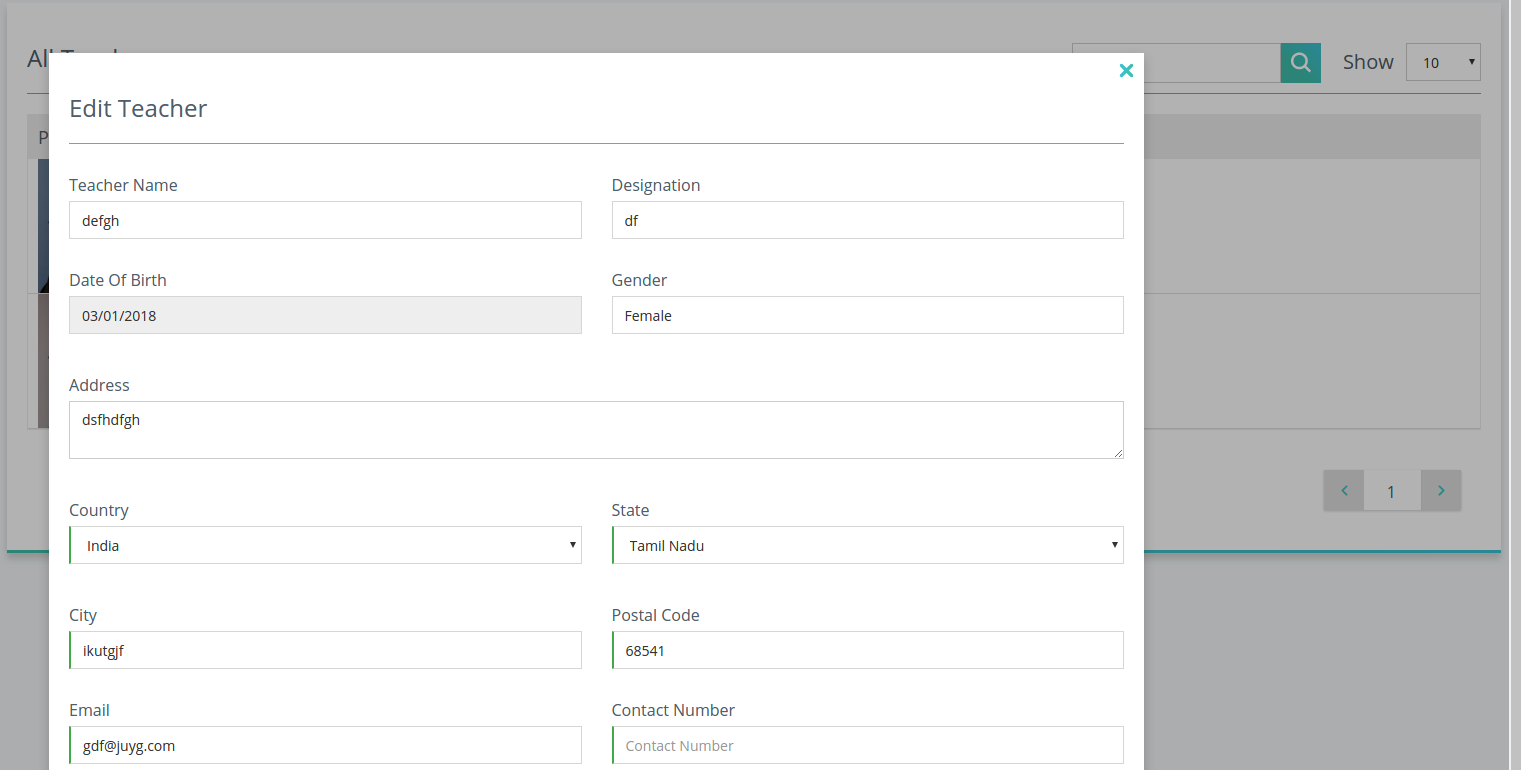
这是我正在编辑的弹出式。现在我改了老师的名字,删除了电话号码。然后,我关闭弹出没有保存。
并看到原始数据也会被更改。
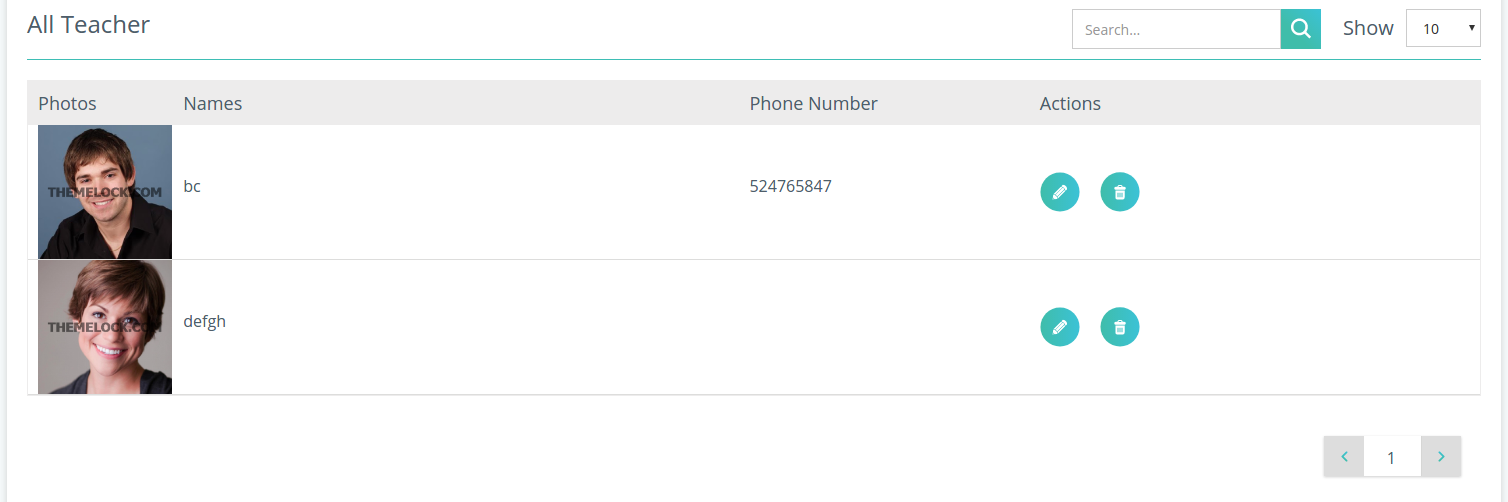
这就是我所怀疑的,循环中的原始数据是如何在不保存或使用公共变量的情况下改变的。
谢谢你提前解决了这个问题。
回答 1
Stack Overflow用户
回答已采纳
发布于 2018-01-04 06:44:12
之所以发生这种情况,是因为存在双向数据绑定。当UI元素被更新时,更改会被传播回模型(这就是为什么循环中的原始数据发生了更改)。您可以通过发送staff对象的副本来防止这种情况。您必须在editStaff方法中深入克隆staff对象。
staff.component.ts
editStaff(staff) {
    this.editStaffData.staffInfo = JSON.parse(JSON.stringify(staff)); //Deep clone staff
    this.canEditStaff = !this.canEditStaff;
}页面原文内容由Stack Overflow提供。腾讯云小微IT领域专用引擎提供翻译支持
原文链接:
https://stackoverflow.com/questions/48089050
复制相关文章
相似问题
腾讯云开发者

Copyright © 2013 - 2026 Tencent Cloud. All Rights Reserved. 腾讯云 版权所有
深圳市腾讯计算机系统有限公司 ICP备案/许可证号:粤B2-20090059  粤公网安备44030502008569号
腾讯云计算(北京)有限责任公司 京ICP证150476号 | 京ICP备11018762号