
为什么Chrome要扩展“对齐项”,而不是像声明的那样将其调整为“flex”?
为什么Chrome要扩展“对齐项”,而不是像声明的那样将其调整为“flex”?
提问于 2018-01-04 03:29:41
我有这样的评论版面,每一个深度的评论(回复)都要薄一点:
ul { padding:0 }

.col-1, .col-2, .col-3, .col-4, .col-5, .col-6, .col-7, .col-8, .col-9, .col-10, .col-11, .col-12, .col, .col-sm-1, .col-sm-2, .col-sm-3, .col-sm-4, .col-sm-5, .col-sm-6, .col-sm-7, .col-sm-8, .col-sm-9, .col-sm-10, .col-sm-11, .col-sm-12, .col-sm, .col-md-1, .col-md-2, .col-md-3, .col-md-4, .col-md-5, .col-md-6, .col-md-7, .col-md-8, .col-md-9, .col-md-10, .col-md-11, .col-md-12, .col-md, .col-lg-1, .col-lg-2, .col-lg-3, .col-lg-4, .col-lg-5, .col-lg-6, .col-lg-7, .col-lg-8, .col-lg-9, .col-lg-10, .col-lg-11, .col-lg-12, .col-lg, .col-xl-1, .col-xl-2, .col-xl-3, .col-xl-4, .col-xl-5, .col-xl-6, .col-xl-7, .col-xl-8, .col-xl-9, .col-xl-10, .col-xl-11, .col-xl-12, .col-xl {
    position: relative;
    width: 100%;
    min-height: 1px;
}

@media (min-width: 768px) {
    .col-md-10 {
        -webkit-box-flex: 0;
        -webkit-flex: 0 0 83.333333%;
        -ms-flex: 0 0 83.333333%;
        flex: 0 0 83.333333%;
        max-width: 83.333333%;
    }
    .col-md-11 {
        -webkit-box-flex: 0;
        -webkit-flex: 0 0 91.666667%;
        -ms-flex: 0 0 91.666667%;
        flex: 0 0 91.666667%;
        max-width: 91.666667%;
    }
    .col-md-12 {
        -webkit-box-flex: 0;
        -webkit-flex: 0 0 100%;
        -ms-flex: 0 0 100%;
        flex: 0 0 100%;
        max-width: 100%;
    }
}

/* Comments */

.comments-list {
    display: flex;
    flex-direction: row;
    flex-wrap: wrap;
}

.comment {
}

.child-comments {
    display: flex;
    align-items: flex-end;
    flex-direction: column;
    height: auto;
}

.comment-wrapper {
    margin: 0 0 24px 0;
    padding: 0 0 24px 0;
    border-bottom: 1px solid rgba(0,0,0,0.2);
    display: inline-flex;
    flex-direction: row;
    max-width: 100%;#C69F73
}

.comment .avatar {
    margin-right: 24px;
    border-radius: 50%;
    object-fit: cover;
    position: relative;
    background-color: rgba(0,0,0,0.2);
}

.comment .info {
    display: flex;
    align-items: flex-start;
    flex-wrap: wrap;
    flex-direction: column;
}

.comment .comment-meta {
    margin: 0 0 12px 0;
}

.comment .comment-author {
    margin: 0 0 6px 0;
}

.comment .comment-author a {
    font-family: 'Simoncini Garamond Italic', sans-serif;
    font-weight: 600;
    font-size: 24px;
    margin: 0 0 4px 0;
}

.comment .comment-time {
    font-size: 14px;
    text-transform: uppercase;
    letter-spacing: 2px;
    font-family: Helvetica, sans-serif;
    font-weight: 600;
    color: rgba(0,0,0,0.4);
    margin: 0 0 16px 0;
}

.comment .comment-content p {
    font-size: 20px;
    margin-bottom: 12px;
}

.comment .comment-content p > a {
    color: rgba(38, 142, 239, 1);
    padding: 0 0 1px 0;
    border-bottom: 2px solid rgba(38, 142, 239, 1);
    transition: color 0.5s ease, border-bottom 0.5s ease;
}

.comment .comment-content p > a:hover {
    color: rgba(0, 68, 181, 1);
    border-bottom: 2px solid rgba(38, 142, 239, 0.5);
}

.comment .comment-content .comment-reply-link {
    font-size: 8px;
    font-family: 'Helvetica', sans-serif;
    text-transform: uppercase;
    letter-spacing: 2px;
    font-weight: 600;
    color: white;
    text-align: center;
    padding: 4px 16px;
    background-color: rgba(0,0,0,0.20);
    transition: background-color 0.5s ease;
}

.comment .comment-content .comment-reply-link:hover {
    background-color: rgba(0,0,0,1);
}<head>
<meta charset="UTF-8">
<title>FoodBlog - A WordPress Food Blog Theme</title>
<meta http-equiv="X-UA-Compatible" content="IE-edge">
<meta name="viewport" content="width=device-width, initial-scale=1">
<!-- Main CSS -->
<link href="css/comments-custom.css" rel="stylesheet">
</head>
<div id="comments" class="comments-area post-single-comments col-md-12">
<div class="comments-title section-title">
<p class="wrap">7 comments </p>
</div><!-- .comments-title -->
<ul class="comments-list col-md-12">
<li class="comment even thread-even depth-1 parent col-md-12" id="comment-3" itemprop="comment" itemscope itemtype="http://schema.org/Comment">
<div class="comment-wrapper col-md-12">
<img alt='Author’s gravatar' src='http://1.gravatar.com/avatar/13f401b35fbfa320cf306a891828f876?s=65&d=%5Bdefault%20gravatar%20URL%5D&r=g' srcset='http://1.gravatar.com/avatar/13f401b35fbfa320cf306a891828f876?s=130&d=%5Bdefault%20gravatar%20URL%5D&r=g 2x' class='avatar avatar-65 photo' height='65' width='65' />
<div class="info">
<div class="comment-meta" role="complementary">
<h2 class="comment-author">
<a class="comment-author-link" href="" itemprop="author">Linda Calinda</a>
</h2>
<time class="comment-time" datetime="2017-12-29T05:00+00:00" itemprop="datePublished">29th December 2017, <a href="#comment-3" itemprop="url">5:00 am</a>
</time>
<a class="comment-edit-link" href="http://127.0.0.1/wordpress/wp-admin/comment.php?action=editcomment&c=3"><p class="comment-meta-item">Edit this comment</p>
</a>
</div>
<div class="comment-content" itemprop="text">
<p>Here we go, another link:<a href="https://www.google.com/" rel="nofollow">https://www.google.com/</a>
</p>
<a rel='nofollow' class='comment-reply-link' href='http://127.0.0.1/wordpress/2017/12/19/finding-the-love-of-your-life/?replytocom=3#respond' onclick='return addComment.moveForm( "comment-3", "3", "respond", "29" )' aria-label='Reply to Linda Calinda'>Reply</a>
</div>
</div>
</div>
<ul class="child-comments col-md-12">
<li class="comment odd alt depth-2 child col-md-11" id="comment-7" itemprop="comment" itemscope itemtype="http://schema.org/Comment">
<div class="comment-wrapper col-md-12">
<img alt='Author’s gravatar' src='http://1.gravatar.com/avatar/13f401b35fbfa320cf306a891828f876?s=65&d=%5Bdefault%20gravatar%20URL%5D&r=g' srcset='http://1.gravatar.com/avatar/13f401b35fbfa320cf306a891828f876?s=130&d=%5Bdefault%20gravatar%20URL%5D&r=g 2x' class='avatar avatar-65 photo' height='65' width='65' /> <div class="info">
<div class="comment-meta" role="complementary">
<h2 class="comment-author">
<a class="comment-author-link" href="" itemprop="author">Dana Throws</a>
</h2>
<time class="comment-time" datetime="2018-01-01T18:22+00:00" itemprop="datePublished">1st January 2018, <a href="#comment-7" itemprop="url">6:22 pm</a></time>
<a class="comment-edit-link" href="http://127.0.0.1/wordpress/wp-admin/comment.php?action=editcomment&c=7"><p class="comment-meta-item">Edit this comment</p></a> </div>
<div class="comment-content" itemprop="text">
<p>REPLY:: Quite Interesting!</p>
<a rel='nofollow' class='comment-reply-link' href='http://127.0.0.1/wordpress/2017/12/19/finding-the-love-of-your-life/?replytocom=7#respond' onclick='return addComment.moveForm( "comment-7", "7", "respond", "29" )' aria-label='Reply to Dana Throws'>Reply</a> </div>
</div>
</div>
</li>
<li class="comment even depth-2 child col-md-11" id="comment-9" itemprop="comment" itemscope itemtype="http://schema.org/Comment">
<div class="comment-wrapper col-md-12">
<img alt='Author’s gravatar' src='http://1.gravatar.com/avatar/13f401b35fbfa320cf306a891828f876?s=65&d=%5Bdefault%20gravatar%20URL%5D&r=g' srcset='http://1.gravatar.com/avatar/13f401b35fbfa320cf306a891828f876?s=130&d=%5Bdefault%20gravatar%20URL%5D&r=g 2x' class='avatar avatar-65 photo' height='65' width='65' /> <div class="info">
<div class="comment-meta" role="complementary">
<h2 class="comment-author">
<a class="comment-author-link" href="" itemprop="author">Lorand Post</a>
</h2>
<time class="comment-time" datetime="2018-01-01T18:28+00:00" itemprop="datePublished">1st January 2018, <a href="#comment-9" itemprop="url">6:28 pm</a></time>
<a class="comment-edit-link" href="http://127.0.0.1/wordpress/wp-admin/comment.php?action=editcomment&c=9"><p class="comment-meta-item">Edit this comment</p></a> </div>
<div class="comment-content" itemprop="text">
<p>Him some great pleasure. To take a trivial example, which of us ever undertakes laborious physical exercise, except to obtain some advantage from it? But who has any right to find fault with a man who chooses to enjoy a pleasure that has no annoying consequences, or one who avoids a pain that produces no resultant pleasure?</p>
<a rel='nofollow' class='comment-reply-link' href='http://127.0.0.1/wordpress/2017/12/19/finding-the-love-of-your-life/?replytocom=9#respond' onclick='return addComment.moveForm( "comment-9", "9", "respond", "29" )' aria-label='Reply to Lorand Post'>Reply</a> </div>
</div>
</div>
<ul class="child-comments col-md-12">
<li class="comment odd alt depth-3 child col-md-11" id="comment-10" itemprop="comment" itemscope itemtype="http://schema.org/Comment">
<div class="comment-wrapper col-md-12">
<img alt='Author’s gravatar' src='http://1.gravatar.com/avatar/13f401b35fbfa320cf306a891828f876?s=65&d=%5Bdefault%20gravatar%20URL%5D&r=g' srcset='http://1.gravatar.com/avatar/13f401b35fbfa320cf306a891828f876?s=130&d=%5Bdefault%20gravatar%20URL%5D&r=g 2x' class='avatar avatar-65 photo' height='65' width='65' /> <div class="info">
<div class="comment-meta" role="complementary">
<h2 class="comment-author">
<a class="comment-author-link" href="" itemprop="author">Smithy</a>
</h2>
<time class="comment-time" datetime="2018-01-01T18:30+00:00" itemprop="datePublished">1st January 2018, <a href="#comment-10" itemprop="url">6:30 pm</a></time>
<a class="comment-edit-link" href="http://127.0.0.1/wordpress/wp-admin/comment.php?action=editcomment&c=10"><p class="comment-meta-item">Edit this comment</p></a> </div>
<div class="comment-content" itemprop="text">
<p>But I must explain to you how all this mistaken idea of denouncing pleasure and praising pain was born and I will give you a complete account of the system, and expound the actual teachings of the great explorer of the truth, the master-builder of human happiness. No one rejects, dislikes, or avoids pleasure itself, because it is pleasure, but because those who do not know how to pursue pleasure rationally encounter consequences that are extremely painful. Nor again is there anyone who loves or pursues or desires to obtain pain of itself, because it is pain, but because occasionally circumstances occur in which toil and pain can procure him some great pleasure. To take a trivial example, which of us ever undertakes laborious physical exercise, except to obtain some advantage from it? But who has any right to find fault with a man who chooses to enjoy a pleasure that has no annoying consequences, or one who avoids a pain that produces no resultant pleasure? On the other hand, we denounce with righteous indignation and dislike men who are so beguiled and demoralized by the charms of pleasure of the moment, so blinded by desire, that they cannot foresee</p>
<a rel='nofollow' class='comment-reply-link' href='http://127.0.0.1/wordpress/2017/12/19/finding-the-love-of-your-life/?replytocom=10#respond' onclick='return addComment.moveForm( "comment-10", "10", "respond", "29" )' aria-label='Reply to Smithy'>Reply</a> </div>
</div>
</div>
</li>
</ul>
</li>
</ul>
</li>
<li class="comment even thread-odd thread-alt depth-1 parent col-md-12" id="comment-8" itemprop="comment" itemscope itemtype="http://schema.org/Comment">
<div class="comment-wrapper col-md-12">
<img alt='Author’s gravatar' src='http://1.gravatar.com/avatar/13f401b35fbfa320cf306a891828f876?s=65&d=%5Bdefault%20gravatar%20URL%5D&r=g' srcset='http://1.gravatar.com/avatar/13f401b35fbfa320cf306a891828f876?s=130&d=%5Bdefault%20gravatar%20URL%5D&r=g 2x' class='avatar avatar-65 photo' height='65' width='65' />
<div class="info">
<div class="comment-meta" role="complementary">
<h2 class="comment-author">
<a class="comment-author-link" href="" itemprop="author">hey@gmail.com</a>
</h2>
<time class="comment-time" datetime="2018-01-01T18:28+00:00" itemprop="datePublished">1st January 2018, <a href="#comment-8" itemprop="url">6:28 pm</a></time>
<a class="comment-edit-link" href="http://127.0.0.1/wordpress/wp-admin/comment.php?action=editcomment&c=8"><p class="comment-meta-item">Edit this comment</p></a> </div>
<div class="comment-content" itemprop="text">
<p>Greatness! </p>
<a rel='nofollow' class='comment-reply-link' href='http://127.0.0.1/wordpress/2017/12/19/finding-the-love-of-your-life/?replytocom=8#respond' onclick='return addComment.moveForm( "comment-8", "8", "respond", "29" )' aria-label='Reply to hey@gmail.com'>Reply</a>
</div>
</div>
</div>
</li>
</ul>
<div id="respond" class="comment-respond">
<h3 id="reply-title" class="comment-reply-title">Leave a Reply
<small>
<a rel="nofollow" id="cancel-comment-reply-link" href="/wordpress/2017/12/19/finding-the-love-of-your-life/#respond" style="display:none;">Cancel reply
</a>
</small>
</h3>
<form action="http://127.0.0.1/wordpress/wp-comments-post.php" method="post" id="commentform" class="comment-form" novalidate>
<p class="logged-in-as"><a href="http://127.0.0.1/wordpress/wp-admin/profile.php" aria-label="Logged in as admin. Edit your profile.">Logged in as admin</a>.
<a href="http://127.0.0.1/wordpress/wp-login.php?action=logout&redirect_to=http%3A%2F%2F127.0.0.1%2Fwordpress%2F2017%2F12%2F19%2Ffinding-the-love-of-your-life%2F&_wpnonce=f9fd35b4b5">Log out?
</a>
</p>
<p class="comment-form-comment">
<label for="comment">Comment</label>
<textarea id="comment" name="comment" cols="45" rows="8" maxlength="65525" aria-required="true" required="required">
</textarea>
</p>
<p class="form-submit">
<input name="submit" type="submit" id="submit" class="submit" value="Post Comment" />
<input type='hidden' name='comment_post_ID' value='29' id='comment_post_ID' />
<input type='hidden' name='comment_parent' id='comment_parent' value='0' />
</p>
<input type="hidden" id="_wp_unfiltered_html_comment_disabled" name="_wp_unfiltered_html_comment_disabled" value="4c1d9851b0" />
<script>(function(){if(window===window.parent){document.getElementById('_wp_unfiltered_html_comment_disabled').name='_wp_unfiltered_html_comment';}})();
</script>
</form>
</div><!-- #respond -->
</div><!-- #comments -->
在SO的代码容器中,这看起来很好,并将项目对齐为flex-start (以及Firefox)。
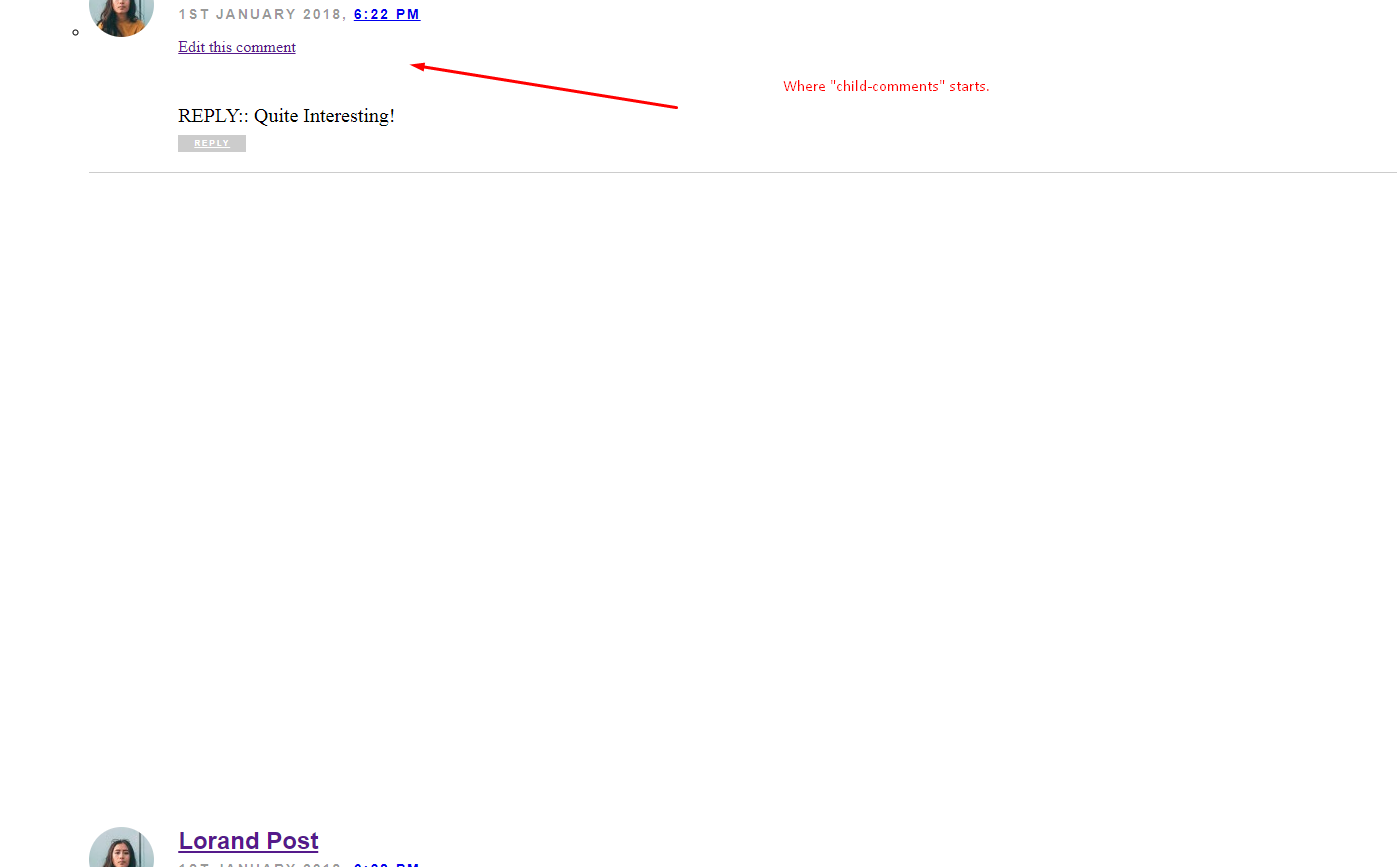
除了铬。这就是它的样子:
下面是来自Chrome的用户代理样式表:
.child-comments {
    display: flex;
    align-items: flex-end;
    flex-direction: column;
    height: auto;
}
@media (min-width: 768px)
comments-custom.css:24
.col-md-12 {
    -webkit-box-flex: 0;
    -webkit-flex: 0 0 100%;
    -ms-flex: 0 0 100%;
    flex: 0 0 100%;
    max-width: 100%;
}
comments-custom.css:3
.col-1, .col-2, .col-3, .col-4, .col-5, .col-6, .col-7, .col-8, .col-9, .col-10, .col-11, .col-12, .col, .col-sm-1, .col-sm-2, .col-sm-3, .col-sm-4, .col-sm-5, .col-sm-6, .col-sm-7, .col-sm-8, .col-sm-9, .col-sm-10, .col-sm-11, .col-sm-12, .col-sm, .col-md-1, .col-md-2, .col-md-3, .col-md-4, .col-md-5, .col-md-6, .col-md-7, .col-md-8, .col-md-9, .col-md-10, .col-md-11, .col-md-12, .col-md, .col-lg-1, .col-lg-2, .col-lg-3, .col-lg-4, .col-lg-5, .col-lg-6, .col-lg-7, .col-lg-8, .col-lg-9, .col-lg-10, .col-lg-11, .col-lg-12, .col-lg, .col-xl-1, .col-xl-2, .col-xl-3, .col-xl-4, .col-xl-5, .col-xl-6, .col-xl-7, .col-xl-8, .col-xl-9, .col-xl-10, .col-xl-11, .col-xl-12, .col-xl {
    position: relative;
    width: 100%;
    min-height: 1px;
}
comments-custom.css:1
ul {
    padding: 0;
}
user agent stylesheet
ol ul, ul ol, ul ul, ol ol {
    -webkit-margin-before: 0px;
    -webkit-margin-after: 0px;
}
user agent stylesheet
ul ul, ol ul {
    list-style-type: circle;
}
user agent stylesheet
ul, menu, dir {
    display: block;
    list-style-type: disc;
    -webkit-margin-before: 1em;
    -webkit-margin-after: 1em;
    -webkit-margin-start: 0px;
    -webkit-margin-end: 0px;
    -webkit-padding-start: 40px;
}
Inherited from li#comment-3.comment.even.thread-even.depth-1.parent.col-md-12
user agent stylesheet
li {
    display: list-item;
    text-align: -webkit-match-parent;
}
Inherited from ul.comments-list.col-md-12
user agent stylesheet
ul, menu, dir {
    display: block;
    list-style-type: disc;
    -webkit-margin-before: 1em;
    -webkit-margin-after: 1em;
    -webkit-margin-start: 0px;
    -webkit-margin-end: 0px;
    -webkit-padding-start: 40px
    }
可能是什么原因?
回答 1
Stack Overflow用户
发布于 2018-01-04 03:44:27
在反复搜索和搜索重写的问题之后,我找到了罪魁祸首。
添加
<!DOCTYPE html>对于您的文档,您的样式表可以优先于其他一切,就像它们应该做的那样,Chrome不再使用自己的样式。
页面原文内容由Stack Overflow提供。腾讯云小微IT领域专用引擎提供翻译支持
原文链接:
https://stackoverflow.com/questions/48088263
复制相关文章
相似问题
腾讯云开发者

Copyright © 2013 - 2026 Tencent Cloud. All Rights Reserved. 腾讯云 版权所有
深圳市腾讯计算机系统有限公司 ICP备案/许可证号:粤B2-20090059  粤公网安备44030502008569号
腾讯云计算(北京)有限责任公司 京ICP证150476号 | 京ICP备11018762号