
无法设置iOS 11大标题条颜色
无法设置iOS 11大标题条颜色
提问于 2018-01-03 12:23:04
在将导航条设置为透明后,我在恢复iOS 11大标题的bartint颜色方面出现了问题。
复制步骤:
- 将导航栏、背景图像和阴影设置为空UIImage()。
- 导航栏变得透明。
- 将导航栏、背景图像和阴影设置为零,并设置条形色调颜色。
- 大标题导航栏变为白色;如果向下滚动(存在旧导航条),则可以看到条形图颜色仅适用于旧风格的导航栏。
Tried:
*将导航背景颜色和状态颜色设置为条形色调,是的,它改变了,但是没有半透明的视觉效果,就像我们设置的条色一样。
有没有人像我一样面对同样的问题,并能用任何解决方案或解决办法来解决这个问题?
原始

在浏览了一个具有透明导航的页面之后返回了
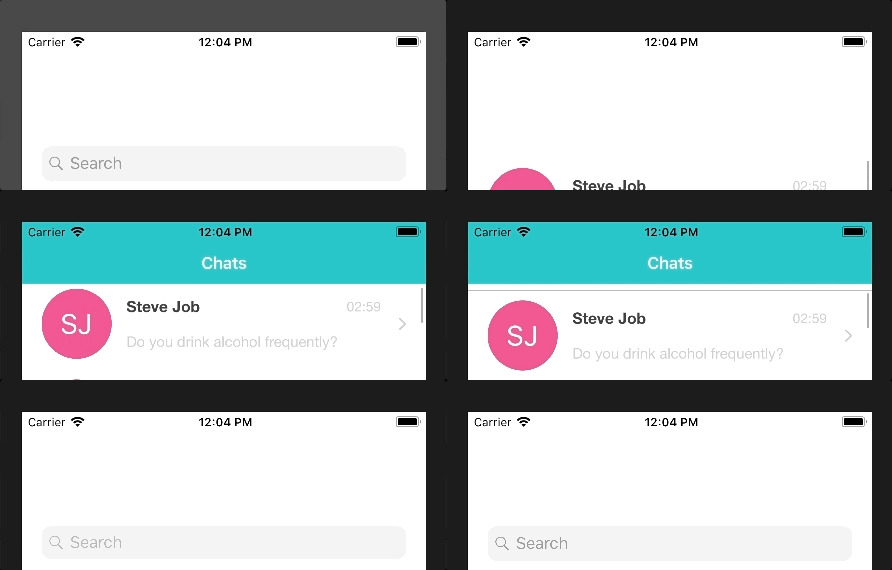
FYI,我还应用自定义导航控制器将透明颜色设置为默认颜色,
class CustomNavigationController: UINavigationController {

override func viewDidLoad() {
    super.viewDidLoad()

    // Do any additional setup after loading the view.
}

override func didReceiveMemoryWarning() {
    super.didReceiveMemoryWarning()
    // Dispose of any resources that can be recreated.
}

override func pushViewController(_ viewController: UIViewController, animated: Bool) {

    super.pushViewController(viewController, animated: animated)
   self.setDefaultNavigationBar()

}

override func popViewController(animated: Bool) -> UIViewController? {
    self.setDefaultNavigationBar()
    return super.popViewController(animated: animated)

}

override func popToViewController(_ viewController: UIViewController, animated: Bool) -> [UIViewController]? {
    self.setDefaultNavigationBar()
    return super.popToViewController(viewController, animated: animated)

}

override func popToRootViewController(animated: Bool) -> [UIViewController]? {
    self.setDefaultNavigationBar()
    return super.popToRootViewController(animated: animated)
}


func setDefaultNavigationBar() {

    let navigationBarColor = UIColor(hexString: "#00b5baff")!
    self.navigationBar.setBackgroundImage(nil, for: .default)
    self.navigationBar.shadowImage = nil
    //self.navigationController?.navigationBar.backgroundColor = UIColor.clear
    //self.navigationController?.navigationBar.tintColor = UIColor.clear
    self.navigationBar.barTintColor = navigationBarColor

}

/*
// MARK: - Navigation

// In a storyboard-based application, you will often want to do a little preparation before navigation
override func prepare(for segue: UIStoryboardSegue, sender: Any?) {
    // Get the new view controller using segue.destinationViewController.
    // Pass the selected object to the new view controller.
}
*/
}
回答 2
Stack Overflow用户
发布于 2018-01-04 23:18:33
尝试将transparent.png图像作为背景图像来实现透明性。那应该管用。如果这不起作用,试着使用下面的代码来更新大标题颜色。
self.navigationController?.navigationBar.largeTitleTextAttributes =
[NSAttributedStringKey.foregroundColor: UIColor.blue,
 NSAttributedStringKey.font: UIFont(name: fontName, size: 30) ??
                             UIFont.systemFont(ofSize: 30)]
希望这能有所帮助!
Stack Overflow用户
发布于 2019-10-31 11:39:47
不确定这是否对任何人有帮助,但当我在选择“更喜欢的大标题”后导航背景颜色变成白色时,这才是对我有用的:
    let appearance = UINavigationBarAppearance()
    appearance.backgroundColor = FlatBlue()
    appearance.titleTextAttributes = [NSAttributedString.Key.foregroundColor : UIColor.white]
    navigationBar.standardAppearance = appearance
navigationBar.scrollEdgeAppearance = appearance页面原文内容由Stack Overflow提供。腾讯云小微IT领域专用引擎提供翻译支持
原文链接:
https://stackoverflow.com/questions/48077336
复制相关文章
相似问题
腾讯云开发者

Copyright © 2013 - 2026 Tencent Cloud. All Rights Reserved. 腾讯云 版权所有
深圳市腾讯计算机系统有限公司 ICP备案/许可证号:粤B2-20090059  粤公网安备44030502008569号
腾讯云计算(北京)有限责任公司 京ICP证150476号 | 京ICP备11018762号