
使用ADAL的身份验证
使用ADAL的身份验证
提问于 2018-01-03 11:05:11
我正在使用下面的代码来验证我的Azure试用帐户中的默认用户。
    static void Main(string[] args)
    {
        GetTokenAsync().Wait();
    }

    static async Task<string> GetTokenAsync()
    {
        string Tenant = "mytest.onmicrosoft.com";
        string Authority = "https://login.microsoftonline.com/" + Tenant;
        string GatewayLoginUrl = "https://login.microsoftonline.com/something/wsfed";
        string ClientId = "something";
        Uri RedirectUri = new Uri("http://something");

        AuthenticationContext context = new AuthenticationContext(Authority);
        PlatformParameters platformParams = new PlatformParameters(PromptBehavior.Auto, null);
        AuthenticationResult result = await context.AcquireTokenAsync(GatewayLoginUrl, ClientId, RedirectUri, platformParams);

        return result.ToString();
    }
我想知道从哪里得到这些价值:
- 租户
- 权威
- GatewayLoginUrl
- ClientId
- RedirectUri
对于使用AD的用户身份验证来说,这些代码足够吗?
回答 1
Stack Overflow用户
回答已采纳
发布于 2018-01-03 18:27:52
在使用Azure Active保护应用程序时,有几种场景(请参阅这里):
以下是Azure AD支持的五种主要应用程序场景:
- Web浏览器到Web应用程序:用户需要登录到由Azure AD保护的web应用程序。
- 单页应用程序(SPA):用户需要登录到由Azure AD保护的单个页面应用程序。
- 本机应用程序到Web :在电话、平板电脑或PC上运行的本机应用程序需要对用户进行身份验证,以便从由Azure .保护的web获得资源。
- :Web应用程序需要从Azure保护的Web中获取资源。
- Daemon或:守护进程应用程序或没有Web用户界面的服务器应用程序需要从Azure AD保护的web API中获取资源。
你说你已经注册了一份本机申请。我假设您需要对Azure Active Directory (AAD )进行身份验证,以便访问受保护的web或web应用程序(场景3),因此您也必须注册该目录。
static void Main(string[] args)
{
    GetTokenAsync().Wait();
}

static async Task<string> GetTokenAsync()
{
    string Tenant = "mytest.onmicrosoft.com";
    string Authority = "https://login.microsoftonline.com/" + Tenant;
    string GatewayLoginUrl = "https://login.microsoftonline.com/something/wsfed";
    string ClientId = "something";
    Uri RedirectUri = new Uri("http://something");

    AuthenticationContext context = new AuthenticationContext(Authority);
    PlatformParameters platformParams = new PlatformParameters(PromptBehavior.Auto, null);
    AuthenticationResult result = await context.AcquireTokenAsync(GatewayLoginUrl, ClientId, RedirectUri, platformParams);

    return result.ToString();
}Tenant是AAD域名,看来你说得对Authority是"https://login.microsoftonline.com/" + Tenant,所以看来你也猜对了GatewayLoginUrl是您要保护的应用程序的AppClientId是本机应用程序的应用程序Id。RedirectUri是本机应用程序的重定向Uri。
应用程序保护:
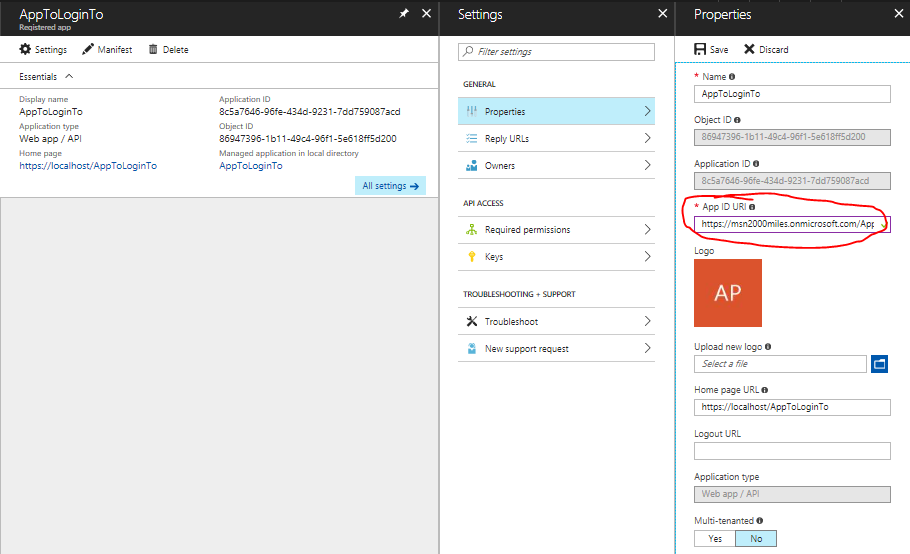
你从这里得到GatewayLoginUrl。
访问要保护的应用程序的本机应用程序:
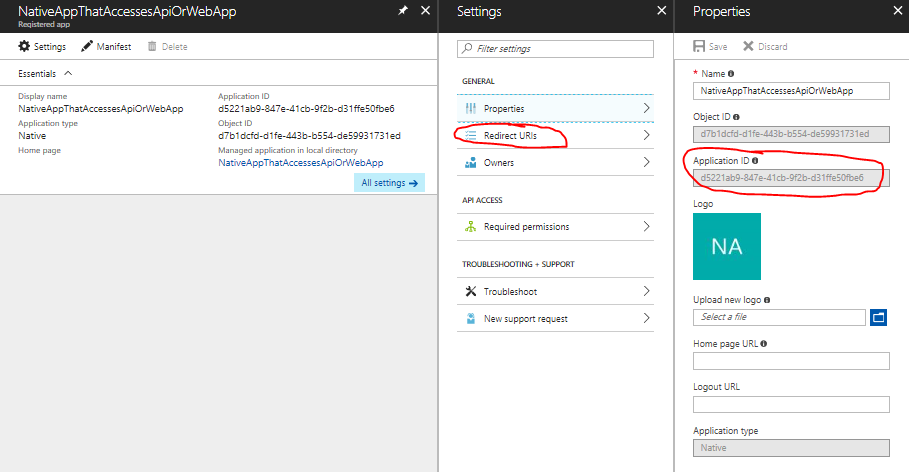
从这里可以得到ClientId和RedirectUri。
其他参考资料
您可以看到本机应用程序这里的完整演练。
有关使用本机应用程序访问受AAD保护的应用程序的全局概述,请参阅医生们。
页面原文内容由Stack Overflow提供。腾讯云小微IT领域专用引擎提供翻译支持
原文链接:
https://stackoverflow.com/questions/48076102
复制相关文章
相似问题
腾讯云开发者

Copyright © 2013 - 2026 Tencent Cloud. All Rights Reserved. 腾讯云 版权所有
深圳市腾讯计算机系统有限公司 ICP备案/许可证号:粤B2-20090059  粤公网安备44030502008569号
腾讯云计算(北京)有限责任公司 京ICP证150476号 | 京ICP备11018762号