
403个Google翻译API的每日配额
我跟随使用说明使用Google。我有:
- 创建了一个项目
- 启用帐单,并在账单帐户上有300美元
- 启用翻译API并确保配额很高
- 生成一个带有Admin角色的服务帐户,并下载JSON
- 将以下行添加到我的.zshrc中: 导出GOOGLE_APPLICATION_CREDENTIALS=/pathto/Holodeck-421412.json
- 其来源如下: 源~/..zshrc
然而,我的nodeJS代码和curl返回:
 code: 403,
  errors:
   [ { message: 'Daily Limit Exceeded',
       domain: 'usageLimits',
       reason: 'dailyLimitExceeded' } ],
  response: undefined,
  message: 'Daily Limit Exceeded' }
我的卷发:
curl --header "Content-Type: application/json" --header "Authorization: Bearer `gcloud auth print-access-token`" --show-error -s "https://translation.googleapis.com/language/translate/v2" -d @translate-request.json并翻译-request.json:
{
  "q": "The quick brown fox jumped over the lazy dog.",
  "source": "en",
  "target": "es",
  "format": "text"
}
我的NodeJS代码:
// Imports the Google Cloud client library
const language = require('@google-cloud/language');
const Translate = require('@google-cloud/translate');

// Instantiates a client
const client = new language.LanguageServiceClient();

// Your Google Cloud Platform project ID
const projectId = 'myproject ID';

// Instantiates a client
const translation = new Translate({
    projectId: projectId
});


// The text to analyze
let text1 = 'Hello, world!';

const translate = (text) => {
    const target = 'en';

    translation
        .translate(text, target)
        .then(results => {
            const translation = results[0];

            console.log(`Text: ${text}`);
            console.log(`Translation: ${translation}`);
        })
        .catch(err => {
            console.error('ERROR:', err);
        });
}


const analyze = (text) => {

    const document = {
        content: "good very good amazingly good",
        type: 'PLAIN_TEXT',
    };

// Detects the sentiment of the text
    client
        .analyzeSentiment({document: document})
        .then(results => {
            const sentiment = results[0].documentSentiment;
            console.log(`Sentiment score: ${sentiment.score}`);
            console.log(`Sentiment magnitude: ${sentiment.magnitude}`);
        })
        .catch(err => {
            console.error('ERROR:', err);
        });
}

translate(text1);
analyze(text1);
这让我感到困惑,因为自然语言API正在工作,所以服务帐户似乎运行正常。对此有什么看法吗?我有3个小时试图通过这个意想不到的障碍,我已经做了任何牦牛剃须,我可以考虑,包括打开新的项目/服务帐户/ API密钥和谷歌集团论坛(它的设计只是让我更欣赏StackOverflow .:)
----UPDATE----
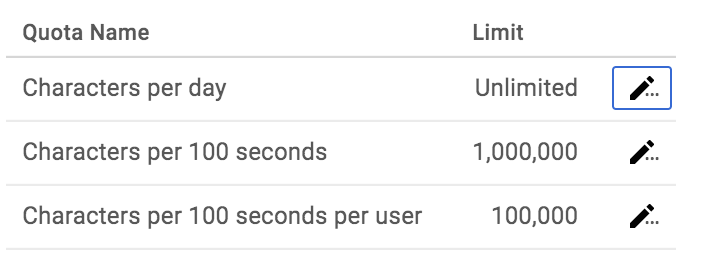
当我将每天字符的配额从1,000,000更改为另一个值时,似乎开始工作15秒左右(2-3次请求),然后返回到403错误。然后,如果我再次改变配额,我会得到另一轮2-3次请求。这就好像请求本身正在更改配额,或者在15-20秒之后取消更改。
回答 3
Stack Overflow用户
发布于 2018-01-03 20:27:28
问题应该已经解决了,从现在开始,请再试一次,看看你是否还在看到这个问题,如果必要的话重新打开问题#70990743。
Stack Overflow用户
发布于 2017-12-28 04:43:59
我也有同样的问题,我在Google问题跟踪器:https://issuetracker.google.com/issues/70990743中找到了这个bug
Stack Overflow用户
发布于 2019-03-27 09:39:57
你可以用配额来解决这个问题。你应该增加“每天字符”和“字符每秒”。
https://stackoverflow.com/questions/47973060
复制相似问题
腾讯云开发者

Copyright © 2013 - 2026 Tencent Cloud. All Rights Reserved. 腾讯云 版权所有
深圳市腾讯计算机系统有限公司 ICP备案/许可证号:粤B2-20090059  粤公网安备44030502008569号
腾讯云计算(北京)有限责任公司 京ICP证150476号 | 京ICP备11018762号