
ConstraintLayout layout_constraintHorizontal_bias似乎不管用
这是我的布局文件。
<?xml version="1.0" encoding="utf-8"?>
<android.support.constraint.ConstraintLayout xmlns:android="http://schemas.android.com/apk/res/android"
    xmlns:app="http://schemas.android.com/apk/res-auto"
    xmlns:tools="http://schemas.android.com/tools"
    android:layout_width="match_parent"
    android:layout_height="match_parent">
    <EditText
        android:layout_width="150dp"
        android:layout_height="50dp"
        android:hint="please input test content"
        android:inputType="phone"
        android:textColorHint="@android:color/holo_red_light"
        android:textSize="13sp"
        app:layout_constraintBottom_toTopOf="parent"
        app:layout_constraintRight_toLeftOf="parent" />
    <TextView
        android:layout_width="80dp"
        android:layout_height="50dp"
        android:gravity="center"
        android:text="Hello"
        android:textColor="@android:color/black"
        app:layout_constraintBottom_toTopOf="parent"
        app:layout_constraintHorizontal_bias="0.5" />
</android.support.constraint.ConstraintLayout>
跟随图片是预览视图。
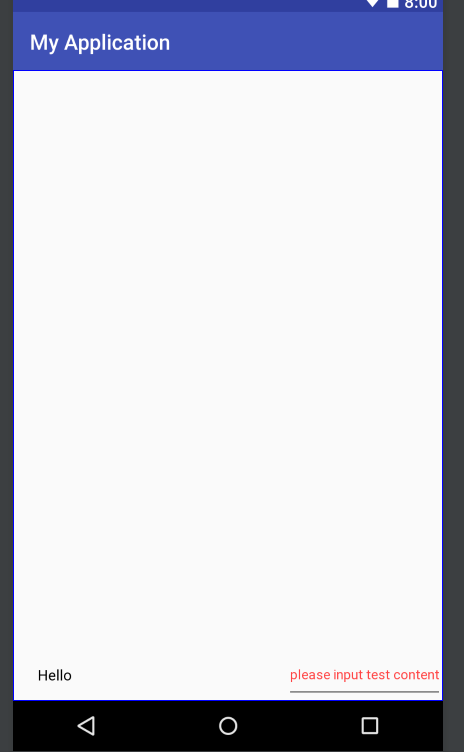
我想将TextView移动到center_horizontal到父视图,但是layout_constraintHorizontal_bias=0.5"似乎不起作用。
谁对这个问题有想法?首先谢谢你!
回答 4
Stack Overflow用户
发布于 2017-12-20 08:54:41
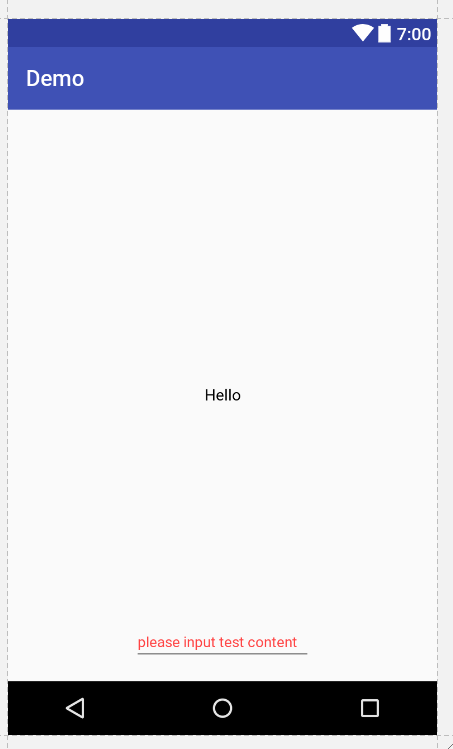
尝尝这个
<?xml version="1.0" encoding="utf-8"?>
<android.support.constraint.ConstraintLayout xmlns:android="http://schemas.android.com/apk/res/android"
    xmlns:app="http://schemas.android.com/apk/res-auto"
    xmlns:tools="http://schemas.android.com/tools"
    android:layout_width="match_parent"
    android:layout_height="match_parent">


    <EditText
        android:id="@+id/editText2"
        android:layout_width="wrap_content"
        android:layout_height="wrap_content"
        android:layout_marginBottom="16dp"
        android:ems="10"
        android:hint="please input test content"
        android:inputType="phone"
        android:textColorHint="@android:color/holo_red_light"
        android:textSize="13sp"
        app:layout_constraintBottom_toBottomOf="parent"
        app:layout_constraintEnd_toEndOf="parent"
        app:layout_constraintStart_toStartOf="parent" />

    <TextView
        android:layout_width="80dp"
        android:layout_height="50dp"
        android:gravity="center"
        android:text="Hello"
        android:textColor="@android:color/black"
        app:layout_constraintBottom_toBottomOf="parent"
        app:layout_constraintHorizontal_bias="0.5"
        app:layout_constraintLeft_toLeftOf="parent"
        app:layout_constraintRight_toRightOf="parent"
        app:layout_constraintTop_toTopOf="parent" />

</android.support.constraint.ConstraintLayout>
编辑
要使用bias,您需要将受约束的属性交给任何父级。
Stack Overflow用户
发布于 2017-12-20 08:59:26
尝试如下:
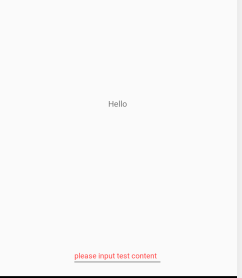
app:layout_constraintHorizontal_bias="0.5"不起作用,因为您没有将它限制在任何父级。阅读更多关于偏见的文章。
<?xml version="1.0" encoding="utf-8"?>
<androidx.constraintlayout.widget.ConstraintLayout xmlns:android="http://schemas.android.com/apk/res/android"
    xmlns:app="http://schemas.android.com/apk/res-auto"
    xmlns:tools="http://schemas.android.com/tools"
    android:layout_width="match_parent"
    android:layout_height="match_parent">


    <TextView
        android:layout_width="80dp"
        android:layout_height="50dp"
        android:gravity="center"
        android:text="Hello"
        android:textColor="@android:color/black"
        app:layout_constraintBottom_toBottomOf="parent"
        app:layout_constraintHorizontal_bias="0.5"
        app:layout_constraintLeft_toLeftOf="parent"
        app:layout_constraintRight_toRightOf="parent"
        app:layout_constraintTop_toTopOf="parent" />

    <EditText
        android:id="@+id/editText2"
        android:layout_width="150dp"
        android:layout_height="50dp"
        android:layout_marginBottom="16dp"
        android:ems="10"
        android:hint="please input test content"
        android:inputType="phone"
        android:textColorHint="@android:color/holo_red_light"
        android:textSize="13sp"
        app:layout_constraintBottom_toBottomOf="parent"
        app:layout_constraintEnd_toEndOf="parent"
        app:layout_constraintStart_toStartOf="parent" />
</androidx.constraintlayout.widget.ConstraintLayout>Stack Overflow用户
发布于 2017-12-20 09:07:14
首先,如果我是您,我会看一些说明约束布局的指南,因为您似乎缺少了一些关键元素。ConstraintLayout
当你这样说的时候,你的问题是你要求你的布局限制在一个0.5的偏差为零。除了textView之外,您的文本视图不受任何约束,app:layout_constraintBottom_toTopOf="parent"是一个小问题,它将文本视图的底部限制在父视图的顶部。
为了使偏见起作用,它需要知道哪些元素是有偏见的。如果简单地希望它成为父对象的中心,那么将文本视图约束为父视图,如下所示:
<TextView
    android:layout_width="80dp"
    android:layout_height="50dp"
    android:gravity="center"
    android:text="Hello"
    android:textColor="@android:color/black"
    app:layout_constraintTop_toTopOf="parent"
    app:layout_constraintBottom_toBottomOf="parent"
    app:layout_constraintRight_toRightOf="parent"
    app:layout_constraintLeft_toLeftOf="parent"
    app:layout_constraintHorizontal_bias="0.5" />
另外,在这一点上,你将不需要偏见,我留下了它,虽然,因为你可以用它来移动它在其他百分比。
https://stackoverflow.com/questions/47901955
复制相似问题
腾讯云开发者

Copyright © 2013 - 2026 Tencent Cloud. All Rights Reserved. 腾讯云 版权所有
深圳市腾讯计算机系统有限公司 ICP备案/许可证号:粤B2-20090059  粤公网安备44030502008569号
腾讯云计算(北京)有限责任公司 京ICP证150476号 | 京ICP备11018762号