
为什么numpy函数在熊猫系列/数据集上如此缓慢?
考虑一个小的MWE,取自another question
DateTime                Data
2017-11-21 18:54:31     1
2017-11-22 02:26:48     2
2017-11-22 10:19:44     3
2017-11-22 15:11:28     6
2017-11-22 23:21:58     7
2017-11-28 14:28:28    28
2017-11-28 14:36:40     0
2017-11-28 14:59:48 1我的答案是使用np.clip,它工作得很好。
np.clip(df.Data, a_min=None, a_max=1)
array([1, 1, 1, 1, 1, 1, 0, 1])
或,
np.clip(df.Data.values, a_min=None, a_max=1)
array([1, 1, 1, 1, 1, 1, 0, 1])
两人的答案是一样的。我的问题是这两种方法的相对性能。考虑-
df = pd.concat([df]*1000).reset_index(drop=True)

%timeit np.clip(df.Data, a_min=None, a_max=1)
1000 loops, best of 3: 270 µs per loop

%timeit np.clip(df.Data.values, a_min=None, a_max=1)
10000 loops, best of 3: 23.4 µs per loop为什么这两者之间存在如此巨大的差异,仅仅是通过在后者上调用values?换句话说..。
为什么numpy函数在熊猫物体上速度这么慢?
回答 4
Stack Overflow用户
发布于 2017-12-22 21:00:54
是的,np.clip在pandas.Series上的速度似乎比numpy.ndarray上慢得多。这是正确的,但实际上(至少是渐近的)没有那么糟糕。8000个元素仍然在运行时的主要贡献者为不变因素的情况下。我认为这是这个问题的一个非常重要的方面,所以我把它形象化(借用another answer):
# Setup

import pandas as pd
import numpy as np

def on_series(s):
    return np.clip(s, a_min=None, a_max=1)

def on_values_of_series(s):
    return np.clip(s.values, a_min=None, a_max=1)

# Timing setup
timings = {on_series: [], on_values_of_series: []}
sizes = [2**i for i in range(1, 26, 2)]

# Timing
for size in sizes:
    func_input = pd.Series(np.random.randint(0, 30, size=size))
    for func in timings:
        res = %timeit -o func(func_input)
        timings[func].append(res)

%matplotlib notebook

import matplotlib.pyplot as plt
import numpy as np

fig, (ax1, ax2) = plt.subplots(1, 2)

for func in timings:
    ax1.plot(sizes,
             [time.best for time in timings[func]],
             label=str(func.__name__))
ax1.set_xscale('log')
ax1.set_yscale('log')
ax1.set_xlabel('size')
ax1.set_ylabel('time [seconds]')
ax1.grid(which='both')
ax1.legend()

baseline = on_values_of_series # choose one function as baseline
for func in timings:
    ax2.plot(sizes,
             [time.best / ref.best for time, ref in zip(timings[func], timings[baseline])],
             label=str(func.__name__))
ax2.set_yscale('log')
ax2.set_xscale('log')
ax2.set_xlabel('size')
ax2.set_ylabel('time relative to {}'.format(baseline.__name__))
ax2.grid(which='both')
ax2.legend()

plt.tight_layout()
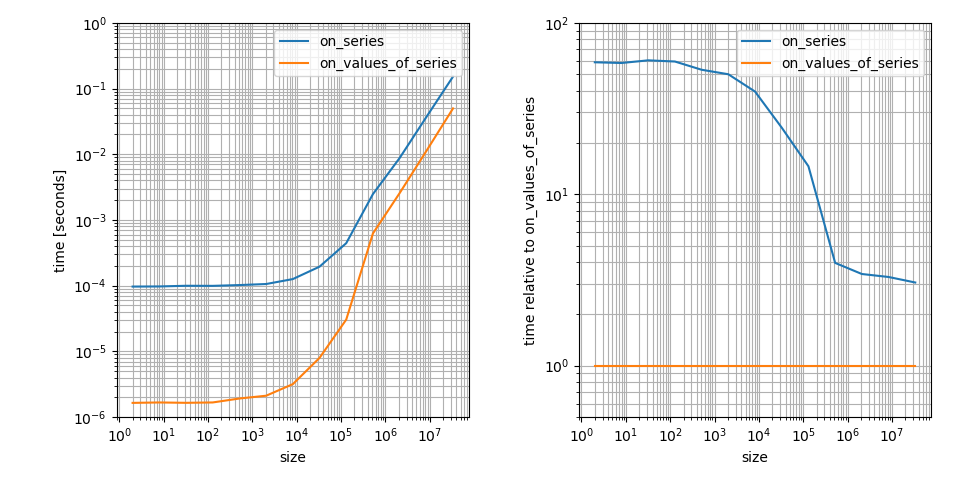
这是一个日志图,因为我认为这更清楚地显示了重要的特性。例如,它显示了np.clip在numpy.ndarray上的速度更快,但在这种情况下它的常数因子也要小得多。大数组的差别仅为3!这仍然是一个很大的差别,但远小于小数组上的差异。
然而,对于时差从何而来的问题,这仍然不是一个答案。
解决方案实际上非常简单:np.clip委托给第一个参数的clip 方法:
>>> np.clip??
Source:
def clip(a, a_min, a_max, out=None):
    """
    ...
    """
    return _wrapfunc(a, 'clip', a_min, a_max, out=out)

>>> np.core.fromnumeric._wrapfunc??
Source:
def _wrapfunc(obj, method, *args, **kwds):
    try:
        return getattr(obj, method)(*args, **kwds)
    # ...
    except (AttributeError, TypeError):
return _wrapit(obj, method, *args, **kwds)因为getattr和pd.Series.clip是不同的方法,是的,是完全不同的方法。
>>> np.ndarray.clip
<method 'clip' of 'numpy.ndarray' objects>
>>> pd.Series.clip
<function pandas.core.generic.NDFrame.clip>不幸的是,np.ndarray.clip是一个C-函数,所以很难对其进行分析,但是pd.Series.clip是一个常规的Python函数,因此很容易对其进行分析。让我们在这里使用5000个整数的系列:
s = pd.Series(np.random.randint(0, 100, 5000))对于np.clip上的values,我得到了以下行分析:
%load_ext line_profiler
%lprun -f np.clip -f np.core.fromnumeric._wrapfunc np.clip(s.values, a_min=None, a_max=1)

Timer unit: 4.10256e-07 s

Total time: 2.25641e-05 s
File: numpy\core\fromnumeric.py
Function: clip at line 1673

Line #      Hits         Time  Per Hit   % Time  Line Contents
==============================================================
  1673                                           def clip(a, a_min, a_max, out=None):
  1674                                               """
  ...
  1726                                               """
  1727         1           55     55.0    100.0      return _wrapfunc(a, 'clip', a_min, a_max, out=out)

Total time: 1.51795e-05 s
File: numpy\core\fromnumeric.py
Function: _wrapfunc at line 55

Line #      Hits         Time  Per Hit   % Time  Line Contents
==============================================================
    55                                           def _wrapfunc(obj, method, *args, **kwds):
    56         1            2      2.0      5.4      try:
    57         1           35     35.0     94.6          return getattr(obj, method)(*args, **kwds)
    58
    59                                               # An AttributeError occurs if the object does not have
    60                                               # such a method in its class.
    61
    62                                               # A TypeError occurs if the object does have such a method
    63                                               # in its class, but its signature is not identical to that
    64                                               # of NumPy's. This situation has occurred in the case of
    65                                               # a downstream library like 'pandas'.
    66                                               except (AttributeError, TypeError):
67 return _wrapit(obj, method, *args, **kwds)但是对于np.clip上的Series,我得到了一个完全不同的分析结果:
%lprun -f np.clip -f np.core.fromnumeric._wrapfunc -f pd.Series.clip -f pd.Series._clip_with_scalar np.clip(s, a_min=None, a_max=1)

Timer unit: 4.10256e-07 s

Total time: 0.000823794 s
File: numpy\core\fromnumeric.py
Function: clip at line 1673

Line #      Hits         Time  Per Hit   % Time  Line Contents
==============================================================
  1673                                           def clip(a, a_min, a_max, out=None):
  1674                                               """
  ...
  1726                                               """
  1727         1         2008   2008.0    100.0      return _wrapfunc(a, 'clip', a_min, a_max, out=out)

Total time: 0.00081846 s
File: numpy\core\fromnumeric.py
Function: _wrapfunc at line 55

Line #      Hits         Time  Per Hit   % Time  Line Contents
==============================================================
    55                                           def _wrapfunc(obj, method, *args, **kwds):
    56         1            2      2.0      0.1      try:
    57         1         1993   1993.0     99.9          return getattr(obj, method)(*args, **kwds)
    58
    59                                               # An AttributeError occurs if the object does not have
    60                                               # such a method in its class.
    61
    62                                               # A TypeError occurs if the object does have such a method
    63                                               # in its class, but its signature is not identical to that
    64                                               # of NumPy's. This situation has occurred in the case of
    65                                               # a downstream library like 'pandas'.
    66                                               except (AttributeError, TypeError):
    67                                                   return _wrapit(obj, method, *args, **kwds)

Total time: 0.000804922 s
File: pandas\core\generic.py
Function: clip at line 4969

Line #      Hits         Time  Per Hit   % Time  Line Contents
==============================================================
  4969                                               def clip(self, lower=None, upper=None, axis=None, inplace=False,
  4970                                                        *args, **kwargs):
  4971                                                   """
  ...
  5021                                                   """
  5022         1           12     12.0      0.6          if isinstance(self, ABCPanel):
  5023                                                       raise NotImplementedError("clip is not supported yet for panels")
  5024
  5025         1           10     10.0      0.5          inplace = validate_bool_kwarg(inplace, 'inplace')
  5026
  5027         1           69     69.0      3.5          axis = nv.validate_clip_with_axis(axis, args, kwargs)
  5028
  5029                                                   # GH 17276
  5030                                                   # numpy doesn't like NaN as a clip value
  5031                                                   # so ignore
  5032         1          158    158.0      8.1          if np.any(pd.isnull(lower)):
  5033         1            3      3.0      0.2              lower = None
  5034         1           26     26.0      1.3          if np.any(pd.isnull(upper)):
  5035                                                       upper = None
  5036
  5037                                                   # GH 2747 (arguments were reversed)
  5038         1            1      1.0      0.1          if lower is not None and upper is not None:
  5039                                                       if is_scalar(lower) and is_scalar(upper):
  5040                                                           lower, upper = min(lower, upper), max(lower, upper)
  5041
  5042                                                   # fast-path for scalars
  5043         1            1      1.0      0.1          if ((lower is None or (is_scalar(lower) and is_number(lower))) and
  5044         1           28     28.0      1.4                  (upper is None or (is_scalar(upper) and is_number(upper)))):
  5045         1         1654   1654.0     84.3              return self._clip_with_scalar(lower, upper, inplace=inplace)
  5046
  5047                                                   result = self
  5048                                                   if lower is not None:
  5049                                                       result = result.clip_lower(lower, axis, inplace=inplace)
  5050                                                   if upper is not None:
  5051                                                       if inplace:
  5052                                                           result = self
  5053                                                       result = result.clip_upper(upper, axis, inplace=inplace)
  5054
  5055                                                   return result

Total time: 0.000662153 s
File: pandas\core\generic.py
Function: _clip_with_scalar at line 4920

Line #      Hits         Time  Per Hit   % Time  Line Contents
==============================================================
  4920                                               def _clip_with_scalar(self, lower, upper, inplace=False):
  4921         1            2      2.0      0.1          if ((lower is not None and np.any(isna(lower))) or
  4922         1           25     25.0      1.5                  (upper is not None and np.any(isna(upper)))):
  4923                                                       raise ValueError("Cannot use an NA value as a clip threshold")
  4924
  4925         1           22     22.0      1.4          result = self.values
  4926         1          571    571.0     35.4          mask = isna(result)
  4927
  4928         1           95     95.0      5.9          with np.errstate(all='ignore'):
  4929         1            1      1.0      0.1              if upper is not None:
  4930         1          141    141.0      8.7                  result = np.where(result >= upper, upper, result)
  4931         1           33     33.0      2.0              if lower is not None:
  4932                                                           result = np.where(result <= lower, lower, result)
  4933         1           73     73.0      4.5          if np.any(mask):
  4934                                                       result[mask] = np.nan
  4935
  4936         1           90     90.0      5.6          axes_dict = self._construct_axes_dict()
  4937         1          558    558.0     34.6          result = self._constructor(result, **axes_dict).__finalize__(self)
  4938
  4939         1            2      2.0      0.1          if inplace:
  4940                                                       self._update_inplace(result)
  4941                                                   else:
4942 1 1 1.0 0.1 return result在这一点上,我停止了对子程序的研究,因为它已经突出了pd.Series.clip比np.ndarray.clip做更多工作的地方。只需将np.clip调用在values上的总时间(55个计时器单元)与pandas.Series.clip方法中的第一个检查之一if np.any(pd.isnull(lower)) (158个计时器单元)进行比较即可。在那个时候,熊猫的方法甚至没有从剪裁开始,它已经花费了3倍的时间。
然而,当数组很大时,这些“间接费用”中的几个就变得无关紧要了:
s = pd.Series(np.random.randint(0, 100, 1000000))

%lprun -f np.clip -f np.core.fromnumeric._wrapfunc -f pd.Series.clip -f pd.Series._clip_with_scalar np.clip(s, a_min=None, a_max=1)

Timer unit: 4.10256e-07 s

Total time: 0.00593476 s
File: numpy\core\fromnumeric.py
Function: clip at line 1673

Line #      Hits         Time  Per Hit   % Time  Line Contents
==============================================================
  1673                                           def clip(a, a_min, a_max, out=None):
  1674                                               """
  ...
  1726                                               """
  1727         1        14466  14466.0    100.0      return _wrapfunc(a, 'clip', a_min, a_max, out=out)

Total time: 0.00592779 s
File: numpy\core\fromnumeric.py
Function: _wrapfunc at line 55

Line #      Hits         Time  Per Hit   % Time  Line Contents
==============================================================
    55                                           def _wrapfunc(obj, method, *args, **kwds):
    56         1            1      1.0      0.0      try:
    57         1        14448  14448.0    100.0          return getattr(obj, method)(*args, **kwds)
    58
    59                                               # An AttributeError occurs if the object does not have
    60                                               # such a method in its class.
    61
    62                                               # A TypeError occurs if the object does have such a method
    63                                               # in its class, but its signature is not identical to that
    64                                               # of NumPy's. This situation has occurred in the case of
    65                                               # a downstream library like 'pandas'.
    66                                               except (AttributeError, TypeError):
    67                                                   return _wrapit(obj, method, *args, **kwds)

Total time: 0.00591302 s
File: pandas\core\generic.py
Function: clip at line 4969

Line #      Hits         Time  Per Hit   % Time  Line Contents
==============================================================
  4969                                               def clip(self, lower=None, upper=None, axis=None, inplace=False,
  4970                                                        *args, **kwargs):
  4971                                                   """
  ...
  5021                                                   """
  5022         1           17     17.0      0.1          if isinstance(self, ABCPanel):
  5023                                                       raise NotImplementedError("clip is not supported yet for panels")
  5024
  5025         1           14     14.0      0.1          inplace = validate_bool_kwarg(inplace, 'inplace')
  5026
  5027         1           97     97.0      0.7          axis = nv.validate_clip_with_axis(axis, args, kwargs)
  5028
  5029                                                   # GH 17276
  5030                                                   # numpy doesn't like NaN as a clip value
  5031                                                   # so ignore
  5032         1          125    125.0      0.9          if np.any(pd.isnull(lower)):
  5033         1            2      2.0      0.0              lower = None
  5034         1           30     30.0      0.2          if np.any(pd.isnull(upper)):
  5035                                                       upper = None
  5036
  5037                                                   # GH 2747 (arguments were reversed)
  5038         1            2      2.0      0.0          if lower is not None and upper is not None:
  5039                                                       if is_scalar(lower) and is_scalar(upper):
  5040                                                           lower, upper = min(lower, upper), max(lower, upper)
  5041
  5042                                                   # fast-path for scalars
  5043         1            2      2.0      0.0          if ((lower is None or (is_scalar(lower) and is_number(lower))) and
  5044         1           32     32.0      0.2                  (upper is None or (is_scalar(upper) and is_number(upper)))):
  5045         1        14092  14092.0     97.8              return self._clip_with_scalar(lower, upper, inplace=inplace)
  5046
  5047                                                   result = self
  5048                                                   if lower is not None:
  5049                                                       result = result.clip_lower(lower, axis, inplace=inplace)
  5050                                                   if upper is not None:
  5051                                                       if inplace:
  5052                                                           result = self
  5053                                                       result = result.clip_upper(upper, axis, inplace=inplace)
  5054
  5055                                                   return result

Total time: 0.00575753 s
File: pandas\core\generic.py
Function: _clip_with_scalar at line 4920

Line #      Hits         Time  Per Hit   % Time  Line Contents
==============================================================
  4920                                               def _clip_with_scalar(self, lower, upper, inplace=False):
  4921         1            2      2.0      0.0          if ((lower is not None and np.any(isna(lower))) or
  4922         1           28     28.0      0.2                  (upper is not None and np.any(isna(upper)))):
  4923                                                       raise ValueError("Cannot use an NA value as a clip threshold")
  4924
  4925         1          120    120.0      0.9          result = self.values
  4926         1         3525   3525.0     25.1          mask = isna(result)
  4927
  4928         1           86     86.0      0.6          with np.errstate(all='ignore'):
  4929         1            2      2.0      0.0              if upper is not None:
  4930         1         9314   9314.0     66.4                  result = np.where(result >= upper, upper, result)
  4931         1           61     61.0      0.4              if lower is not None:
  4932                                                           result = np.where(result <= lower, lower, result)
  4933         1          283    283.0      2.0          if np.any(mask):
  4934                                                       result[mask] = np.nan
  4935
  4936         1           78     78.0      0.6          axes_dict = self._construct_axes_dict()
  4937         1          532    532.0      3.8          result = self._constructor(result, **axes_dict).__finalize__(self)
  4938
  4939         1            2      2.0      0.0          if inplace:
  4940                                                       self._update_inplace(result)
  4941                                                   else:
4942 1 1 1.0 0.0 return result仍然有多个函数调用,例如isna和np.where,它们花费了大量时间,但总的来说,这至少可以与np.ndarray.clip时间相比较(即在我的计算机上的时间差为3的情况下)。
外卖应该是:
- 许多NumPy函数只是委托给传入的对象的一个方法,因此当您传入不同的对象时,可能会有巨大的差异。
- 分析,特别是行分析,可能是一个很好的工具,可以找到性能差异的来源。
- 在这种情况下,一定要测试大小不同的对象。您可以比较可能无关紧要的常数因素,除非您处理了大量的小数组。
旧版本:
Python 3.6.3 64-bit on Windows 10
Numpy 1.13.3
Pandas 0.21.1Stack Overflow用户
发布于 2017-12-20 02:31:32
只要读一下源代码,就知道了。
def clip(a, a_min, a_max, out=None):
    """a : array_like Array containing elements to clip."""
    return _wrapfunc(a, 'clip', a_min, a_max, out=out)

def _wrapfunc(obj, method, *args, **kwds):
    try:
        return getattr(obj, method)(*args, **kwds)
    #This situation has occurred in the case of
    # a downstream library like 'pandas'.
    except (AttributeError, TypeError):
        return _wrapit(obj, method, *args, **kwds)

def _wrapit(obj, method, *args, **kwds):
    try:
        wrap = obj.__array_wrap__
    except AttributeError:
        wrap = None
    result = getattr(asarray(obj), method)(*args, **kwds)
    if wrap:
        if not isinstance(result, mu.ndarray):
            result = asarray(result)
        result = wrap(result)
    return result
纠正:
在熊猫v0.13.0_ahl1之后,熊猫有自己的clip工具。
Stack Overflow用户
发布于 2017-12-23 05:47:17
在这里,性能差异有两部分需要注意:
- 每个库中的Python开销(
pandas非常有用) - 数值算法实现的差异(
pd.clip实际上调用了np.where)
在一个非常小的数组上运行这个程序应该可以显示Python开销的不同。对于numpy,这是可以理解的非常小,但是熊猫做了很多检查(空值,更灵活的参数处理,等等),然后才开始处理大量的数字。我试着展示了这两个代码在进入C代码基石之前所经历的阶段的粗略分解。
data = pd.Series(np.random.random(100))当在np.clip上使用ndarray时,开销只是调用对象的方法的numpy包装函数:
>>> %timeit np.clip(data.values, 0.2, 0.8)        # numpy wrapper, calls .clip() on the ndarray
>>> %timeit data.values.clip(0.2, 0.8)            # C function call

2.22 µs ± 125 ns per loop (mean ± std. dev. of 7 runs, 100000 loops each)
1.32 µs ± 20.4 ns per loop (mean ± std. dev. of 7 runs, 1000000 loops each)
熊猫花更多的时间来检查边缘情况,然后才能找到算法:
>>> %timeit np.clip(data, a_min=0.2, a_max=0.8)   # numpy wrapper, calls .clip() on the Series
>>> %timeit data.clip(lower=0.2, upper=0.8)       # pandas API method
>>> %timeit data._clip_with_scalar(0.2, 0.8)      # lowest level python function

102 µs ± 1.54 µs per loop (mean ± std. dev. of 7 runs, 10000 loops each)
90.4 µs ± 1.01 µs per loop (mean ± std. dev. of 7 runs, 10000 loops each)
73.7 µs ± 805 ns per loop (mean ± std. dev. of 7 runs, 10000 loops each)
相对于整个时间,在访问C代码之前,这两个库的开销相当大。对于numpy,单个包装指令的执行时间与数字处理的时间相同。仅在前两层函数调用中,熊猫的开销就增加了30倍。
要隔离算法级别上正在发生的事情,我们应该在更大的数组上检查这一点,并对相同的函数进行基准测试:
>>> data = pd.Series(np.random.random(1000000))

>>> %timeit np.clip(data.values, 0.2, 0.8)
>>> %timeit data.values.clip(0.2, 0.8)

2.85 ms ± 37.3 µs per loop (mean ± std. dev. of 7 runs, 100 loops each)
2.85 ms ± 15.9 µs per loop (mean ± std. dev. of 7 runs, 100 loops each)

>>> %timeit np.clip(data, a_min=0.2, a_max=0.8)
>>> %timeit data.clip(lower=0.2, upper=0.8)
>>> %timeit data._clip_with_scalar(0.2, 0.8)

12.3 ms ± 135 µs per loop (mean ± std. dev. of 7 runs, 100 loops each)
12.3 ms ± 115 µs per loop (mean ± std. dev. of 7 runs, 100 loops each)
12.2 ms ± 76.5 µs per loop (mean ± std. dev. of 7 runs, 100 loops each)这两种情况下的python开销现在都可以忽略不计;包装器函数和参数检查的时间相对于100万个值的计算时间来说很小。然而,有一个3-4倍的速度差异,可以归因于数字实现。通过研究源代码中的一些内容,我们看到clip的clip实现实际上使用的是np.where,而不是np.clip。
def clip_where(data, lower, upper):
    ''' Actual implementation in pd.Series._clip_with_scalar (minus NaN handling). '''
    result = data.values
    result = np.where(result >= upper, upper, result)
    result = np.where(result <= lower, lower, result)
    return pd.Series(result)

def clip_clip(data, lower, upper):
    ''' What would happen if we used ndarray.clip instead. '''
return pd.Series(data.values.clip(lower, upper))在执行条件替换之前,单独检查每个布尔条件所需的额外工作似乎是速度差异的原因。同时指定upper和lower将导致4次通过numpy数组(两个不等式检查和两个对np.where的调用)。对这两个功能进行基准测试表明,3-4倍的速比:
>>> %timeit clip_clip(data, lower=0.2, upper=0.8)
>>> %timeit clip_where(data, lower=0.2, upper=0.8)

11.1 ms ± 101 µs per loop (mean ± std. dev. of 7 runs, 100 loops each)
2.97 ms ± 76.7 µs per loop (mean ± std. dev. of 7 runs, 100 loops each)我不知道熊猫神为什么要这么做。np.clip可能是一个较新的API函数,以前需要一个解决方案。还有一点比我在这里讲的要多一点,因为熊猫在运行最后的算法之前会检查各种情况,而这只是其中一个可能被调用的实现。
https://stackoverflow.com/questions/47893677
复制相似问题
腾讯云开发者

Copyright © 2013 - 2026 Tencent Cloud. All Rights Reserved. 腾讯云 版权所有
深圳市腾讯计算机系统有限公司 ICP备案/许可证号:粤B2-20090059  粤公网安备44030502008569号
腾讯云计算(北京)有限责任公司 京ICP证150476号 | 京ICP备11018762号