
网格视图行和列合并
网格视图行和列合并
提问于 2017-12-15 06:00:27
我在datatable中有以下格式的数据,我试图绑定到gridview (format -1)
 Id     col1    col2
 20      a     ac-1
 20      a     ac-2
 20      a     ac-3
 20      a     ac-4
 21      a     ac-1
 21      a     ac-2
 21      a     ac-3
21 a ac-4在拥有数据库之后,我得到了下面格式的(格式- 2)的网格视图。
 Id     col1    col2
 20      a      ac-1
                ac-2
                ac-3
                ac-4
 21             ac-1
                ac-2
                ac-3
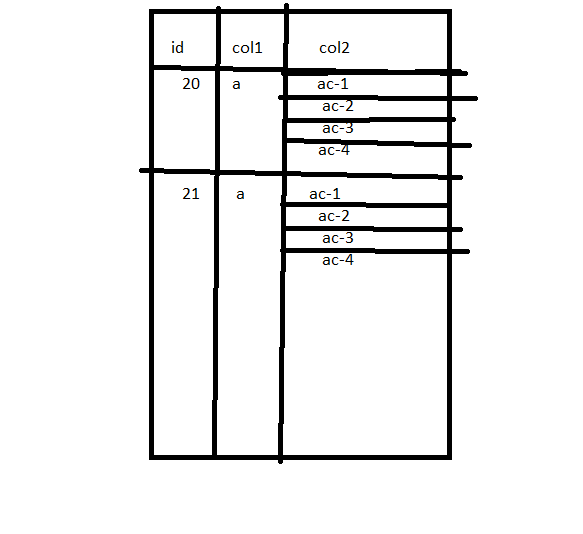
ac-4但是,我正在寻找以下格式的数据要表示为网格视图(格式-3)。
   Id   col1    col2
   20     a     ac-1
                ac-2
                ac-3
                ac-4
   21     a     ac-1
                ac-2
                ac-3
                ac-4
下面的代码是grdiview中Ondatabound事件的代码
   for (int i = gvConversionGrid.Rows.Count - 1; i > 0; i--)
   {
        GridViewRow row = gvConversionGrid.Rows[i];
        GridViewRow previousRow = gvConversionGrid.Rows[i - 1];
        for (int j = 0; j < row.Cells.Count; j++)
        {
            if (row.Cells[j].Text == previousRow.Cells[j].Text)
            {
                if (previousRow.Cells[j].RowSpan == 0)
                {
                    if (row.Cells[j].RowSpan == 0)
                    {
                        previousRow.Cells[j].RowSpan += 2;
                    }
                    else
                    {
                        previousRow.Cells[j].RowSpan = row.Cells[j].RowSpan + 1;
                    }
                    row.Cells[j].Visible = false;
                }
            }
        }
}是否有任何方法来操作网格视图并为网格视图数据带来格式,如格式-3.
有谁能帮上忙吗?这个问题我会非常感激的。事先非常感谢
更新:我正在寻找以下格式的图像
回答 2
Stack Overflow用户
回答已采纳
发布于 2017-12-15 08:01:03
可以将前面的Id值设置为在方法之外声明的变量,并将当前行与GridView的OnRowDataBound事件中的行进行比较。
string previousCellValue = "";

protected void GridView1_RowDataBound(object sender, GridViewRowEventArgs e)
{
    //check if the row is a datarow
    if (e.Row.RowType == DataControlRowType.DataRow)
    {
        //cast the dataitem back to a row
        DataRowView row = e.Row.DataItem as DataRowView;

        //check if the current id matches the previous row
        if (previousCellValue == row["Id"].ToString())
        {
            //clear the first cell
            e.Row.Cells[0].Text = "";

            //apply column span
            e.Row.Cells[0].ColumnSpan = 2;
            e.Row.Cells[1].Visible = false;
        }
        else
        {
            previousCellValue = row["Id"].ToString();
        }
    }
}
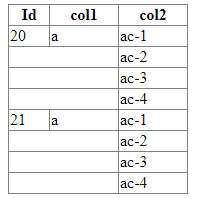
结果:
更新
string previousCellValue = "";
int previousCellCount = 1;

protected void GridView1_RowDataBound(object sender, GridViewRowEventArgs e)
{
    //check if the row is a datarow and not the first row
    if (e.Row.RowType == DataControlRowType.DataRow)
    {
        //cast the dataitem back to a row
        DataRowView row = e.Row.DataItem as DataRowView;

        //check if the current id matches the previous row
        if (previousCellValue == row["Id"].ToString())
        {
            //count the number of same cells
            previousCellCount++;
        }
        else
        {
            //span the rows for the first two cells
            if (previousCellCount > 1)
            {
                GridView1.Rows[e.Row.RowIndex - previousCellCount].Cells[0].RowSpan = previousCellCount;
                GridView1.Rows[e.Row.RowIndex - previousCellCount].Cells[1].RowSpan = previousCellCount;

                //hide the other cells in the column
                for (int i = 1; i < previousCellCount; i++)
                {
                    GridView1.Rows[(e.Row.RowIndex - previousCellCount) + i].Cells[0].Visible = false;
                    GridView1.Rows[(e.Row.RowIndex - previousCellCount) + i].Cells[1].Visible = false;
                }
            }

            previousCellValue = row["Id"].ToString();
            previousCellCount = 1;
        }
    }
    else if (e.Row.RowType == DataControlRowType.Footer)
    {
        //use the footer row to create spanning for the last rows if needed
        if (previousCellCount > 1)
        {
            GridView1.Rows[GridView1.Rows.Count - previousCellCount].Cells[0].RowSpan = previousCellCount;
            GridView1.Rows[GridView1.Rows.Count - previousCellCount].Cells[1].RowSpan = previousCellCount;

            //hide the other cells in the column
            for (int i = 1; i < previousCellCount; i++)
            {
                GridView1.Rows[(GridView1.Rows.Count - previousCellCount) + i].Cells[0].Visible = false;
                GridView1.Rows[(GridView1.Rows.Count - previousCellCount) + i].Cells[1].Visible = false;
            }
        }
    }
}
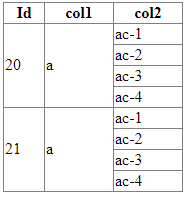
结果:
Stack Overflow用户
发布于 2017-12-15 07:59:14
您可以插入两个隐藏列。
 Id     col1    col2  groupindex  groupcount
 20      a     1      1         4
 20      a     2      2         4
 20      a     3      3         4
 20      a     4      4         4
 21      a     1      1         5
 21      a     2      2         5
 21      a     3      3         5
 21      a     4      4         5
 21      a     5      5         5
并设置行距:
 void GridView_RowDataBound(object sender, GridViewRowEventArgs e)
{
    if (e.Row.RowType == DataControlRowType.DataRow )
    {

        // set rowspan for the first row of group
        if (Convert.ToInt32(e.Row.Cells[3]) == 1)
        {
            var rowSpan = Convert.ToString(e.Row.Cells[4]);
            e.Row.Cells[0].Attributes.Add("rowspan", rowSpan);
            e.Row.Cells[1].Attributes.Add("rowspan", rowSpan);
        }
        else
        {
            e.Row.Cells[0].Visible = false;
            e.Row.Cells[1].Visible = false;
        }
    }
}页面原文内容由Stack Overflow提供。腾讯云小微IT领域专用引擎提供翻译支持
原文链接:
https://stackoverflow.com/questions/47826624
复制相关文章
相似问题
腾讯云开发者

Copyright © 2013 - 2026 Tencent Cloud. All Rights Reserved. 腾讯云 版权所有
深圳市腾讯计算机系统有限公司 ICP备案/许可证号:粤B2-20090059  粤公网安备44030502008569号
腾讯云计算(北京)有限责任公司 京ICP证150476号 | 京ICP备11018762号