
列表中最常见的单词
我在Excel中有一个列表,其子集如下所示:
Food and Human Nutrition
Food and Human Nutrition with Placement
Food and Nutrition with Professional Experience
Food Marketing and Nutrition
Food Marketing and Nutrition with Placement
Food, Nutrition and Health我想在这个列表中找到n最常见的单词。我试着用这个公式找出最常见的词:
=INDEX(rng,MODE(MATCH(rng,rng,0)))这样做的问题是,它将每个单元格视为单个字符串,而且由于6行中的每一行都不同,因此找不到最常见的单词。我想要做的是输出“食物”、“营养”和“和”作为最常见的词,其次是“营销”、“安置”、“与”等。
回答 3
Stack Overflow用户
发布于 2017-12-12 12:29:01
下面是一个VBA宏,它提供了您想要的东西。
- 通过使用字典对象来测试唯一性。
- 计数在字典中完成。
- 然后对结果进行排序。
仔细阅读代码中的注释,了解需要做出的假设。以及需要设置的引用
另外,请注意,标点符号会导致同一个单词被计算在不同的类别中。如果这可能是一个问题,我们只需要以不同的方式拆分源数据,或者在拆分空格之前消除所有标点符号,或者使用正则表达式进行拆分。
'Set Reference to Microsoft Scripting Runtime

Option Explicit
Sub UniqueWordCounts()
    Dim wsSrc As Worksheet, wsRes As Worksheet
    Dim rSrc As Range, rRes As Range
    Dim vSrc As Variant, vRes As Variant
    Dim vWords As Variant
    Dim dWords As Dictionary
    Dim I As Long, J As Long
    Dim V As Variant, vKey As Variant

'Assume source data is in column 1, starting at A1
'  Could easily be anyplace
Set wsSrc = Worksheets("sheet2")
With wsSrc
    Set rSrc = .Range(.Cells(1, 1), .Cells(.Rows.Count, 1).End(xlUp))
End With

'Results to go a few columns over
Set wsRes = Worksheets("sheet2")
    Set rRes = rSrc(1, 1).Offset(0, 2)

'Read source data into vba array (for processing speed)
vSrc = rSrc

'Collect individual words and counts into dictionary
Set dWords = New Dictionary
    dWords.CompareMode = TextCompare

For I = 1 To UBound(vSrc, 1)

    'Split the sentence into individual words
    For Each vKey In Split(vSrc(I, 1))
        If Not dWords.Exists(vKey) Then
            dWords.Add Key:=vKey, Item:=1
        Else
            dWords(vKey) = dWords(vKey) + 1
        End If
    Next vKey
Next I

'Size results array
ReDim vRes(0 To dWords.Count, 1 To 2)

'Column headers
    vRes(0, 1) = "Word"
    vRes(0, 2) = "Count"

'Populate the columns
    I = 0
    For Each V In dWords.Keys
        I = I + 1
        vRes(I, 1) = V
        vRes(I, 2) = dWords(V)
    Next V

'Size results range
Set rRes = rRes.Resize(UBound(vRes, 1) + 1, UBound(vRes, 2))

'Populate, format and sort the Results range
With rRes
    .EntireColumn.Clear
    .Value = vRes
    With .Rows(1)
        .Font.Bold = True
        .HorizontalAlignment = xlCenter
    End With
    .EntireColumn.AutoFit
    .Sort key1:=.Columns(2), order1:=xlDescending, key2:=.Columns(1), order2:=xlAscending, MatchCase:=False, Header:=xlYes
End With

End Sub
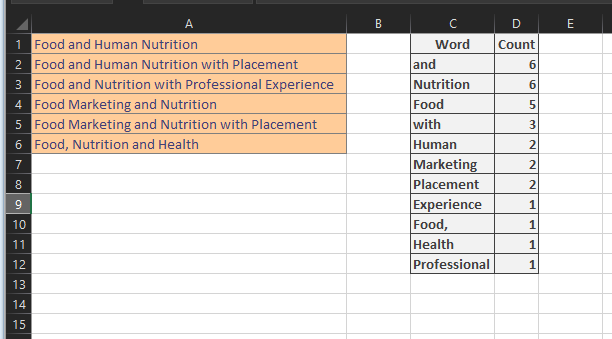
Stack Overflow用户
发布于 2017-12-12 12:08:13
如果您知道并希望使用VBA,那么这将是一个非常复杂的任务。因此,像这个=MostCommonWords(Range;Optional WordsNumber)这样的自定义公式会给出这样的结果:

这是公式后面的代码:
Public Function MostCommonWords(inputRange As Range, _
                        Optional NumberOfWords As Long = 1) As String

    Dim myCell      As Range
    Dim inputString As String, tempString As String, myResult As String
    Dim myArr       As Variant, myKey As Variant
    Dim cnt         As Long, topNumber As Long
    Dim myColl      As Object

    Set myColl = CreateObject("Scripting.Dictionary")
    For Each myCell In inputRange
        tempString = LCase(Replace(myCell, ",", ""))
        inputString = inputString & " " & tempString
    Next myCell
    myArr = Split(inputString)
    For cnt = LBound(myArr) To UBound(myArr)
        If myColl.exists(myArr(cnt)) Then
            myColl(myArr(cnt)) = myColl(myArr(cnt)) + 1
        Else
            myColl.Add myArr(cnt), 1
        End If
    Next cnt
    For cnt = 1 To NumberOfWords
        topNumber = 0
        myResult = vbNullString
        For Each myKey In myColl
            If topNumber < myColl(myKey) Then
                topNumber = myColl(myKey)
                myResult = myKey
            End If
        Next myKey
        MostCommonWords = MostCommonWords & " " & myResult
        myColl.Remove myResult
    Next cnt

End Function
它怎麽工作?
- 它将输入范围中的所有单元格添加到一个名为
inputString的字符串中。 - 逗号被移除,所有的单词都被移到小写。
- 使用字典结构,每个单词都作为键添加,它的时间被用作一个值。
- 根据需要显示的字数,对字典中的最大值进行了检查,并给出了它的键。
- 一旦找到最大的值,键就会从字典中删除,这样就可以找到第二大值--
myColl.Remove myResult。
Stack Overflow用户
发布于 2017-12-12 12:17:33
最简单的方法可能是使用协调程序(比如Word),但也非常简单的方法是在Word中转换为单个列表,然后在Excel中将其枢轴化。如果表仅在空格上拆分,则Food,和Food将显示为不同的单词,因此最好先删除标点符号(查找/替换)。
https://stackoverflow.com/questions/47771738
复制相似问题
腾讯云开发者

Copyright © 2013 - 2026 Tencent Cloud. All Rights Reserved. 腾讯云 版权所有
深圳市腾讯计算机系统有限公司 ICP备案/许可证号:粤B2-20090059  粤公网安备44030502008569号
腾讯云计算(北京)有限责任公司 京ICP证150476号 | 京ICP备11018762号