
在TFS 2015.4敏捷模板中添加新的工作流状态并在看板中丢失
我使用的是TFS 2015.4敏捷模板。我想改变我的工作流状态,以包括分析作为一个选项。我已经修改了用户Story和ProcessConfiguration,工作流节点和有效状态等。我成功地重新上传了模板,并将新模板设置为默认值。在设置用户故事状态方面一切都很好。但是,在看板上,我想添加一个选项卡,它映射到新添加的Analysis。这个新的选项不会出现。还有什么东西我遗漏了吗?
回答 1
Stack Overflow用户
发布于 2017-12-12 03:49:52
你需要修改流程配置以映射新的工作流状态以转移。尝试以下步骤:
- 导出ProcessConfiguration文件:
witadmin exportprocessconfig /collection:http://tfsserver:8080/tfs/teamprojectcollection /p:teamproject /f:C:\Users\username\Desktop\ProcessConfiguration.xml
- 修改XML定义文件。在您的示例中,应该通过添加Analysis状态来修改:
<RequirementBacklog category="Microsoft.RequirementCategory" parent="Microsoft.FeatureCategory" pluralName="Stories" singularName="User Story" workItemCountLimit="1000"> <AddPanel> <Fields> <Field refname="System.Title" /> </Fields> </AddPanel> <Columns> <Column width="100" refname="System.WorkItemType" /> <Column width="400" refname="System.Title" /> <Column width="100" refname="System.State" /> <Column width="50" refname="Microsoft.VSTS.Scheduling.StoryPoints" /> <Column width="100" refname="Microsoft.VSTS.Common.ValueArea" /> <Column width="200" refname="System.IterationPath" /> <Column width="200" refname="System.Tags" /> </Columns> <States> <State type="Proposed" value="New" /> <State type="InProgress" value="Active" /> <State type="InProgress" value="Resolved" /> <State type="InProgress" value="Analysis" /> <State type="Complete" value="Closed" /> </States> </RequirementBacklog>
- 导入ProcessConfiguration文件:
witadmin importprocessconfig /collection:http://tfsserver:8080/tfs/teamprojectcollection /p:teamproject /f:C:\Users\username\Desktop\ProcessConfiguration.xml
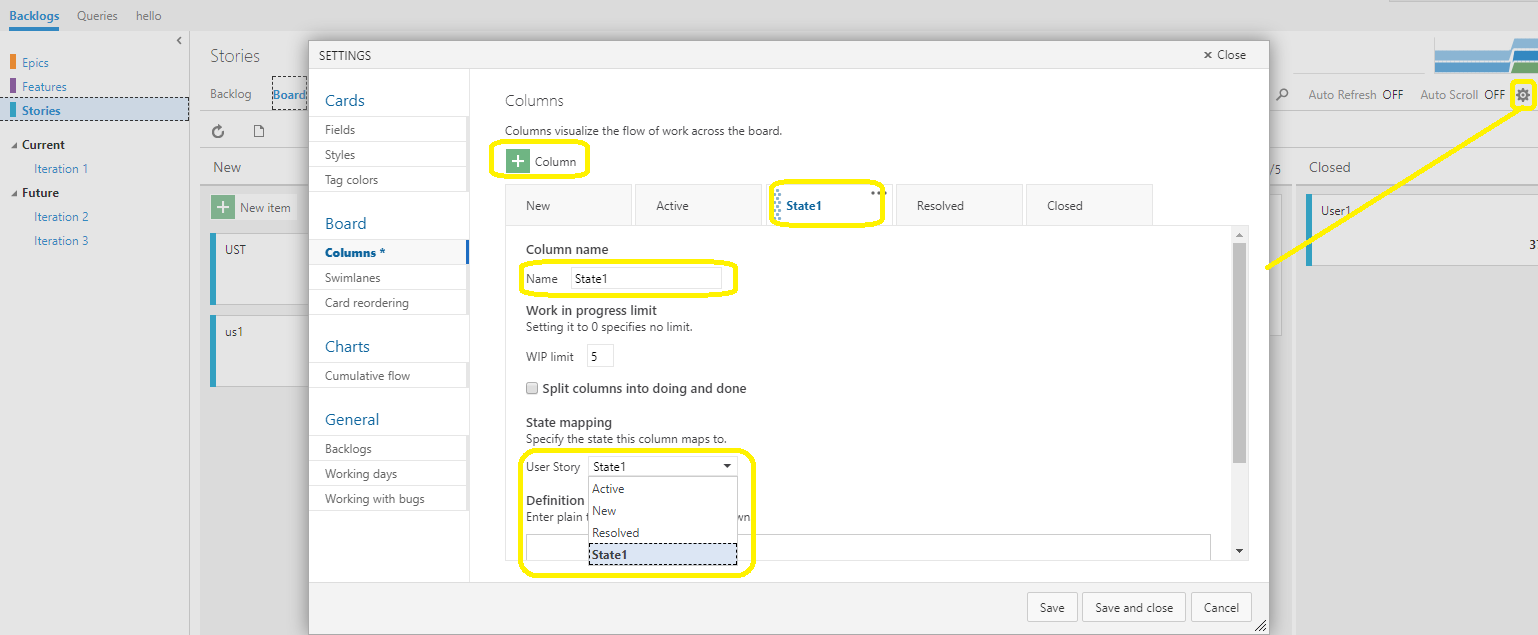
- 通过这种方式,您可以添加一个列并选择Analysis状态,它类似于下面的屏幕截图:
https://stackoverflow.com/questions/47761879
复制相似问题
腾讯云开发者

Copyright © 2013 - 2026 Tencent Cloud. All Rights Reserved. 腾讯云 版权所有
深圳市腾讯计算机系统有限公司 ICP备案/许可证号:粤B2-20090059  粤公网安备44030502008569号
腾讯云计算(北京)有限责任公司 京ICP证150476号 | 京ICP备11018762号