
如何将tSQLt测试与集成?
通过遵循这个开始使用ReadyRoll,我开发了简单的Ready数据库项目。
之后,我按照这个tSQLt在VS2015中使用tSQLt适配器添加了在ReadyRoll中使用tSQLt适配器运行测试测试。
接下来,在我的代码中签入VSTS,然后按照下面的链接创建构建和发布步骤。
运行tSQLt在发布级别测试任务配置
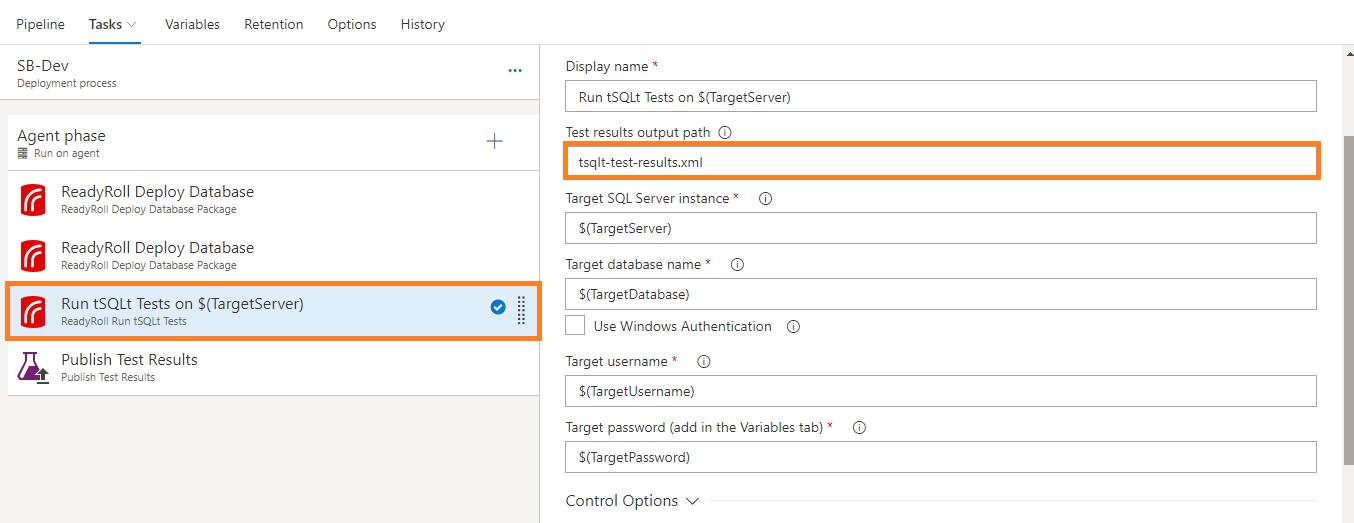
我有点困惑,在测试结果的输出路径下给出在运行tSQLt测试任务配置在发布级别。
因此,我在运行tSQLt测试任务时在发布级别上得到了错误,如下图所示。
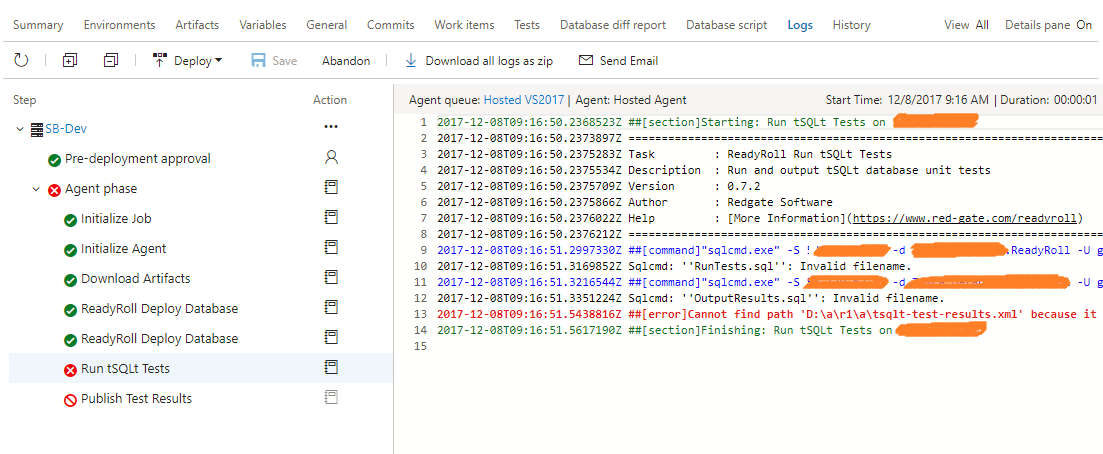
有人能告诉我如何解决上述问题吗?
回答 2
Stack Overflow用户
发布于 2018-01-10 10:54:07
这个问题现在已经在VSTS ReadyRoll扩展的2.1.4版本中解决了。
有问题的台词:
Invoke-VstsTool -FileName 'sqlcmd.exe' -Arguments "-S $databaseServer -d $databaseName -i 'RunTests.sql'"
Invoke-VstsTool -FileName 'sqlcmd.exe' -Arguments "-S $databaseServer -d $databaseName -i 'OutputResults.sql' -o $outputPath"
改为:
$connectionParams = "-S ""$databaseServer"" -d ""$databaseName"""
Invoke-VstsTool -RequireExitCodeZero -FileName 'sqlcmd.exe' -Arguments "-b $connectionParams -i RunTests.sql"
Invoke-VstsTool -RequireExitCodeZero -FileName 'sqlcmd.exe' -Arguments "-b $connectionParams -i OutputResults.sql -o ""$outputPath"""
对所造成的不便表示歉意。
Stack Overflow用户
发布于 2017-12-11 05:27:29
运行tsSQLt测试任务中存在问题(可以复制此问题)。
源代码(可以在代理工作文件夹中找到它,例如:_work/_task/RunDatabaseTestsxxx):
RunDatabaseTests.ps1:
[CmdletBinding(DefaultParameterSetName = 'None')]
param()
$global:ErrorActionPreference = 'Stop'
Import-Module -Name "$PSScriptRoot\ps_modules\TaskHelpers"

[string]$outputPath = Get-VstsInput -Name OutputPath
[string]$databaseServer = Get-VstsInput -Name DatabaseServer
[string]$databaseName = Get-VstsInput -Name DatabaseName
[bool]$useWindowsAuth = Get-VstsInput -Name UseWindowsAuth -AsBool
[string]$databaseUserName = Get-VstsInput -Name DatabaseUserName
[string]$databasePassword = Get-VstsInput -Name DatabasePassword

Write-VstsTaskVerbose -Message 'Ensuring the path to sqlcmd is present in env:PATH'
Initialize-SqlCmdInPathEnvironmentVariable

[string]$sourcesDirectory = Get-VstsTaskVariable -Name 'Build.SourcesDirectory'

if(!$sourcesDirectory)
{
  Write-VstsTaskVerbose -Message 'Build.SourcesDirectory was not found as a VSTS Task variable'
  Write-VstsTaskVerbose -Message 'Looking for Agent.ReleaseDirectory to use as source directory instead'
  # For RM, look for the test assemblies under the release directory.
  $sourcesDirectory = Get-VstsTaskVariable -Name 'Agent.ReleaseDirectory'
}

if(!$sourcesDirectory)
{
  $msg = 'No source directory found'
  Exit-WithError $msg
}

Write-VstsTaskVerbose -Message 'Source directory found'
Write-VstsTaskDebug -Message "buildSourcesDirectory = $buildSourcesDirectory"

if ([System.IO.Path]::IsPathRooted($outputPath) -eq $False)
{
  $outputPath = Join-Path $sourcesDirectory $outputPath
}

Write-VstsTaskDebug -Message "OutputPath(absolute) = $outputPath"

if ($useWindowsAuth -eq $True) {
  Write-VstsTaskVerbose -Message 'Starting sqlcmd with Windows Authentication'
  Invoke-VstsTool -FileName 'sqlcmd.exe' -Arguments "-S $databaseServer -d $databaseName -i 'RunTests.sql'"
  Invoke-VstsTool -FileName 'sqlcmd.exe' -Arguments "-S $databaseServer -d $databaseName -i 'OutputResults.sql' -o $outputPath"
}
else {
  Write-VstsTaskVerbose -Message 'Starting sqlcmd with SQL Authentication'
  Invoke-VstsTool -FileName 'sqlcmd.exe' -Arguments "-S $databaseServer -d $databaseName -U $databaseUserName -P $databasePassword -i 'RunTests.sql'"
  Invoke-VstsTool -FileName 'sqlcmd.exe' -Arguments "-S $databaseServer -d $databaseName -U $databaseUserName -P $databasePassword -i 'OutputResults.sql' -o $outputPath"
}

# sqlcmd limits line length to 2034 characters and inserts new lines. Remove these.
$x = Get-Content $outputPath -Raw
$x.Replace("`r`n", "") > $outputPath
RunTests.sql:
EXEC [tSQLt].[RunAll];OutputResults.sql:
:XML ON
EXEC [tSQLt].[XmlResultFormatter];我可以通过调用"sqlcmd.exe" -S v-tinmo-12r2 -d ReadyRollDemo2 -U starain -P User@123 -i RunTests.sql命令来运行测试(从'RunTests.sql‘中删除单引号,也可以将单引号替换为双引号)
因此,您可以通过命令行任务调用sqlcmd.exe来运行测试和获取报告,也可以参考运行tSQLt测试任务的源代码来自定义构建/发布任务。
https://stackoverflow.com/questions/47711693
复制相似问题
腾讯云开发者

Copyright © 2013 - 2026 Tencent Cloud. All Rights Reserved. 腾讯云 版权所有
深圳市腾讯计算机系统有限公司 ICP备案/许可证号:粤B2-20090059  粤公网安备44030502008569号
腾讯云计算(北京)有限责任公司 京ICP证150476号 | 京ICP备11018762号