
adjustPan切断EditText的底部
adjustPan切断EditText的底部
提问于 2017-12-07 19:16:40
看起来,adjustPan实际上是在我的EditText的基线上而不是视图的实际边缘上平移。
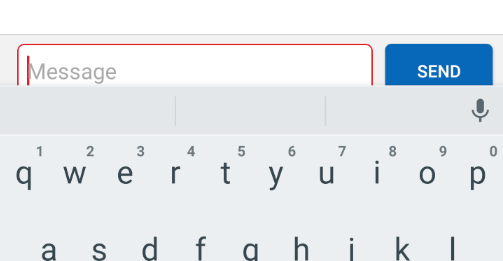
我一直在寻找解决这个问题的方法,但我什么也没找到。
活动代码(kotlin):
override fun onCreate(savedInstanceState: Bundle?) {
    super.onCreate(savedInstanceState)
    setContentView(R.layout.activity_main)
    window.setSoftInputMode(SOFT_INPUT_ADJUST_PAN)
}
布局xml:
<android.support.constraint.ConstraintLayout
    xmlns:android="http://schemas.android.com/apk/res/android"
    xmlns:app="http://schemas.android.com/apk/res-auto"
    xmlns:tools="http://schemas.android.com/tools"
    android:layout_width="match_parent"
    android:layout_height="match_parent"
    tools:context="com.foo.testbed.MainActivity">

<EditText
    android:id="@+id/myEditText"
    android:layout_width="0dp"
    android:layout_height="48dp"
    android:layout_marginBottom="8dp"
    android:layout_marginEnd="15dp"
    android:layout_marginStart="8dp"
    android:background="@drawable/rounded_edit_text"
    android:hint="Message"
    android:paddingStart="8dp"
    app:layout_constraintBottom_toBottomOf="parent"
    app:layout_constraintEnd_toStartOf="@id/myButton"
    app:layout_constraintStart_toStartOf="parent" />

<Button
    android:id="@+id/myButton"
    android:layout_width="wrap_content"
    android:layout_height="48dp"
    android:layout_marginBottom="8dp"
    android:layout_marginEnd="8dp"
    android:text="Send"
    app:layout_constraintBottom_toBottomOf="parent"
    app:layout_constraintEnd_toEndOf="parent"
    app:layout_constraintTop_toTopOf="@id/myEditText" />
我试图从以下几个问题中找到解决办法,但没有结果:
回答 1
Stack Overflow用户
回答已采纳
发布于 2018-01-31 14:38:01
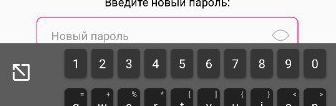
解决方案是设置一个顶部的机器人垫子
我在editText中的例子:
<AutoCompleteTextView
                android:id="@+id/editText_new_password"
                android:layout_width="match_parent"
                android:layout_height="@dimen/btn_editbox_height"
                android:background="@drawable/edit_text_style"
                android:gravity="center_vertical"
                android:paddingEnd="@dimen/login_edit_box_pass_padding_right"
                android:paddingTop="10dp"
                android:paddingBottom="10dp"
                android:paddingStart="@dimen/edit_box_padding"
                android:textSize="14sp" />
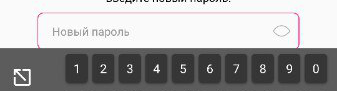
用垫子12:
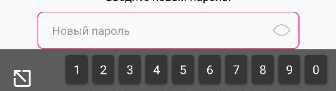
赤裸的垫子:
页面原文内容由Stack Overflow提供。腾讯云小微IT领域专用引擎提供翻译支持
原文链接:
https://stackoverflow.com/questions/47702227
复制相关文章
相似问题
腾讯云开发者

Copyright © 2013 - 2026 Tencent Cloud. All Rights Reserved. 腾讯云 版权所有
深圳市腾讯计算机系统有限公司 ICP备案/许可证号:粤B2-20090059  粤公网安备44030502008569号
腾讯云计算(北京)有限责任公司 京ICP证150476号 | 京ICP备11018762号