
如何使用Python获取整个滚动元素的屏幕截图
如何使用Python获取整个滚动元素的屏幕截图
提问于 2017-12-04 12:47:41
我要拍一张整个网页的截图。这里最重要的部分是我需要截图来包含不适合屏幕的页面的全部内容。
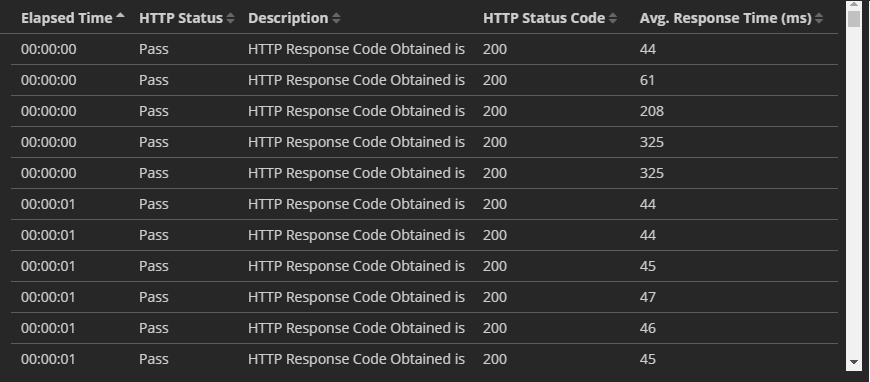
数据包含多行(行)数据,由于数据长度较长,它有一个滚动条。每一次的行数都不同,截图也应该相应的。
对于滚动的长网页,执行此任务非常简单。但是,当数据很大并且在滚动条下时,如何实现它呢?
我想使用Python来完成这个任务。我使用下面的代码来使用Python捕捉网页的截图。
from selenium import webdriver
from selenium.webdriver.chrome.options import Options
options = webdriver.ChromeOptions()
options.add_argument('headless')
options.add_argument('window-size=1440x1440')
driver = webdriver.Chrome(executable_path=os.path.abspath('C:/Program Files (x86)/Python36/selenium/chromedriver/build/scripts-3.6/chromedriver.exe'),chrome_options=options)
driver.get("https://www.test.com") ##updated as a random test URL
time.sleep(60);
driver.save_screenshot('C:/Users/Dev/Desktop/Maxx/Snapshots/test.png')
driver.quit
print ("captured snapshot")
使用滚动条在浏览器上显示的数据。
回答 1
Stack Overflow用户
发布于 2019-09-23 19:04:37
from PIL import Image
from io import BytesIO

from selenium import webdriver
from selenium.webdriver.chrome.options import Options

def open_url(url):
    options = Options()

    options.headless = True

    driver = webdriver.Chrome(chrome_options=options)

    driver.maximize_window()
    driver.get(url)
    save_screenshot(driver, 'screen.png')

def save_screenshot(driver, file_name):
    height, width = scroll_down(driver)
    driver.set_window_size(width, height)
    img_binary = driver.get_screenshot_as_png()
    img = Image.open(BytesIO(img_binary))
    img.save(file_name)
    # print(file_name)
    print(" screenshot saved ")


def scroll_down(driver):
    total_width = driver.execute_script("return document.body.offsetWidth")
    total_height = driver.execute_script("return document.body.parentNode.scrollHeight")
    viewport_width = driver.execute_script("return document.body.clientWidth")
    viewport_height = driver.execute_script("return window.innerHeight")

    rectangles = []

    i = 0
    while i < total_height:
        ii = 0
        top_height = i + viewport_height

        if top_height > total_height:
            top_height = total_height

        while ii < total_width:
            top_width = ii + viewport_width

            if top_width > total_width:
                top_width = total_width

            rectangles.append((ii, i, top_width, top_height))

            ii = ii + viewport_width

        i = i + viewport_height

    previous = None
    part = 0

    for rectangle in rectangles:
        if not previous is None:
            driver.execute_script("window.scrollTo({0}, {1})".format(rectangle[0], rectangle[1]))
            time.sleep(0.5)
        # time.sleep(0.2)

        if rectangle[1] + viewport_height > total_height:
            offset = (rectangle[0], total_height - viewport_height)
        else:
            offset = (rectangle[0], rectangle[1])

        previous = rectangle

    return (total_height, total_width)

open_url("https://www.medium.com")scroll_down函数滚动到页面底部,并返回网页的总高度和宽度。
save_screenshot函数设置窗口大小并使用枕头保存屏幕截图。
页面原文内容由Stack Overflow提供。腾讯云小微IT领域专用引擎提供翻译支持
原文链接:
https://stackoverflow.com/questions/47633765
复制相关文章
相似问题
腾讯云开发者

Copyright © 2013 - 2026 Tencent Cloud. All Rights Reserved. 腾讯云 版权所有
深圳市腾讯计算机系统有限公司 ICP备案/许可证号:粤B2-20090059  粤公网安备44030502008569号
腾讯云计算(北京)有限责任公司 京ICP证150476号 | 京ICP备11018762号