
JMeter JSR223侦听器用于ExtentReports需要改进
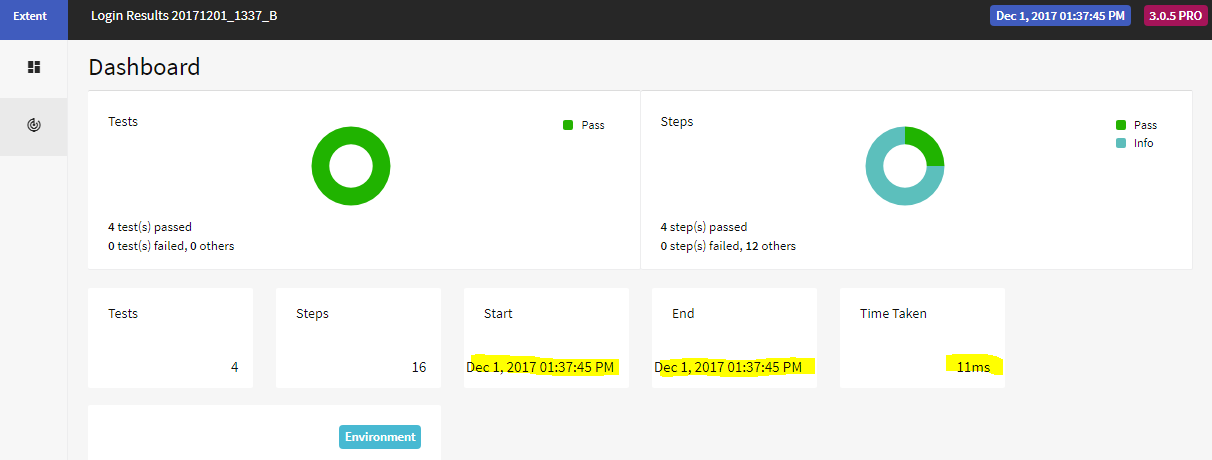
我编写了一个新的JSR223监听器,将测试结果写入一个extentreports html报告中。这是很好的工作,但可以改进。我只是不确定改进它的最好方法。我看到的一个具体问题是仪表板所花费的时间的价值。它显示了最后一个取样器运行的开始/结束时间。它应该显示第一个采样器的时间作为开始时间,结束采样器的时间作为结束时间,并且应该从这两个日期时间中得到所取的时间值。请您看一下我的听者脚本,并分享您可能得到的建议吗?
测试计划设置:在线程组中,我有HTTP请求采样器,它可以登录、执行一个操作并注销。在线程组的根目录下,下面的代码包含在BeanShell断言中:
//request data
String requestData = new String(prev.SamplerData);
//String requestData = new String(requestData);
props.put("propRequestData", requestData);
//response data
String respData = new String(prev.ResponseData);
//String respData = new String(prev.getResponseDataAsString());
props.put("propResponse", respData);
//response code
String respCode = new String(prev.ResponseCode);
props.put("propRespCode",respCode);
//response message
String respMessage = new String(prev.ResponseMessage);
props.put("propRespMessage",respMessage);
在我的测试计划的根部,我有以下JSR223侦听器代码:
import com.aventstack.extentreports.*;
import com.aventstack.extentreports.reporter.*;
import com.aventstack.extentreports.markuputils.*;

ExtentHtmlReporter htmlReporter;
ExtentReports extent;
ExtentTest test;

// create the HtmlReporter
htmlReporter = new ExtentHtmlReporter("C:/AUTO_Results/Results_${testApp}_${reportDate}_${currentTime}_${testenv}.html");

//configure report
htmlReporter.config().setCreateOfflineReport(true);
htmlReporter.config().setChartVisibilityOnOpen(true);
htmlReporter.config().setDocumentTitle("${testApp} Results");
htmlReporter.config().setEncoding("utf-8");
htmlReporter.config().setReportName("${testApp} Results ${reportDate}_${currentTime}_${testenv}");
htmlReporter.setAppendExisting(true);

// create ExtentReports
extent = new ExtentReports();

// attach reporter to ExtentReports
extent.attachReporter(htmlReporter);
extent.setReportUsesManualConfiguration(true);

// Show Env section and set data on dashboard
extent.setSystemInfo("Tool","JMeter");
extent.setSystemInfo("Test Env","${testenv}");
extent.setSystemInfo("Test Date","${reportDate}");
extent.setSystemInfo("Test Time","${currentTime}");

//stringify test info
String threadName = sampler.getThreadName();
String samplerName = sampler.getName();
String requestData = props.get("propRequestData");
String respCode = props.get("propRespCode");
String respMessage = props.get("propRespMessage");
String responseData = props.get("propResponse");


// create test
test = extent.createTest(threadName+" - "+samplerName);
//test.assignCategory("API Testing");

// analyze sampler result
if (vars.get("JMeterThread.last_sample_ok") == "false") {
   log.error("FAILED: "+samplerName);
   print("FAILED: "+samplerName);
   test.fail(MarkupHelper.createLabel("FAILED:  "+sampler.getName(),ExtentColor.RED));

} else if (vars.get("JMeterThread.last_sample_ok") == "true") {
    if(responseData.contains("@error")) {
        log.info("FAILED: "+sampler.getName());
         print("FAILED: "+sampler.getName());
        test.fail(MarkupHelper.createLabel("FAILED:   "+sampler.getName(),ExtentColor.RED));

    } else if (responseData.contains("{")) {
            log.info("Passed: "+sampler.getName());
        print("Passed: "+sampler.getName());
            test.pass(MarkupHelper.createLabel("Passed:   "+sampler.getName(),ExtentColor.GREEN));
    }

} else {
    log.error("Something is really wonky");
    print("Something is really wonky");
    test.fatal("Something is really wonky");
}

//info messages
    test.info("RequestData:   "+requestData);
    test.info("Response Code and Message:    "+respCode+"   "+respMessage);
    test.info("ResponseData:    "+responseData);


//playing around
//markupify json into code blocks
//Markup m = MarkupHelper.createCodeBlock(requestData);
//test.info(MarkupHelper.createModal("Modal text"));
//Markup mCard = MarkupHelper.createCard(requestData, ExtentColor.CYAN);
//   test.info("Request  "+m);
//  test.info(mCard);
//     test.info("Response Data:     "+MarkupHelper.createCodeBlock(props.get("propResponse")));
//   test.info("ASSERTION MESSAGE:     "+props.get("propAssertion"));


// end the reporting and save the file
extent.flush();
在JSR223侦听器中列出的${变量}是在用户定义的变量元素中定义的。我在我的lib文件夹中使用:j米-3.2 extentreports-pro-3.0.5.jar
这是仪表板的截图
回答 2
Stack Overflow用户
发布于 2018-01-10 07:50:20
您的结束时间很好(结束采样器),您需要的是开始第一个采样器。
我想你可以用启动预定义属性
启动属性也被复制到具有相同名称的变量中。
- START.MS - JMeter启动时间(毫秒)
- START.YMD - JMeter启动时间为yyyyMMdd
- START.HMS - JMeter启动时间为HHmmss
- TESTSTART.MS -测试开始时间以毫秒为单位
将JSR223 PostProcessor添加到第一个采样器并添加到变量开始时间的另一个选项:
log.info("start time is " + prev.getStartTime() );
vars.put("startTimeFirstSample", "" + prev.getStartTime() );Stack Overflow用户
发布于 2018-01-10 14:22:07
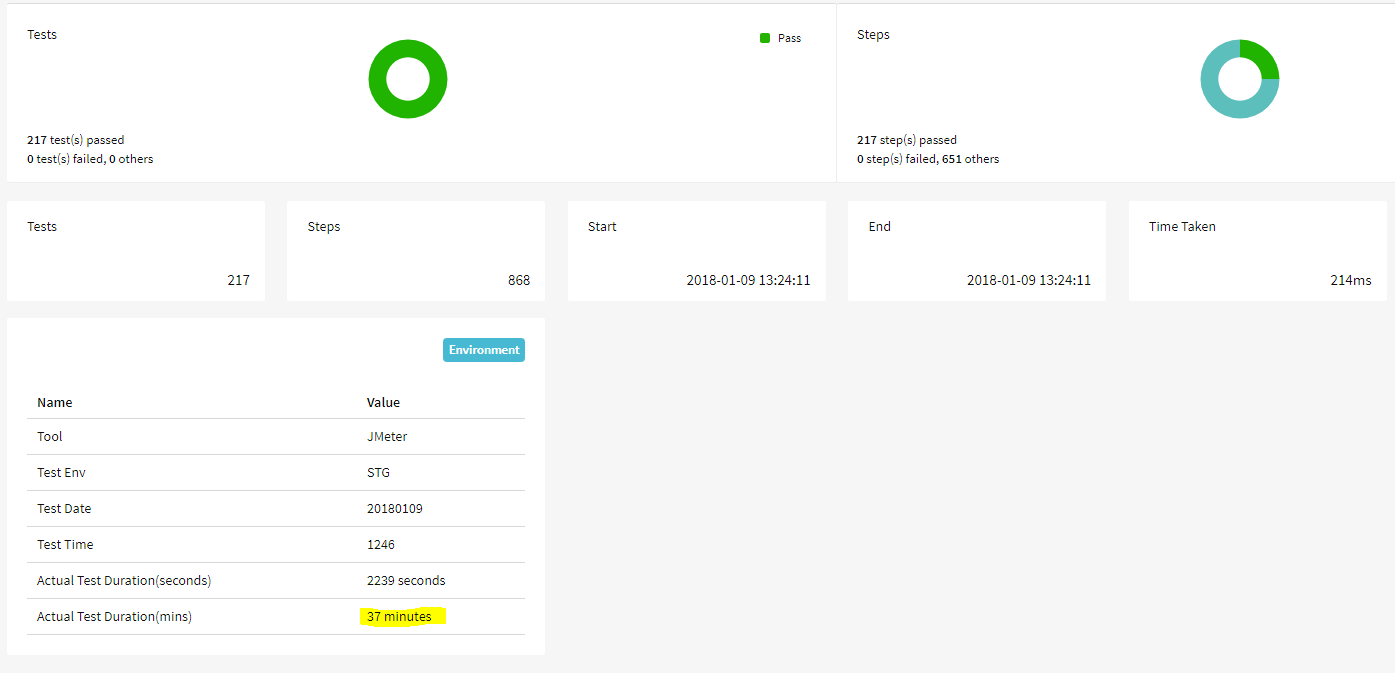
在测试期间,我得到了以下解决办法。1.在安装线程组中,我使用以下代码添加了一个JSR223示例程序:
log.info("--------------Initialize");
import java.time.Duration;
import java.time.Instant;

Instant myStart = Instant.now();
props.put("varmyStart",myStart);
log.info("Test Start time: ----  "+props.get("varmyStart"));

//response
props.put("propResponse","Test Start time { "+props.get("varmyStart")+" }");
SampleResult.setResponseData(props.get("propResponse"));- 在拆卸线程组中,我使用以下代码添加了一个JSR223示例程序: Log.info(//millis props.put("varTimeTakenMS",timeElapsed.toMillis().toString());log.info(“log.info varTimeTaken(MS):-”+props.get(“varTimeTakenMS”));//秒props.put("varTimeTakenSEC",timeElapsed.getSeconds());log.info("prop“:-”+props.get(“varTimeTakenSEC”));//MS props.put("varTimeTakenMINS“),varTimeTakenSEC();Log.info(“varTimeTaken(MINS):-”+props.get(“varTimeTakenMINS”));//response props.put("propResponse",“测试结束时间”{ "+props.get("varmyEnd")+“} )。测试持续时间:"+props.get("varTimeTakenMINS")+“分钟”);
- 在监听器代码中,在// Show Env部分下并在仪表板上设置数据,我添加了以下几行: //extent.setSystemInfo(“实际测试时间(Ms)”、props.get("varTimeTakenMS")+“毫秒”)、extent.setSystemInfo(“实际测试持续时间(秒)”、props.get("varTimeTakenSEC")+“秒”)、extent.setSystemInfo(“实际测试持续时间(Mins)”、props.get("varTimeTakenMINS")+“分钟”);
它不漂亮,但它给了我我所需要的。
https://stackoverflow.com/questions/47601473
复制相似问题
腾讯云开发者

Copyright © 2013 - 2026 Tencent Cloud. All Rights Reserved. 腾讯云 版权所有
深圳市腾讯计算机系统有限公司 ICP备案/许可证号:粤B2-20090059  粤公网安备44030502008569号
腾讯云计算(北京)有限责任公司 京ICP证150476号 | 京ICP备11018762号