
提取MSER检测区域(Python,OpenCV)
提取MSER检测区域(Python,OpenCV)
提问于 2017-12-01 14:36:41
在这张图像中,我无法提取MSER检测到的区域:
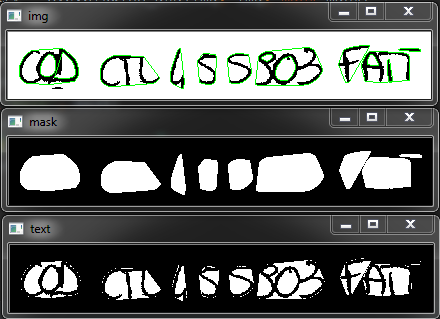
我想要做的是拯救绿色的有界区域。我的实际代码是:
import cv2
import numpy as np

mser = cv2.MSER_create()
img = cv2.imread('C:\\Users\\Link\\img.tif')
gray = cv2.cvtColor(img, cv2.COLOR_BGR2GRAY)
vis = img.copy()
regions, _ = mser.detectRegions(gray)
hulls = [cv2.convexHull(p.reshape(-1, 1, 2)) for p in regions]
cv2.polylines(vis, hulls, 1, (0, 255, 0))

mask = np.zeros((img.shape[0], img.shape[1], 1), dtype=np.uint8)
mask = cv2.dilate(mask, np.ones((150, 150), np.uint8))
for contour in hulls:
    cv2.drawContours(mask, [contour], -1, (255, 255, 255), -1)

    text_only = cv2.bitwise_and(img, img, mask=mask)


cv2.imshow('img', vis)
cv2.waitKey(0)
cv2.imshow('mask', mask)
cv2.waitKey(0)
cv2.imshow('text', text_only)
cv2.waitKey(0)
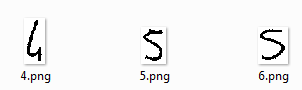
预期的结果应该是像ROI一样的图像。
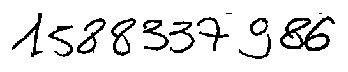
源图像:
回答 3
Stack Overflow用户
回答已采纳
发布于 2017-12-01 14:55:02
只需获取每个轮廓的边界框,就可以将其作为ROI提取区域并保存出来:
for i, contour in enumerate(hulls):
    x,y,w,h = cv2.boundingRect(contour)
cv2.imwrite('{}.png'.format(i), img[y:y+h,x:x+w])Stack Overflow用户
发布于 2019-08-23 09:48:58
detectRegions还返回边框:
regions, boundingBoxes = mser.detectRegions(gray)

for box in boundingBoxes:
        x, y, w, h = box;
        cv2.rectangle(vis, (x, y), (x+w, y+h), (0, 255, 0), 1)
这将绘制绿色矩形,或者像GPhilo的回答中提到的那样保存它们。
Stack Overflow用户
发布于 2020-05-17 13:26:06
嘿找到了一个更干净的方法
regions, _ = mser.detectRegions(roi_gray)

bounding_boxes = [cv2.boundingRect(p.reshape(-1, 1, 2)) for p in regions]页面原文内容由Stack Overflow提供。腾讯云小微IT领域专用引擎提供翻译支持
原文链接:
https://stackoverflow.com/questions/47595684
复制相关文章
相似问题
腾讯云开发者

Copyright © 2013 - 2026 Tencent Cloud. All Rights Reserved. 腾讯云 版权所有
深圳市腾讯计算机系统有限公司 ICP备案/许可证号:粤B2-20090059  粤公网安备44030502008569号
腾讯云计算(北京)有限责任公司 京ICP证150476号 | 京ICP备11018762号