
Webpack 3在JSX语法上失败
Webpack 3在JSX语法上失败
提问于 2017-11-30 16:26:11
最近,我从Webpack v1升级到了v3,现在的构建还没有从应用程序中识别出JSX语法。我按照v1的文档从这里到v2,然后安装了v3。
webpack.config.js
const webpack = require('webpack');
const precss = require('precss');
const ExtractTextPlugin = require('extract-text-webpack-plugin');
const path = require('path');

const jsPresets = [
  ['env', {
    targets: {
      chrome: 52,
      browsers: [
        'last 4 versions',
        'safari >= 7',
      ],

    },
  } ],
  'babel-preset-stage-2',
];

const baseConfig = {
  entry: [
    'babel-polyfill',
    'antd/dist/antd.css',
    './wp-content/plugins/custom/js/router',
    './wp-content/plugins/custom/js/legacy/header',
    './node_modules/m-react-splitters/lib/splitters.css',
    'react-s-alert/dist/s-alert-default.css',
    'react-s-alert/dist/s-alert-css-effects/flip.css',
    'react-s-alert/dist/s-alert-css-effects/bouncyflip.css',
    'react-quill/dist/quill.snow.css',
  ],
  output: {
    path: path.resolve(__dirname, './wp-content/plugins/custom/js'),
    filename: 'custom.js',
  },
  module: {
    rules: [{
      test: /\.css$/,
      use: ExtractTextPlugin.extract({
        fallback: 'style-loader',
        use: [
          'css-loader?-url',
          'postcss-loader',
        ]
      }),
    }, {
        // whatwg-fetch use Promsie which IE11 doesn't support
        test: /\.js$/,
        include: [/whatwg-.*/],
        use: {
          loader: 'babel-loader'
        },
      }, {
      test: /\.(js|jsx)$/,
      exclude: /(node_modules|bower_components)/,
      use: {
        loader: 'babel-loader',
        options: {
          presets: jsPresets,
          plugins: [
            ['import', { libraryName: 'antd' }],
            'transform-class-properties',
            'transform-es2015-arrow-functions',
          ],
        },
      },
    }],
  },

  plugins: [
    new ExtractTextPlugin({
      filename: '../css/custom.css',
      allChunks: true,
    }),
    new webpack.ProvidePlugin({
      React: 'react',
      Intl: 'imports-loader?this=>global!exports-loader?global.Intl!intl',
    }),
  ],
};

module.exports = baseConfig;
webpack试图捆绑后向终端抛出的错误消息:
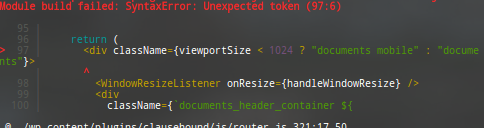
我不知道这里出了什么问题,任何帮助都是值得感激的。
回答 1
Stack Overflow用户
回答已采纳
发布于 2017-11-30 16:34:51
据我所见,在你的预置中,你没有使用反应预置。您需要安装babel-预设-响应如下:
npm install --save-dev babel-cli babel-preset-react然后,在你的预设中,只需添加"react“,它就应该转到另一个位置。
页面原文内容由Stack Overflow提供。腾讯云小微IT领域专用引擎提供翻译支持
原文链接:
https://stackoverflow.com/questions/47578078
复制相关文章
相似问题
腾讯云开发者

Copyright © 2013 - 2026 Tencent Cloud. All Rights Reserved. 腾讯云 版权所有
深圳市腾讯计算机系统有限公司 ICP备案/许可证号:粤B2-20090059  粤公网安备44030502008569号
腾讯云计算(北京)有限责任公司 京ICP证150476号 | 京ICP备11018762号