
如何读取文本文件作为输入,并使用熊猫写入excel列?
如何读取文本文件作为输入,并使用熊猫写入excel列?
提问于 2017-11-30 09:29:43
我使用permission.txt文件作为输入,并希望将数据写入Excel-2007的列中(我使用的是熊猫XlsxWriter,因为我想要超过256个列)。我想这样写到excel文件中。我已经尝试了下面的代码,这些代码以行形式写入数据,而不是将数据写入列(列1,列2......column 400)。

import pandas as pd
from pandas import ExcelWriter
from pandas import ExcelFile
import numpy as np


data = pd.read_csv('F:/Research_Work/python/Permission.txt', sep=" ", header=None)
writer = ExcelWriter('Example2.xlsx')
data.to_excel(writer,'Sheet1',index=False)回答 1
Stack Overflow用户
回答已采纳
发布于 2017-11-30 13:57:36
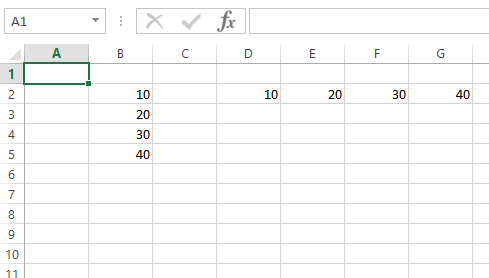
您只需转换数据数据,如下所示:
import pandas as pd

# Create a Pandas dataframe from some data.
df1 = pd.DataFrame({'Data': [10, 20, 30, 40]})
df2 = df1.T

# Create a Pandas Excel writer using XlsxWriter as the engine.
writer = pd.ExcelWriter('pandas_simple.xlsx', engine='xlsxwriter')

# Write the data in column and transposed (row) directions.
df1.to_excel(writer, sheet_name='Sheet1',
             startrow=1, startcol=1, header=False, index=False)

df2.to_excel(writer, sheet_name='Sheet1',
             startrow=1, startcol=3, header=False, index=False)

# Close the Pandas Excel writer and output the Excel file.
writer.save()
输出:
页面原文内容由Stack Overflow提供。腾讯云小微IT领域专用引擎提供翻译支持
原文链接:
https://stackoverflow.com/questions/47569973
复制相关文章
相似问题
腾讯云开发者

Copyright © 2013 - 2026 Tencent Cloud. All Rights Reserved. 腾讯云 版权所有
深圳市腾讯计算机系统有限公司 ICP备案/许可证号:粤B2-20090059  粤公网安备44030502008569号
腾讯云计算(北京)有限责任公司 京ICP证150476号 | 京ICP备11018762号