
将本机2种颜色作为背景
将本机2种颜色作为背景
提问于 2017-11-29 22:36:42
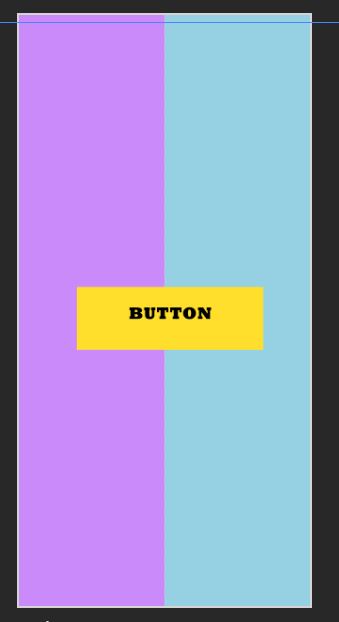
我试着用flex制作2种颜色的背景,它看起来很好,但是我想让中间的按钮和照片中的按钮一样,在代码中插入按钮?我想要这样:
     return (
            <View style={container}>
                <View style={leftContainer}>
                </View>
                <View style={rightContainer}>
                </View>
                <Button
                    title="button"/>
            </View>
        )
    }
}


const styles = StyleSheet.create({
    container: {
        flex: 1,
        flexDirection:'row'

    },
    leftContainer:{
        flex:1,
        backgroundColor: '#ca8afa',
    },
    rightContainer:{
        flex:1,
        backgroundColor: '#96d0e3'

    },
    addButton: {
      justifyContent: 'center',
      alignItems: 'center',
      position: 'absolute',
      bottom: 20,
      right: 20,
      zIndex: 1111,
      width: calcSize(192 / 2),
      height: calcSize(192 / 2)
    }
  })
问题是,按钮现在也在行中,而不是在中间,我如何修复它?
回答 1
Stack Overflow用户
回答已采纳
发布于 2017-11-30 00:40:12
下面是一个可能的解决方案的现场演示:https://snack.expo.io/HJFL7A3ez
编辑-也在这里添加了代码:
export default class App extends Component {
  render() {
        return (
            <View style={styles.container}>
                <View style={styles.leftContainer}>
                </View>
                <View style={styles.rightContainer}>
                </View>
                <View style={styles.buttonContainer}>
                  <Button style={styles.addButton} title="button"/>
                </View>
            </View>
        )
    }
}

const styles = StyleSheet.create({
  container: {
      flex: 1,
      flexDirection:'row'

  },
  leftContainer:{
      flex:1,
      backgroundColor: '#ca8afa',
  },
  rightContainer:{
      flex:1,
      backgroundColor: '#96d0e3'

  },
  buttonContainer: {
    position: 'absolute',
    width: '100%',
    height: '100%',
    justifyContent: 'center',
    alignItems: 'center',
  },
  addButton: {
    zIndex: 1111,
    width: 200
  }
}) 页面原文内容由Stack Overflow提供。腾讯云小微IT领域专用引擎提供翻译支持
原文链接:
https://stackoverflow.com/questions/47563006
复制相关文章
相似问题
腾讯云开发者

Copyright © 2013 - 2026 Tencent Cloud. All Rights Reserved. 腾讯云 版权所有
深圳市腾讯计算机系统有限公司 ICP备案/许可证号:粤B2-20090059  粤公网安备44030502008569号
腾讯云计算(北京)有限责任公司 京ICP证150476号 | 京ICP备11018762号