
滤波BindingSource和DataGridView
滤波BindingSource和DataGridView
提问于 2017-11-29 19:26:22
当我的DataGridView是BindingSource时,我正在尝试过滤我的BindingSource。当我试图更改BindingSource中的筛选器时,只有BindingSource.Filter值会改变,但是DGV看起来仍然是一样的。如何完成对DGV的过滤?
BindingSource udalosti = new BindingSource();
//filling bindingsource by udalosti.Add()
eventDataGridView.DataSource = udalosti;
这是我的过滤功能
string filter="";
if (typeComboBox.Text != "")
{
    filter = "Typ LIKE '" + typeComboBox.Text + "' AND ";
}
if (descriptionTextBox.Text != "")
{
    filter += "Popis LIKE '%" + descriptionTextBox.Text + "%' AND ";
}
if (sourceTextBox.Text != "")
{
    filter += "Zdroj LIKE '" + sourceTextBox.Text + "' AND ";
}
if (filter.Length > 0)
    udalosti.Filter = filter.Substring(0, filter.Length - 5);
else
    udalosti.Filter = filter;
eventDataGridView.ResetBindings();
这就是内容的外观
class Udalost
{
   public string Typ { get; set; }
   public string Popis { get; set; }
   public string Zdroj { get; set; }
   public DateTime Cas { get; set; }
}回答 1
Stack Overflow用户
回答已采纳
发布于 2017-12-03 13:08:51
使用DataTable是最简单的方法,所以您不必实现IBindingListView。
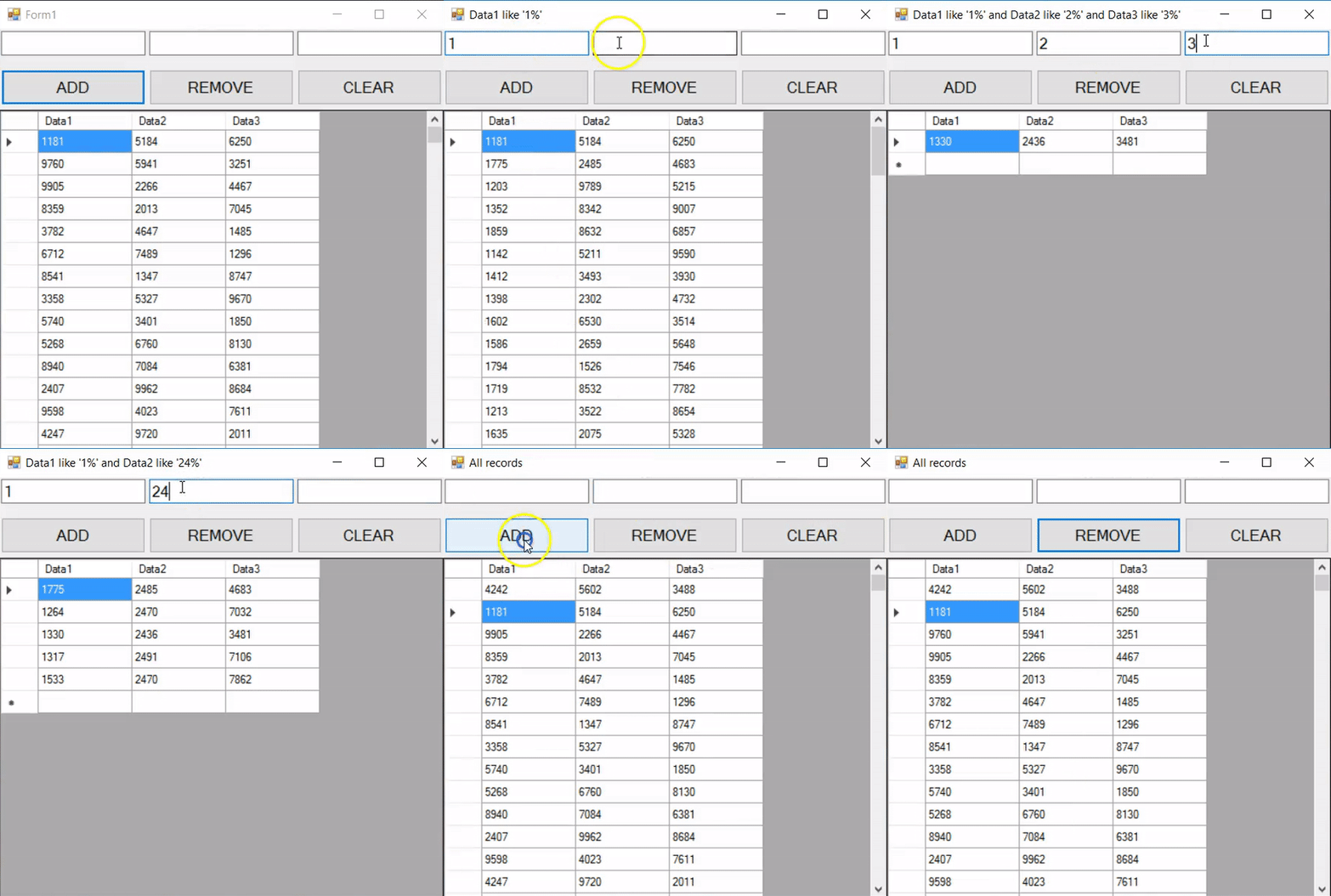
CS:
public partial class Form1 : Form
{
    MyDataTable dt;
    BindingSource bs;

    public Form1()
    {
        InitializeComponent();

        dt = new MyDataTable();
        bs = new BindingSource();
        bs.DataSource = dt.DefaultView;
        dataGridView1.DataSource = bs;
    }

    private void buttonAdd_Click(object sender, EventArgs e)
    {
        var r = new Random();
        var dr = dt.NewRow();
        dr[0] = r.Next(1111, 9999);
        dr[1] = r.Next(1111, 9999);
        dr[2] = r.Next(1111, 9999);
        dt.Rows.InsertAt(dr, 0);
    }

    private void buttonRemove_Click(object sender, EventArgs e)
    {
        dt.Rows.RemoveAt(0);
    }

    private void buttonClear_Click(object sender, EventArgs e)
    {
        textBox1.Text =
        textBox2.Text =
        textBox3.Text = string.Empty;
        UpdateDgv();
    }

    private void textBox1_TextChanged(object sender, EventArgs e)
    {
        UpdateDgv();
    }

    private void textBox2_TextChanged(object sender, EventArgs e)
    {
        UpdateDgv();
    }

    private void textBox3_TextChanged(object sender, EventArgs e)
    {
        UpdateDgv();
    }

    private void UpdateDgv()
    {
        string filter = GetFilter();

        if (filter != string.Empty)
            this.Text = filter;
        else this.Text = "All records";

        bs.Filter = filter;
    }

    private string GetFilter()
    {
        string filter = string.Empty;

        if (textBox1.Text != string.Empty)
            filter = string.Format("Data1 like '{0}%'", textBox1.Text);

        if (textBox2.Text != string.Empty)
        {
            if (textBox1.Text != string.Empty)
                filter += " and ";
            filter += string.Format("Data2 like '{0}%'", textBox2.Text);
        }

        if (textBox3.Text != string.Empty)
        {
            if (filter != string.Empty)
                filter += " and ";
            filter += string.Format("Data3 like '{0}%'", textBox3.Text);
        }

        return filter;
    }
}
DataTable:
public class MyDataTable : DataTable
{
    public MyDataTable()
    {
        Columns.Add("Data1", typeof(string));
        Columns.Add("Data2", typeof(string));
        Columns.Add("Data3", typeof(string));

        DataRow dr;
        var r = new Random();
        for (int i = 0; i < 1000; i++)
        {
            dr = NewRow();
            dr["Data1"] = r.Next(1111, 9999);
            dr["Data2"] = r.Next(1111, 9999);
            dr["Data3"] = r.Next(1111, 9999);
            Rows.Add(dr);
        }
    }
}页面原文内容由Stack Overflow提供。腾讯云小微IT领域专用引擎提供翻译支持
原文链接:
https://stackoverflow.com/questions/47560310
复制相关文章
相似问题
腾讯云开发者

Copyright © 2013 - 2026 Tencent Cloud. All Rights Reserved. 腾讯云 版权所有
深圳市腾讯计算机系统有限公司 ICP备案/许可证号:粤B2-20090059  粤公网安备44030502008569号
腾讯云计算(北京)有限责任公司 京ICP证150476号 | 京ICP备11018762号