
Style()和ThemedStyle()之间的冲突
我使用Tkinter和ttk在Python中创建GUI。我希望为用户可以配置的UI有两个独立的主题。其中一个选项是使用以下代码调用的vista主题:
from tkinter import Tk
from tkinter.ttk import Style

root = Tk()
root.style = Style()
root.style.theme_use('vista')
另一个选项是名为“使用:
from tkinter import Tk
from ttkthemes import ThemedStyle

root = Tk()
root.style = ThemedStyle()
root.style.theme_use('black')我有一些问题,因为我希望用户能够在程序运行时切换主题。单独应用这些主题(例如,应用主题、关闭程序和在启动时应用其他主题)效果很好。在调用root.style = ThemedStyle()时,当从vista主题切换到black主题时,在代码后面的某个地方开始遇到问题,然后调用black:
    if self.ui_theme == 'Dark':
        self.root.style = ThemedStyle()
        theme = 'black'
        self.root.tk_setPalette(background='#2f3136')
    else:
        self.root.style = Style()
        theme = 'vista'
        self.root.tk_setPalette(background='#f0f0f0')
self.root.style.theme_use(theme)最重要的是,从black到vista,再返回到black,会导致以下错误:
error reading package index file C:/Python34/Lib/site-packages/ttkthemes/themes/pkgIndex.tcl: Theme plastik already exists我假设在同一个实例中两次调用self.root.style = ThemedStyle()时会发生这种情况。
在应用新主题时,是否有一种避免强迫用户重新启动应用程序的方法?提前谢谢。
回答 1
Stack Overflow用户
发布于 2017-11-26 19:14:21
开始时只创建一次Style()和ThemeStyle(),并将其赋值给变量。
然后将变量赋值给root.style。
from tkinter import Tk
from tkinter.ttk import Style, Button
from ttkthemes import ThemedStyle

def style_1():
    print('winxpblue')
    root.style = s
    root.style.theme_use('winxpblue')

def style_2():
    print('black')
    root.style = t
    root.style.theme_use('black')

root = Tk()

s = Style()
t = ThemedStyle()

#print(s.theme_names())
#print(t.theme_names())

Button(root, text="winxpblue", command=style_1).pack()
Button(root, text="black", command=style_2).pack()

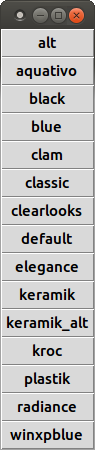
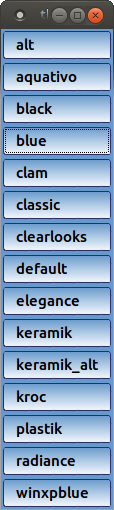
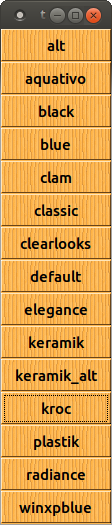
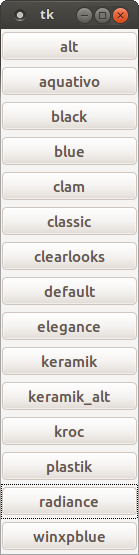
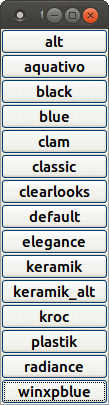
root.mainloop()编辑:在Linux上测试后,我发现我不需要Style()。我在ThemedStyle()中有所有的主题。也许在Windows/MacOS上,它的工作方式也是一样的。
import tkinter as tk
from tkinter import ttk
import ttkthemes

root = tk.Tk()

root.style = ttkthemes.ThemedStyle()

for i, name in enumerate(sorted(root.style.theme_names())):
    b = ttk.Button(root, text=name, command=lambda name=name:root.style.theme_use(name))
    b.pack(fill='x')

root.mainloop()
https://stackoverflow.com/questions/47499069
复制相似问题
腾讯云开发者

Copyright © 2013 - 2026 Tencent Cloud. All Rights Reserved. 腾讯云 版权所有
深圳市腾讯计算机系统有限公司 ICP备案/许可证号:粤B2-20090059  粤公网安备44030502008569号
腾讯云计算(北京)有限责任公司 京ICP证150476号 | 京ICP备11018762号