
CompileOptions.bootClasspath属性已被取消推荐。
升级到Gradle 4.x后,i 收到警告
CompileOptions.bootClasspath属性已被取消推荐,并计划在Gradle 5.0中删除该属性。请改用CompileOptions.bootstrapClasspath属性。
在我的一个项目里。在我的build.gradle中,我没有看到任何叫做build.gradle或类似的东西。这个警告是什么意思?
警告只出现在commons子项目中,而不是在核心中。
公地/build.gradle:
apply plugin: 'com.android.library'

ext {
    PUBLISH_GROUP_ID = 'com.afollestad.material-dialogs'
    PUBLISH_ARTIFACT_ID = 'commons'
    PUBLISH_VERSION = '0.9.2.3'
    BUILD_TOOLS = "26.0.3"
    TARGET_SDK = 25
}

android {
    compileSdkVersion TARGET_SDK
    buildToolsVersion BUILD_TOOLS

    defaultConfig {
        minSdkVersion 16
        targetSdkVersion TARGET_SDK
        versionCode 1
        versionName PUBLISH_VERSION
    }
    lintOptions {
        checkReleaseBuilds false
    }
}

dependencies {
    implementation project(':core')
}

// Changes to this block must be applied in core/build.gradle and commons/build.gradle
task("javadoc", type: Javadoc) {
    description "Generates Javadoc API documentation for the main source code."
    source = android.sourceSets.main.java.srcDirs
    ext.androidJar = "${android.sdkDirectory}/platforms/${android.compileSdkVersion}/android.jar"
    classpath += files(ext.androidJar)
    exclude "**/BuildConfig.java"
    exclude "**/R.java"
    options.links("http://docs.oracle.com/javase/7/docs/api/");
    options.links("http://d.android.com/reference/");
}
核心/build.gradle:
apply plugin: 'com.android.library'

ext {
    PUBLISH_GROUP_ID = 'com.afollestad.material-dialogs'
    PUBLISH_ARTIFACT_ID = 'core'
    PUBLISH_VERSION = '0.9.2.3'
    SUPPORT_LIBRARY_VERSION = '25.4.0'
    BUILD_TOOLS = "26.0.3"
    TARGET_SDK = 25
}

android {
    compileSdkVersion TARGET_SDK
    buildToolsVersion BUILD_TOOLS

    defaultConfig {
        minSdkVersion 16
        targetSdkVersion TARGET_SDK
        versionCode 1
        versionName PUBLISH_VERSION
        consumerProguardFiles 'progress-proguard.txt'
    }
    lintOptions {
        checkReleaseBuilds false
    }
}

dependencies {
    api "com.android.support:support-v13:$SUPPORT_LIBRARY_VERSION"
    api "com.android.support:appcompat-v7:$SUPPORT_LIBRARY_VERSION"
    api "com.android.support:recyclerview-v7:$SUPPORT_LIBRARY_VERSION"
    api "com.android.support:support-annotations:$SUPPORT_LIBRARY_VERSION"
    implementation "me.zhanghai.android.materialprogressbar:library:1.4.1"
}

// Changes to this block must be applied in core/build.gradle and commons/build.gradle
task("javadoc", type: Javadoc) {
    description "Generates Javadoc API documentation for the main source code."
    source = android.sourceSets.main.java.srcDirs
    ext.androidJar = "${android.sdkDirectory}/platforms/${android.compileSdkVersion}/android.jar"
    classpath += files(ext.androidJar)
    exclude "**/BuildConfig.java"
    exclude "**/R.java"
    options.links("http://docs.oracle.com/javase/7/docs/api/");
    options.links("http://d.android.com/reference/");
}回答 3
Stack Overflow用户
发布于 2017-12-04 12:37:43
我的等级是在Ubuntu上使用来自/usr/lib/jvm/java-8-openjdk-amd64/jre的/usr/lib/jvm/java-8-openjdk-amd64/jre8(参见在build.gradle中添加println System.getProperty("java.home") )。没有涉及安卓工作室。
我可以通过显式地将sourceCompatibility和targetCompatibility设置为1.7 (默认值)来触发警告。通过将Java版本更改为
android {

    compileOptions {
        sourceCompatibility 1.8
        targetCompatibility 1.8
    }
}
警告就消失了。
只为一个项目显示警告的原因是它不被重复。commons是在core之前配置的,因为字母数字排序。当我将sourceCompatibility和targetCompatibility设置为commons的1.8时,警告将移到core。
将所有项目的sourceCompatibility和targetCompatibility设置为1.8将完全消除警告。如果这是您想要的项目,以及为什么第4级不能使用警告-无警告与1.7是两个不同的问题。
Stack Overflow用户
发布于 2017-12-01 16:59:41
我认为这个关于和旧JDK的消息(将其添加到您的gradle中)将解决这个问题:
android {

    compileOptions {
        sourceCompatibility JavaVersion.VERSION_1_8
        targetCompatibility JavaVersion.VERSION_1_8
    }
}
建议使用java 9 JDK并卸载旧的JDK,然后将其包含到您的项目结构中:File -> Other settings -> Default project structure。
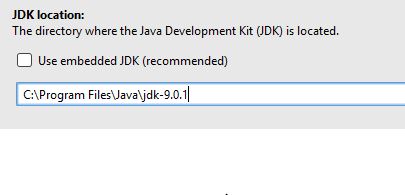
可能的结论:
android的默认JDK是...\Android studio\jre (嵌入式JDK),如上图所示。此嵌入式JDK包含不推荐的bootClasspath.。
使用包含bootstrapClasspath或修改compileOptions的新JDK将解决这个问题。
为什么旧的JDK (嵌入式version )与新的 gradle 不兼容
我没有头绪。
Stack Overflow用户
发布于 2018-03-07 12:43:59
撇开前面的话不说,我可以为Java构建提供出现错误的地方。引用:CompileOptions.bootClasspath必须指向与预期目标系统匹配的Java运行时JAR。这意味着,例如,如果要使用Java 6在服务器上运行程序,则需要将rt.jar设置为指向兼容的Java6运行时,即:Java6。
我通常设置一个项目变量/环境变量来指向这个文件:
BOOT_CLASSPATH
它通常与JRE共存,而不是在JDK中,除非在jre文件夹下。
在项目Gradle脚本中,我们有:
[compileJava, compileTestJava, ]*.options*.bootClasspath = BOOT_CLASSPATH显式设置。然而,在其他一些脚本中,我们根本不公开设置bootClasspath,并且仍然存在消息问题。
The CompileOptions.bootClasspath property has been deprecated
and is scheduled to be removed in Gradle 5.0. Please use the
CompileOptions.bootstrapClasspath property instead.
..。不管怎么说。我猜测Java插件本身就是某种默认行为。我知道这只是背景故事。我可以帮你解决这个警告。
CompileOptions.bootstrapClasspath`
https://stackoverflow.com/questions/47495066
复制相似问题
腾讯云开发者

Copyright © 2013 - 2026 Tencent Cloud. All Rights Reserved. 腾讯云 版权所有
深圳市腾讯计算机系统有限公司 ICP备案/许可证号:粤B2-20090059  粤公网安备44030502008569号
腾讯云计算(北京)有限责任公司 京ICP证150476号 | 京ICP备11018762号