
WPF :字形从右到左文本呈现
WPF :字形从右到左文本呈现
提问于 2017-11-25 21:09:58
我想使用字形渲染从右到左的语言文本(例如阿拉伯语或混合英语和阿拉伯语)。
我用的是这个代码:
    Typeface typeface = new Typeface(new FontFamily("Arial"),
                      FontStyles.Italic,
                      FontWeights.Normal,
                      FontStretches.Normal);

       GlyphTypeface glyphTypeface;
       if (!typeface.TryGetGlyphTypeface(out glyphTypeface))
           throw new InvalidOperationException("No glyphtypeface found");

       string text = "Hello  ,  سلام";
       double size = 40;

       ushort[] glyphIndexes = new ushort[text.Length];
       double[] advanceWidths = new double[text.Length];

       double totalWidth = 0;

       for (int n = 0; n < text.Length; n++)
       {
           ushort glyphIndex = glyphTypeface.CharacterToGlyphMap[text[n]];
           glyphIndexes[n] = glyphIndex;

           double width = glyphTypeface.AdvanceWidths[glyphIndex] * size;
           advanceWidths[n] = width;

           totalWidth += width;
       }

       Point origin = new Point(50, 50);

       GlyphRun glyphRun = new GlyphRun(glyphTypeface, 0, false, size,
           glyphIndexes, origin, advanceWidths, null, null, null, null,
           null, null);

       dc.DrawGlyphRun(Brushes.Black, glyphRun);
但问题是阿拉伯字符是分开显示的,如下所示:
Hello , س ل ا م请引导我
------------------------------------------------------
更新:
这是混淆解决方案的结果:
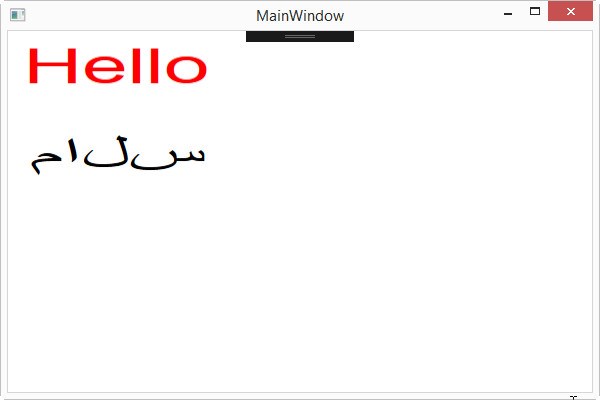
问题是阿拉伯字母是分开呈现的。
但这正是我想要的:
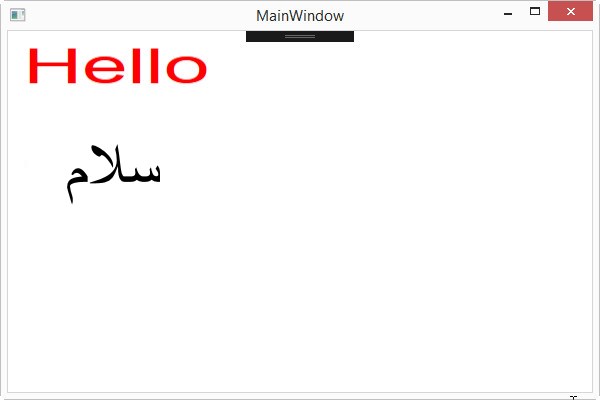
回答 1
Stack Overflow用户
发布于 2017-11-25 21:44:11
尝试用不同的CultureInfo格式化两个字符串
string x = string.Format(new CultureInfo("en-US"), "{0}" ,text1);
string y = string.Format(new CultureInfo("ar-SA"), "{0}", text2);
更新解决方案..。xaml有一个画布。
<Window x:Class="StackOverflowCS.MainWindow"
        Title="MainWindow" Height="600" Width="800">
    <Grid>
        <Canvas Name="MyCanvas" Height="600"  Width="800"/>
    </Grid>
</Window>
MainWindow (WPF)
   public partial class MainWindow : Window
    {
        public MainWindow()
        {
            InitializeComponent();

            Size s = new Size(200,50);
            GlyphElement gex = new GlyphElement(
               string.Format(new CultureInfo("en-US"), "{0}", "Hello"), Brushes.Red, s);
            MyCanvas.Children.Add(gex);
            Canvas.SetTop(gex, 10);
            Canvas.SetLeft(gex, 10);

            GlyphElement gey = new GlyphElement(
               string.Format(new CultureInfo("ar-SA"), "{0}", "سلام"), Brushes.Black, s);
            MyCanvas.Children.Add(gey);
            Canvas.SetTop(gey, 100);
            Canvas.SetLeft(gey, 10);
        }
    }
将GlyphElement包装在FrameworkElement中
    class GlyphElement : FrameworkElement
    {
        private GlyphRunner gr;
        public GlyphElement(string text, Brush br, Size size) { gr = new GlyphRunner(text, br, size); }
        protected override Visual GetVisualChild(int index) { return gr; }
        protected override int VisualChildrenCount { get { return 1; } }
    }
将GlyphRunner包装在DrawingVisual中
    public class GlyphRunner : DrawingVisual
    {
        public GlyphRunner(string text, Brush bc, Size size)
        {
            DrawingImage di = CreateGlyph(text, new Point(0, 0), bc);
            using (DrawingContext dc = RenderOpen())
            {
                dc.DrawImage(di,new Rect(size));
            }
        }

        // small updates to your code follow
        public DrawingImage CreateGlyph(string text, Point origin, Brush bc)
        {
            Typeface typeface = new Typeface(new FontFamily("Arial"),
                                 FontStyles.Normal,
                                 FontWeights.Normal,
                                 FontStretches.Normal);

            GlyphTypeface glyphTypeface;
            if (!typeface.TryGetGlyphTypeface(out glyphTypeface))
                throw new InvalidOperationException("No glyphtypeface found");

            ushort[] glyphIndexes = new ushort[text.Length];
            double[] advanceWidths = new double[text.Length];

            double totalWidth = 0;

            for (int n = 0; n < text.Length; n++)
            {
                ushort glyphIndex = glyphTypeface.CharacterToGlyphMap[text[n]];
                glyphIndexes[n] = glyphIndex;

                double width = glyphTypeface.AdvanceWidths[glyphIndex];
                advanceWidths[n] = width;

                totalWidth += width;
            }

            float ppd = (float)VisualTreeHelper.GetDpi(this).PixelsPerDip;
            GlyphRun gr =  new GlyphRun(glyphTypeface, 0, false, 1.0, ppd, glyphIndexes, origin, advanceWidths, null, null, null, null, null, null);
            GlyphRunDrawing glyphRunDrawing = new GlyphRunDrawing(bc, gr);
            return new DrawingImage(glyphRunDrawing);
        }

}页面原文内容由Stack Overflow提供。腾讯云小微IT领域专用引擎提供翻译支持
原文链接:
https://stackoverflow.com/questions/47490542
复制相关文章
相似问题
腾讯云开发者

Copyright © 2013 - 2026 Tencent Cloud. All Rights Reserved. 腾讯云 版权所有
深圳市腾讯计算机系统有限公司 ICP备案/许可证号:粤B2-20090059  粤公网安备44030502008569号
腾讯云计算(北京)有限责任公司 京ICP证150476号 | 京ICP备11018762号