
SWIFT3.2中JTAppleCalendar cellForItemAt日期上的自定义单元格错误
我在我的项目中添加了JTAppleCalendar,我想在我的一些日历单元格中添加一些标记。我成功地添加了它们,但是当我在日历月中左右滚动时,标签中的单元格会消失、隐藏或混合,当我一次又一次滚动时,就会有越来越多的混合。我需要什么协议或代表等等吗?还是,只是个虫子?
我怎么才能治好那个窃听器?
我的cellForItemAt代码:
func calendar(_ calendar: JTAppleCalendarView, cellForItemAt date: Date, cellState: CellState, indexPath: IndexPath) -> JTAppleCell {
        let cell = calendar.dequeueReusableCell(withReuseIdentifier: "CellView", for: indexPath) as! CellView

        var currentdate = String(describing: myCalendar.date(byAdding: .day, value: 1, to: cellState.date))
        currentdate = currentdate.substring(from: 9, length: 10)


        cell.tagList.tags.removeAll()
        cell.tagList.hide()
        cell.contentView.backgroundColor = nil
        cell.tagList.alpha = 0
        cell.tagList.numberOfRows = 0
        cell.tagList.backgroundColor = UIColor.clear
        cell.tagList.isHidden = true


        var i : Int
        i = 0

        for object in datas {

        i =  i + 1

                let clean = "\(object)".components(separatedBy: "*")

                if clean[0] == currentdate {
                   let gotag : Int
                    gotag = Int(clean[1])!
                    cell.tagList.isHidden = false
                    cell.dayLabel.text = cellState.text
                    cell.contentView.backgroundColor = UIColor.gray

                    let itemName = "Item name  \(i)"


                        cell.tagList.alpha = 1

                        if clean[1] == "1" {

                                cell.tagList.addTag(itemName, target: self, tapAction: #selector(ViewController.tap(_:)), longPressAction: #selector(ViewController.tap(_:)),backgroundColor: UIColor.orange,textColor: UIColor.white,comesTag: gotag)


                        }else if clean[1] == "2" {

                                cell.tagList.addTag(itemName, target: self, tapAction: #selector(ViewController.tap(_:)), longPressAction: #selector(ViewController.tap(_:)),backgroundColor: UIColor.green,textColor: UIColor.white,comesTag: gotag)

                        }else if clean[1] == "3" {

                                 cell.tagList.addTag(itemName, target: self, tapAction: #selector(ViewController.tap(_:)), longPressAction: #selector(ViewController.tap(_:)),backgroundColor: UIColor.brown,textColor: UIColor.white,comesTag: gotag)

                        }else if clean[1] == "4" {

                              cell.tagList.addTag(itemName, target: self, tapAction: #selector(ViewController.tap(_:)), longPressAction: #selector(ViewController.tap(_:)),backgroundColor: UIColor.black,textColor: UIColor.white,comesTag: gotag)
                        }


            }else{

                cell.tagList.backgroundColor = UIColor.clear
        }


        }


        handleCellConfiguration(cell: cell, cellState: cellState)
        return cell
    }
在行动中的错误:
https://github.com/LetSwiftDev/CalendarBug/blob/master/calendarbug.gif

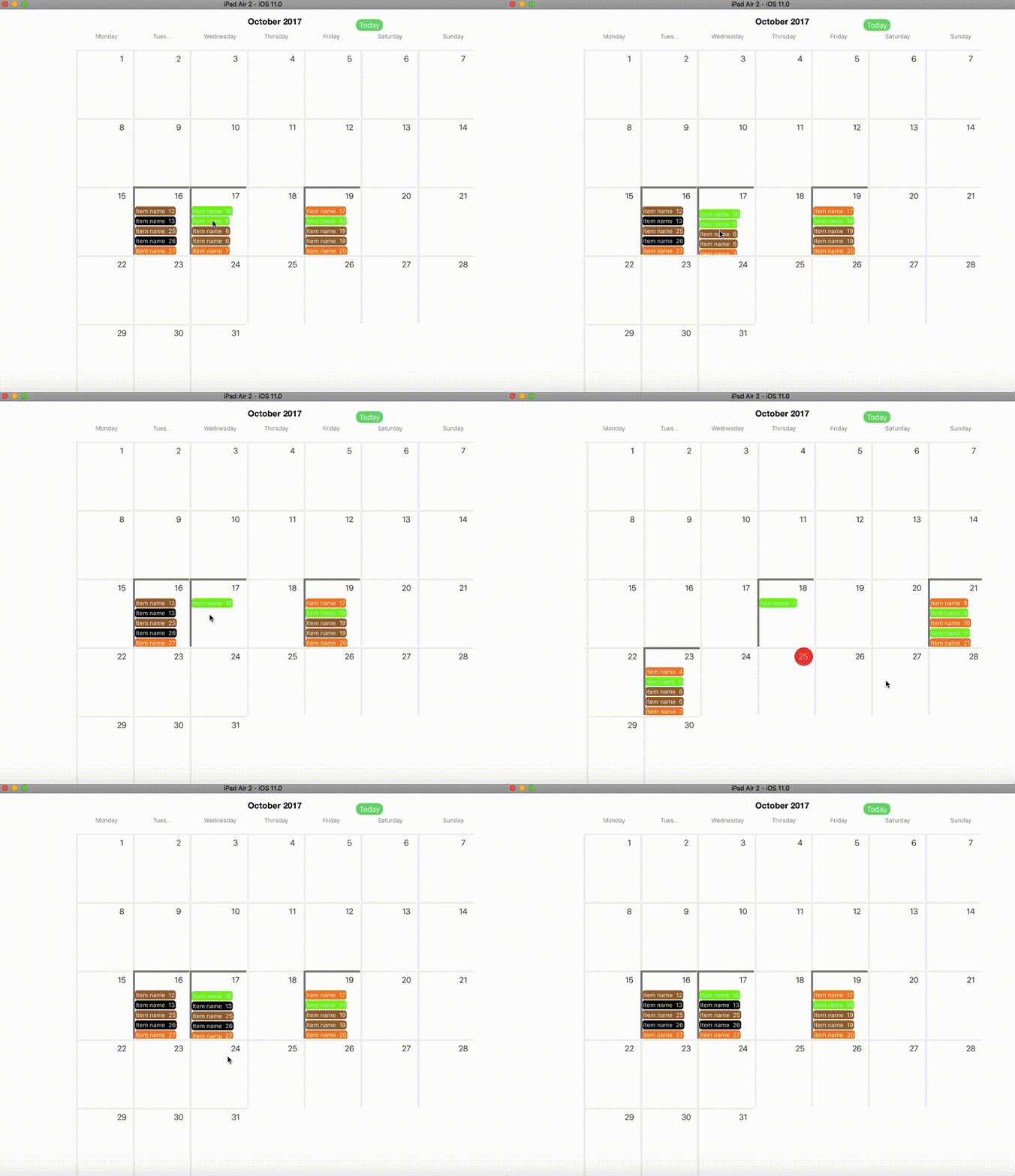
你也可以在这里加入正式的JTAppleCalendar聊天 https://gitter.im/patchthecode/JTAppleCalendar
回答 2
Stack Overflow用户
发布于 2017-11-28 11:07:59
基本上,要想找到一个奇怪的“解决方案”,您应该实现经典的UICollectionView (JTAppleCalendar from it) willDisplay 方法,正如您可以看到的那样,理论上它应该用于检测单元格添加而不是复制它的内容,因此要重新构建这些内容,您可以遵循此页面中向JTAppleCalendar gitHub 问题和解释的示例。
所以,您的代码可能是:
ViewController.swift
extension ViewController: JTAppleCalendarViewDelegate, JTAppleCalendarViewDataSource {
    func calendar(_ calendar: JTAppleCalendarView, willDisplay cell: JTAppleCell, forItemAt date: Date, cellState: CellState, indexPath: IndexPath) {
        var cell = cell as! CellView
        cell = sharedFunctionToConfigureCell(cell: cell, cellState: cellState, date: date)
    }

    func calendar(_ calendar: JTAppleCalendarView, cellForItemAt date: Date, cellState: CellState, indexPath: IndexPath) -> JTAppleCell {
        var cell = calendar.dequeueReusableCell(withReuseIdentifier: "CellView", for: indexPath) as! CellView
        cell = sharedFunctionToConfigureCell(cell: cell, cellState: cellState, date: date)
        return cell
    }

    func sharedFunctionToConfigureCell(cell: CellView, cellState: CellState, date: Date)-> CellView {
        var currentdate = String(describing: myCalendar.date(byAdding: .day, value: 1, to: cellState.date))
        currentdate = currentdate.substring(from: 9, length: 10)
        cell.tagList.tags.removeAll()
        cell.tagList.hide()
        cell.contentView.backgroundColor = nil
        cell.tagList.alpha = 0
        cell.tagList.numberOfRows = 0
        cell.tagList.backgroundColor = UIColor.clear
        cell.tagList.isHidden = true
        var i : Int
        i = 0
        for object in datas {
            i =  i + 1
            let clean = "\(object)".components(separatedBy: "*")
            if clean[0] == currentdate {
                let gotag : Int
                gotag = Int(clean[1])!
                cell.tagList.isHidden = false
                cell.dayLabel.text = cellState.text
                cell.contentView.backgroundColor = UIColor.gray
                let itemName = "Item name  \(i)"
                cell.tagList.alpha = 1
                if clean[1] == "1" {
                    cell.tagList.addTag(itemName, target: self, tapAction: #selector(ViewController.tap(_:)), longPressAction: #selector(ViewController.tap(_:)),backgroundColor: UIColor.orange,textColor: UIColor.white,comesTag: gotag)
                }else if clean[1] == "2" {
                    cell.tagList.addTag(itemName, target: self, tapAction: #selector(ViewController.tap(_:)), longPressAction: #selector(ViewController.tap(_:)),backgroundColor: UIColor.green,textColor: UIColor.white,comesTag: gotag)
                }else if clean[1] == "3" {
                    cell.tagList.addTag(itemName, target: self, tapAction: #selector(ViewController.tap(_:)), longPressAction: #selector(ViewController.tap(_:)),backgroundColor: UIColor.brown,textColor: UIColor.white,comesTag: gotag)
                }else if clean[1] == "4" {
                    cell.tagList.addTag(itemName, target: self, tapAction: #selector(ViewController.tap(_:)), longPressAction: #selector(ViewController.tap(_:)),backgroundColor: UIColor.black,textColor: UIColor.white,comesTag: gotag)
                }
            }else{
                cell.tagList.backgroundColor = UIColor.clear
            }
        }
        handleCellConfiguration(cell: cell, cellState: cellState)
        return cell
    }

    // your other code..
更新(测试后):
在您的评论之后,我决定深入分析您的代码。
首先,您的mainStoryBoard中有一个小错误,您可以很容易地更正它,用UIButton替换DesignableButton (不存在的类),如图中所示,以避免错误:mainStoryBoard

之后,完整的JTAppleCaledar库似乎没有任何问题,实际上,作者还扩展了willDisplay委托,解决了许多围绕单元格呈现的问题。
我在TagListView.swift类中找到了您的问题,更确切地说是在reset方法中。
TagListView.swift:
func reset() {
  for tag in tags {
      tag.removeFromSuperview()
  }
  tags = []
  currentRow = 0
  numberOfRows = 0
}此方法从superview中删除所有标签列表(标签数组),但不删除过去添加到superview中的其他标记,换句话说,只有数组tags中包含的标记。因此,为了避免这个问题,可以通过在线添加(我们知道它们是reset,所以不需要知道它们的所有tag号)来增强您的tag方法:
func reset() {
  for tag in tags {
      tag.removeFromSuperview()
  }
  tags = []
  currentRow = 0
  numberOfRows = 0
  self.subviews.forEach({ if $0 is UILabel { $0.removeFromSuperview()} })
}
要优化代码,只需更正此方法如下:
func reset(){
    tags = []
    currentRow = 0
    numberOfRows = 0
    self.subviews.forEach({ if $0 is UILabel { $0.removeFromSuperview()} })
}
输出
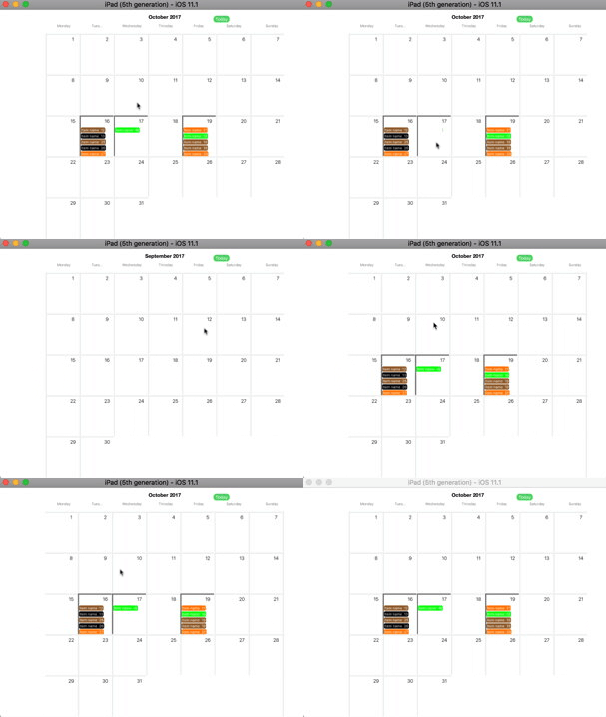
Stack Overflow用户
发布于 2017-11-25 15:11:22
我不知道这是不是真正的问题,但你错过了一个功能。实现willDisplayCell函数,如下所示:-> https://github.com/patchthecode/JTAppleCalendar/issues/553
这也许能解决你的问题。但奇怪的是,您的自定义框架工作没有警告您忘记实现该函数。
https://stackoverflow.com/questions/47485263
复制相似问题
腾讯云开发者

Copyright © 2013 - 2026 Tencent Cloud. All Rights Reserved. 腾讯云 版权所有
深圳市腾讯计算机系统有限公司 ICP备案/许可证号:粤B2-20090059  粤公网安备44030502008569号
腾讯云计算(北京)有限责任公司 京ICP证150476号 | 京ICP备11018762号