
苹果PDFKit上错误的高亮注释
苹果PDFKit上错误的高亮注释
提问于 2017-11-24 08:51:56
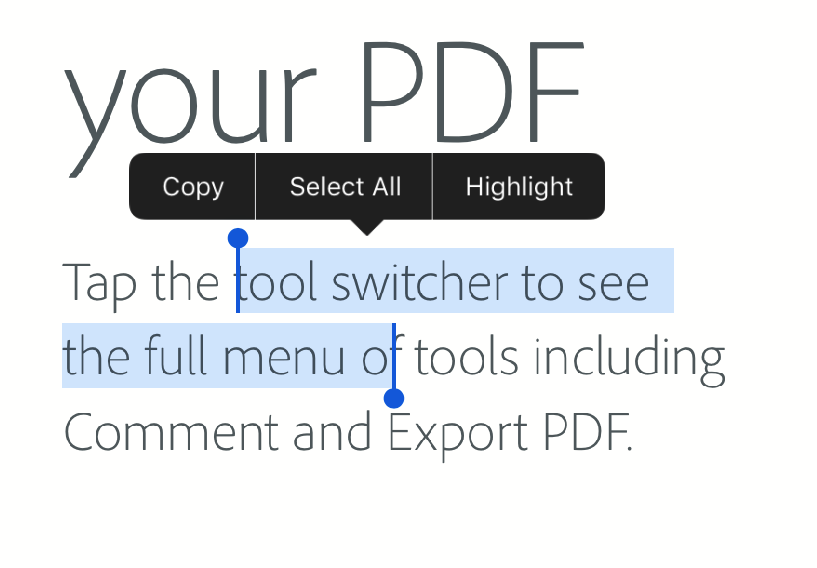
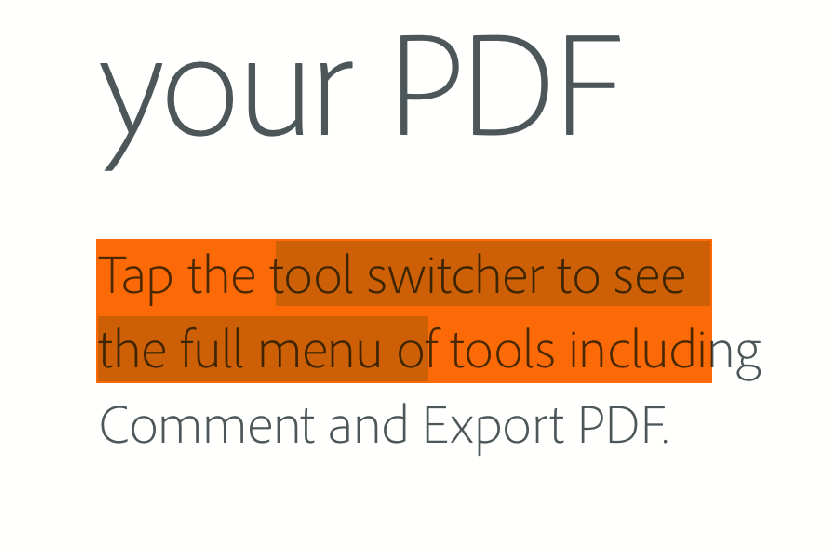
我使用PDFKit on iOS突出显示文本(PDF文件)。为此,我创建了一个PDFAnnotation并将其添加到选定的文本区域。我想准确地突出选定的区域,但它总是覆盖整个线条,如下面的图片。如何仅为所选区域创建注释??
我的代码:
        let highlight = PDFAnnotation(bounds: selectionText.bounds(for: page), forType: PDFAnnotationSubtype.highlight, withProperties: nil)
        highlight.color = highlightColor
        page.addAnnotation(highlight)
回答 2
Stack Overflow用户
回答已采纳
发布于 2017-11-29 22:11:19
PDFSelection bounds(forPage:)方法返回一个矩形以满足整个选择区域。在你的情况下不是最好的解决方案。
尝试使用selectionsByLine(),并为每个rect添加单独的注释,以PDF格式表示每一行选定的行。示例:
    let selections = pdfView.currentSelection?.selectionsByLine()
    // Simple scenario, assuming your pdf is single-page.
    guard let page = selections?.first?.pages.first else { return }

    selections?.forEach({ selection in
        let highlight = PDFAnnotation(bounds: selection.bounds(for: page), forType: .highlight, withProperties: nil)
        highlight.endLineStyle = .square
        highlight.color = UIColor.orange.withAlphaComponent(0.5)

        page.addAnnotation(highlight)
})Stack Overflow用户
发布于 2018-06-27 11:03:03
正如PDFKit Highlight Annotation: quadrilateralPoints中所建议的那样,您可以使用quadrilateralPoints向相同的注释中添加不同的行高光。
func highlight() {
    guard let selection = pdfView.currentSelection, let currentPage = pdfView.currentPage else {return}
    let selectionBounds = selection.bounds(for: currentPage)
    let lineSelections = selection.selectionsByLine()

    let highlightAnnotation = PDFAnnotation(bounds: selectionBounds, forType: PDFAnnotationSubtype.highlight, withProperties: nil)

    highlightAnnotation.quadrilateralPoints = [NSValue]()
    for (index, lineSelection) in lineSelections.enumerated() {
        let n = index * 4
        let bounds = lineSelection.bounds(for: pdfView.currentPage!)
        let convertedBounds = bounds.convert(to: selectionBounds.origin)
        highlightAnnotation.quadrilateralPoints?.insert(NSValue(cgPoint: convertedBounds.topLeft), at: 0 + n)
        highlightAnnotation.quadrilateralPoints?.insert(NSValue(cgPoint: convertedBounds.topRight), at: 1 + n)
        highlightAnnotation.quadrilateralPoints?.insert(NSValue(cgPoint: convertedBounds.bottomLeft), at: 2 + n)
        highlightAnnotation.quadrilateralPoints?.insert(NSValue(cgPoint: convertedBounds.bottomRight), at: 3 + n)
    }

    pdfView.currentPage?.addAnnotation(highlightAnnotation)
}

extension CGRect {

    var topLeft: CGPoint {
        get {
            return CGPoint(x: self.origin.x, y: self.origin.y + self.height)
        }
    }

    var topRight: CGPoint {
        get {
            return CGPoint(x: self.origin.x + self.width, y: self.origin.y + self.height)
        }
    }

    var bottomLeft: CGPoint {
        get {
            return CGPoint(x: self.origin.x, y: self.origin.y)
        }
    }

    func convert(to origin: CGPoint) -> CGRect {
        return CGRect(x: self.origin.x - origin.x, y: self.origin.y - origin.y, width: self.width, height: self.height)
    }
}页面原文内容由Stack Overflow提供。腾讯云小微IT领域专用引擎提供翻译支持
原文链接:
https://stackoverflow.com/questions/47469528
复制相关文章
相似问题
腾讯云开发者

Copyright © 2013 - 2026 Tencent Cloud. All Rights Reserved. 腾讯云 版权所有
深圳市腾讯计算机系统有限公司 ICP备案/许可证号:粤B2-20090059  粤公网安备44030502008569号
腾讯云计算(北京)有限责任公司 京ICP证150476号 | 京ICP备11018762号