
使用vuefire的无效Firebase绑定源
使用vuefire的无效Firebase绑定源
提问于 2017-11-23 21:14:09
我从vue和firebase开始,但是现在当我显示我的数据库中已经有了什么时,我有了这个错误。
main.js
import vueFire from 'vuefire';
import firebase from 'firebase';

Vue.use(vueFire);

let config = {


apiKey: "mykey",
  authDomain: "mydomain",
  databaseURL: "myurl",
  projectId: "my",
  storageBucket: "bucket",
  messagingSenderId: "number"
};

let application = firebase.initializeApp(config)
let db = application.database()
let notificationsdb = db.ref('notifications')

export { notificationsdb };
component.vue
import { notificationsdb } from '../main';
export default {

    name: 'Notifications',

    firebase: {
      notifi: notificationsdb
    },

    data() {
      return{
        newNoti: {
          name: '',
          text: ''
        },

      }
    },

    methods: {
      addNoti: function(){
        notificationsdb.push(this.newNoti);
        this.newNoti.name = '',
        this.newNoti.text = ''
        toastr.success('Notificación creada');
      },
      deleteNoti: function(noti){
        notificationsdb.child(noti['.key']).remove();
        toastr.success('Notificación eliminada');
      }
    }
  }
如果我删除这一行代码并保存它,然后将它放回去,我会保持更改,它会工作。但是如果我按下F5,它就停止工作了
firebase: {
      notifi: notificationsdb
    },
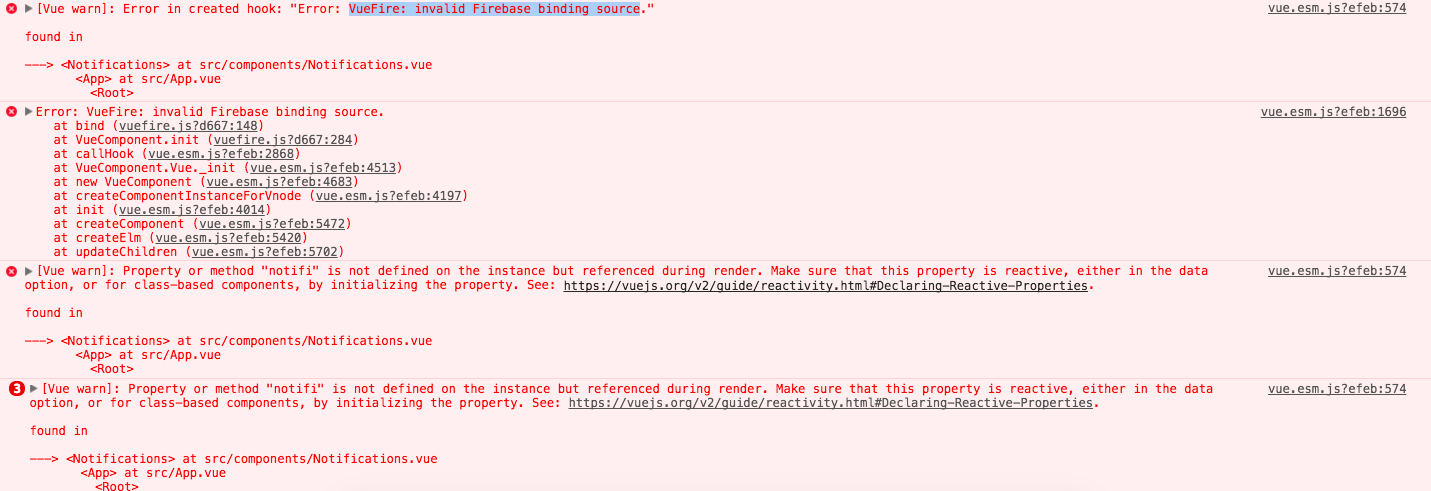
他给我发了以下错误
Vue警告:创建钩子中的错误:“VueFire:无效的Firebase绑定源”。
回答 1
Stack Overflow用户
发布于 2018-04-16 15:42:37
所以,我假设你开始你的项目是这样的:
vue init webpack myProject基本上,您的组件在第一次加载时无法访问来自firebase的数据。您需要一些时间来进行编辑(服务器请求正在完成的时间)。然后,当您按保存时,它会触发HMR,并且您的站点将重新加载它所期望的数据。
尝试进行这些更改(尽管您应该将这个配置内容移动到一个单独的文件中(例如firebaseDB.js )):
// let db = application.database()
// let notificationsdb = db.ref('notifications')
// export { notificationsdb }
export default application.database()然后在component.vue
[...]
import db from '../firebaseDB'
[...]
firebase: {
  notifi: db.ref('notifications')
},
[...]您可能希望向这个组件添加一个loading状态变量,依此类推。祝好运!
页面原文内容由Stack Overflow提供。腾讯云小微IT领域专用引擎提供翻译支持
原文链接:
https://stackoverflow.com/questions/47463337
复制相关文章
相似问题
腾讯云开发者

Copyright © 2013 - 2026 Tencent Cloud. All Rights Reserved. 腾讯云 版权所有
深圳市腾讯计算机系统有限公司 ICP备案/许可证号:粤B2-20090059  粤公网安备44030502008569号
腾讯云计算(北京)有限责任公司 京ICP证150476号 | 京ICP备11018762号