
pkgdown守恒码块间距
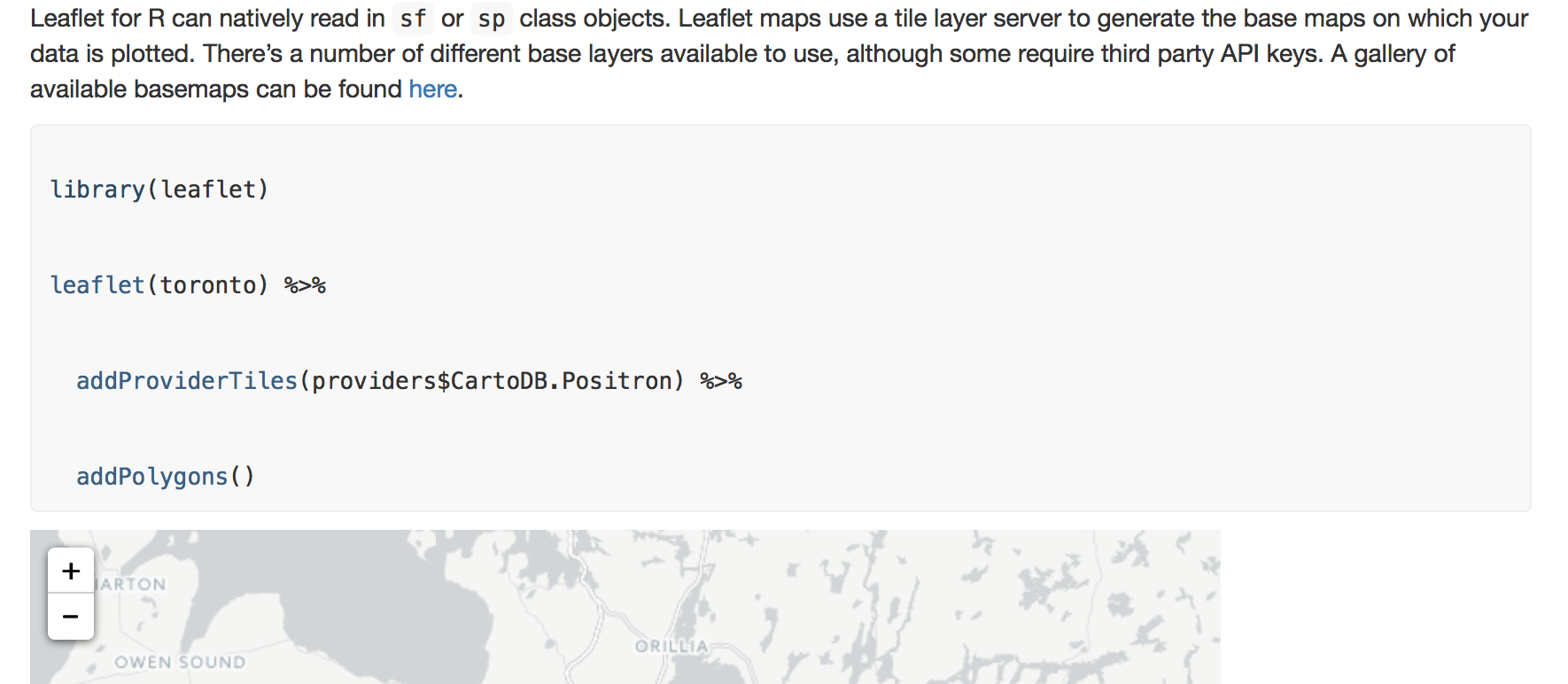
在运行所有默认选项的pkgdown::build_site()时,代码块输出都有问题。块在html内容中呈现,每一行代码之间都有多余的空白。例如:
```{r, message = FALSE}图书馆(小册子)
传单(多伦多) %>%
addProviderTiles(providers$CartoDB.Positron) %>%
addPolygons()
以下列形式出现:
library(leaflet)


leaflet(toronto) %>%


  addProviderTiles(providers$CartoDB.Positron) %>%


  addPolygons()
或者,截图形式:
在blogdown生成的html内容中,我没有遇到这个问题,尽管我知道这是一个独立的包,README.md文件也呈现得很好。
我还没有在pkgdown代码块中找到任何关于间距的信息,我想知道从哪里开始对此进行故障排除。
vignette的YAML部分使用默认条目:
---
title: "Vignette Title"
author: "Autho"
date: "11/22/2017"
output: rmarkdown::html_vignette
vignette: >
  %\VignetteIndexEntry{Vignette Title}
  %\VignetteEngine{knitr::rmarkdown}
  %\VignetteEncoding{UTF-8}
---
设置块也是标准的。
```{r setup, include = FALSE}knitr::opts_chunk$set(
崩塌=真实,
注释= "#>“
)
会议详情:
R version 3.4.1 (2017-06-30)
Platform: x86_64-apple-darwin15.6.0 (64-bit)
Running under: OS X El Capitan 10.11.6

Matrix products: default
BLAS: /System/Library/Frameworks/Accelerate.framework/Versions/A/Frameworks/vecLib.framework/Versions/A/libBLAS.dylib
LAPACK: /Library/Frameworks/R.framework/Versions/3.4/Resources/lib/libRlapack.dylib

locale:
[1] en_CA.UTF-8/en_CA.UTF-8/en_CA.UTF-8/C/en_CA.UTF-8/en_CA.UTF-8

attached base packages:
[1] stats     graphics  grDevices utils     datasets  methods   base

other attached packages:
[1] leaflet_1.1.0      ggplot2_2.2.1.9000 cancensus_0.1.5    bindrcpp_0.2
[5] sf_0.5-5           dplyr_0.7.4        rgdal_1.2-15       sp_1.2-5

loaded via a namespace (and not attached):
 [1] Rcpp_0.12.13       lattice_0.20-35    class_7.3-14       assertthat_0.2.0
 [5] rprojroot_1.2      digest_0.6.12      mime_0.5           R6_2.2.2
 [9] plyr_1.8.4         backports_1.1.0    evaluate_0.10.1    e1071_1.6-8
[13] httr_1.3.1         rlang_0.1.4        rematch_1.0.1      lazyeval_0.2.1
[17] curl_2.8.1         rstudioapi_0.7     whisker_0.3-2      callr_1.0.0
[21] rmarkdown_1.7      pkgdown_0.1.0.9000 desc_1.1.1         labeling_0.3
[25] devtools_1.13.4    readr_1.1.1        udunits2_0.13      stringr_1.2.0
[29] htmlwidgets_0.9    munsell_0.4.3      shiny_1.0.3        compiler_3.4.1
[33] httpuv_1.3.5       pkgconfig_2.0.1    htmltools_0.3.6    highlight_0.4.7.2
[37] tibble_1.3.4       roxygen2_6.0.1     viridisLite_0.2.0  crayon_1.3.4
[41] withr_2.1.0.9000   MASS_7.3-47        commonmark_1.4     grid_3.4.1
[45] jsonlite_1.5       xtable_1.8-2       gtable_0.2.0       DBI_0.7
[49] magrittr_1.5       units_0.4-6        scales_0.5.0.9000  stringi_1.1.5
[53] xml2_1.1.1         RColorBrewer_1.1-2 tools_3.4.1        glue_1.2.0
[57] purrr_0.2.4        hms_0.3            crosstalk_1.0.0    pkgload_0.0.0.9000
[61] yaml_2.1.14        colorspace_1.3-2   classInt_0.1-24    memoise_1.1.0
[65] knitr_1.17 bindr_0.1 回答 2
Stack Overflow用户
发布于 2017-11-26 15:53:21
Stack Overflow用户
发布于 2017-11-26 16:25:06
问题是为html code元素指定的样式下的行高,该元素表示html页面上的计算机代码片段。
根据pkgdown::build_site的文档,
如果你想对你的pkgdown站点做一些小的定制,最简单的方法是添加pkgdown/ex.css和pkgdown/exex.js。它们将自动复制到docs/并插入到默认的pkgdown CSS和JSS之后。
因此,添加一个名为“extra.css”的文件,其中包含下面的代码,就可以做到这一点:
/*-- Extra CSS for code chunks --*/

pre, code {
  background-color: #f8f8f8;
  color: #333;
  line-height: 1.0; /*-- Change line-height as required --*/
}
下面的代码片段说明了改变行高的效果。
/*Using two class selectors to illustrate the example*/

pre,
code.wide {
  background-color: #f8f8f8;
  color: #333;
  line-height: 2.0;
}

pre,
code.narrow {
  background-color: #f8f8f8;
  color: #333;
  line-height: 1.0;
}<pre>
<code class="wide">
1st line of code
2nd line of code
3rd line of code
</code>
</pre>
<pre>
<code class="narrow">
1st line of code
2nd line of code
3rd line of code
</code>
</pre>
https://stackoverflow.com/questions/47449001
复制相似问题
腾讯云开发者

Copyright © 2013 - 2026 Tencent Cloud. All Rights Reserved. 腾讯云 版权所有
深圳市腾讯计算机系统有限公司 ICP备案/许可证号:粤B2-20090059  粤公网安备44030502008569号
腾讯云计算(北京)有限责任公司 京ICP证150476号 | 京ICP备11018762号