
不能单击MenuBar
不能单击MenuBar
提问于 2017-11-20 13:50:08
我正在学习PyQt5,目前正在用Exit函数和Open函数制作一个MenuBar。我目前有MenuBar显示的快捷方式,但我不能点击MenuBar时,我悬停在它上面。以下是我的当前代码:
import sys
from PyQt5.QtWidgets import QMainWindow, QAction, qApp, QApplication, QPushButton, QDesktopWidget, QLabel, QFileDialog
from PyQt5.QtGui import QIcon
from PyQt5.QtCore import QCoreApplication
from win32api import GetSystemMetrics

CURRENT_VERSION = 0.1

class Example(QMainWindow):

    def __init__(self):
        super().__init__()

        self.initUI()

    def initUI(self):
        self.setWindowTitle('test')

        window_width = GetSystemMetrics(0)
        window_height = GetSystemMetrics(1)

        self.resize(0.6 * window_width, 0.6 * window_height)
        self.center()

        self.setWindowIcon(QIcon('Icon.png'))

        #Exit on menubar
        exitAct = QAction('&Exit', self)
        exitAct.setShortcut('Ctrl+Q')
        exitAct.setStatusTip('Exit applicatiion')
        exitAct.triggered.connect(qApp.quit)

        #Open on menubar
        openAct = QAction('&Open', self)
        openAct.setShortcut('Ctrl+O')
        openAct.setStatusTip('Open Directory')
        openAct.triggered.connect(self.openFile)

        menubar = self.menuBar()
        fileMenu = menubar.addMenu('&File')
        fileMenu.addAction(exitAct)
        fileMenu.addAction(openAct)

        btn = QPushButton("Test", self)
        btn.resize(btn.sizeHint())
        btn.move(50, 50)

        btn.clicked.connect(self.buttonpress)

        self.label = QLabel(self)
        self.image = QLabel(self)
        self.openDirectoryDialog = ""

        self.show()

    def center(self):
        qr = self.frameGeometry()
        cp = QDesktopWidget().availableGeometry().center()
        qr.moveCenter(cp)
        self.move(qr.topLeft())

    def openFile(self):
        self.openDirectoryDialog=ddir = QFileDialog.getExistingDirectory(self, "Get Dir Path")

    def buttonpress(self):
        label = QLabel(self)
        self.label.move(100,150)
        self.label.setFixedWidth(500)
        self.label.setFixedHeight(100)
        self.label.setText(self.openDirectoryDialog)


if __name__ == '__main__':

    app = QApplication(sys.argv)

    w = Example()

sys.exit(app.exec_())在我添加打开文件的能力并且只有exit菜单项之前,它是工作的,但是我甚至不能让它再次工作。
回答 1
Stack Overflow用户
回答已采纳
发布于 2017-11-20 14:50:02
造成此问题的原因是QLabels位于菜单上方,阻塞了该菜单的单击事件。QMainWindow有一个特殊的结构,如下图所示:
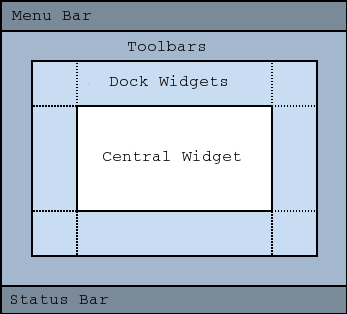
如果您想要添加一个小部件,您必须将其添加到Central widget,当您将一个父部件传递给一个小部件时,它将放置在相对于它的位置‘(0,0)。
进行修改后,您将得到以下内容:
class Example(QMainWindow):
    [...]
    def initUI(self):
        [...]

        #Exit on menubar
        exitAct = QAction('&Exit', self)
        exitAct.setShortcut('Ctrl+Q')
        exitAct.setStatusTip('Exit applicatiion')
        exitAct.triggered.connect(qApp.quit)

        #Open on menubar
        openAct = QAction('&Open', self)
        openAct.setShortcut('Ctrl+O')
        openAct.setStatusTip('Open Directory')
        openAct.triggered.connect(self.openFile)

        menubar = self.menuBar()

        fileMenu = menubar.addMenu('&File')
        fileMenu.addAction(exitAct)
        fileMenu.addAction(openAct)

        centralwidget = QWidget(self)
        self.setCentralWidget(centralwidget)
        btn = QPushButton("Test", centralwidget)
        btn.resize(btn.sizeHint())
        btn.move(50, 50)

        btn.clicked.connect(self.buttonpress)

        self.label = QLabel(centralwidget)
        self.image = QLabel(centralwidget)
[...]页面原文内容由Stack Overflow提供。腾讯云小微IT领域专用引擎提供翻译支持
原文链接:
https://stackoverflow.com/questions/47393609
复制相关文章
相似问题
腾讯云开发者

Copyright © 2013 - 2026 Tencent Cloud. All Rights Reserved. 腾讯云 版权所有
深圳市腾讯计算机系统有限公司 ICP备案/许可证号:粤B2-20090059  粤公网安备44030502008569号
腾讯云计算(北京)有限责任公司 京ICP证150476号 | 京ICP备11018762号