
UIAlertAction按钮文本对齐
UIAlertAction按钮文本对齐
提问于 2017-11-18 20:42:37
我想对齐UIAlertAction文本对齐左,并添加图标,如图像所示。我花了很多时间在谷歌上得到解决方案,但没有找到正确的答案。每个正文张贴的警告标题,而不是警报动作标题。
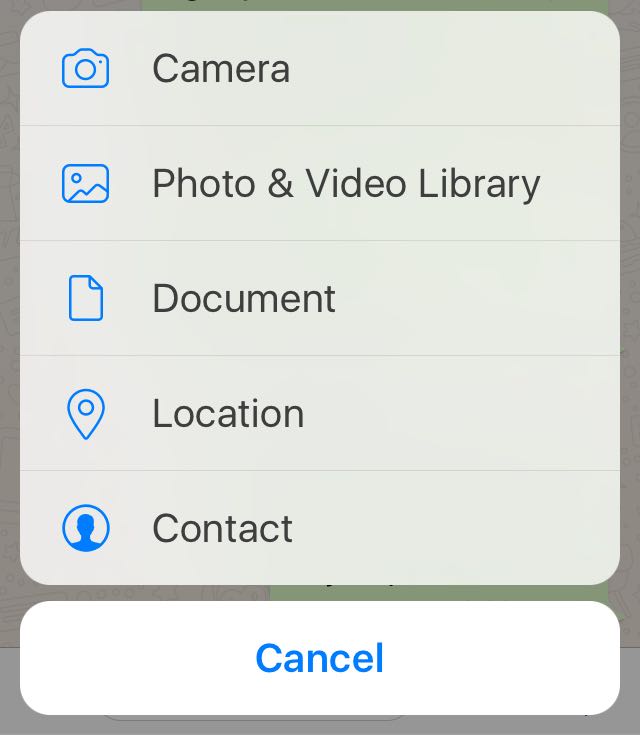
请给我推荐去的正确路线。
谢谢!!
回答 6
Stack Overflow用户
发布于 2018-08-02 16:54:41
您可以使用下面的示例代码来实现这一点。简单又简单。
Swift 4
let actionSheetAlertController: UIAlertController = UIAlertController(title: nil, message: nil, preferredStyle: .actionSheet)

let cancelActionButton = UIAlertAction(title: "Cancel", style: .cancel, handler: nil)
actionSheetAlertController.addAction(cancelActionButton)


let documentsActionButton = UIAlertAction(title: "Documents", style: .default, handler: nil)
actionSheetAlertController.addAction(documentsActionButton)
documentsActionButton.setValue(#imageLiteral(resourceName: "doccument"), forKey: "image")
documentsActionButton.setValue(kCAAlignmentLeft, forKey: "titleTextAlignment")

let cameraActionButton = UIAlertAction(title: "Camera", style: .default, handler: nil)
actionSheetAlertController.addAction(cameraActionButton)
cameraActionButton.setValue(#imageLiteral(resourceName: "camera"), forKey: "image")
cameraActionButton.setValue(kCAAlignmentLeft, forKey: "titleTextAlignment")

let galleryActionButton = UIAlertAction(title: "Gallery", style: .default, handler: nil)
actionSheetAlertController.addAction(galleryActionButton)
galleryActionButton.setValue(#imageLiteral(resourceName: "gallery"), forKey: "image")
galleryActionButton.setValue(kCAAlignmentLeft, forKey: "titleTextAlignment")

actionSheetAlertController.view.tintColor = kTHEME_COLOR
self.present(actionSheetAlertController, animated: true, completion: nil)Stack Overflow用户
发布于 2019-11-19 21:00:18
kCAAlignmentLeft的更新版本为CATextLayerAlignmentMode.left ( @Niraj here回答),因此代码如下所示:
Swift 5.0
documentsActionButton.setValue(CATextLayerAlignmentMode.left, forKey: "titleTextAlignment")Stack Overflow用户
发布于 2018-03-21 10:26:13
您可以使用下面的示例代码来实现这一点。用图像替换图像名称
Swift 3
 let actionSheet = UIAlertController(title: nil, message: nil, preferredStyle: .actionSheet)
 let camera = UIAlertAction(title: "Camera", style: .default) { (action) in
  // Do something
 }
 let cameraImage = UIImage(named: "icon_camera")
 camera.setValue(cameraImage, forKey: "image")
 camera.setValue(0, forKey: "titleTextAlignment")
actionSheet.addAction(camera)页面原文内容由Stack Overflow提供。腾讯云小微IT领域专用引擎提供翻译支持
原文链接:
https://stackoverflow.com/questions/47370823
复制相关文章
相似问题
腾讯云开发者

Copyright © 2013 - 2026 Tencent Cloud. All Rights Reserved. 腾讯云 版权所有
深圳市腾讯计算机系统有限公司 ICP备案/许可证号:粤B2-20090059  粤公网安备44030502008569号
腾讯云计算(北京)有限责任公司 京ICP证150476号 | 京ICP备11018762号