
VisualStudio2017- PreBuild事件命令行(构建另一个项目)
VisualStudio2017- PreBuild事件命令行(构建另一个项目)
提问于 2017-11-15 09:28:32
我有多个项目的解决方案。
当我构建项目' Foo‘时,我需要它在Foo之前构建'SimplePluginFramework’项目。
它还需要在发布模式下构建“SimplePluginFramework”,即使Foo是在调试模式下构建的。
我试着将它添加到Foo的预构建事件命令行中,但是它存在于代码9009中,而且Bar没有构建.
$(MSBuildBinPath)\MSBuild.exe "L:\SL1 - Current System\Core\SL Agent\SLV1\Agent\SimplePluginFramework\SimplePluginFramework.csproj" /t:build /p:Configuration=Release 如何使一个项目的构建在生成之前触发另一个项目的生成?
我尝试过添加对该项目的引用,但它仍然没有构建它。
错误:
    1>Target "PreBuildEvent" in file "C:\Program Files (x86)\Microsoft Visual Studio\2017\Enterprise\MSBuild\15.0\Bin\Microsoft.Common.CurrentVersion.targets" from project "L:\SL1-(SentiLAN)-SentiLAN v1 - Current System\SentilanCore\SentiLAN Agent\SentilanV1\AgentServiceTpl\SentilanService\SentilanService.csproj" (target "CoreBuild" depends on it):
1>Using "Exec" task from assembly "Microsoft.Build.Tasks.Core, Version=15.1.0.0, Culture=neutral, PublicKeyToken=b03f5f7f11d50a3a".
1>Task "Exec"
1>  "C:\Program Files (x86)\Microsoft Visual Studio\2017\Enterprise\MSBuild\15.0\Bin\MSBuild.exe" "L:\SL1 - Current System\Core\SL Agent\SLV1\Agent\SimplePluginFramework\SimplePluginFramework.csproj" /t:build /p:Configuration=release
1>  Microsoft (R) Build Engine version 15.3.409.57025 for .NET Framework
1>  Copyright (C) Microsoft Corporation. All rights reserved.
1>
1>  Build started 15/11/2017 09:47:32.
1>  Project "L:\SL1 - Current System\Core\SL Agent\SLV1\Agent\SimplePluginFramework\SimplePluginFramework.csproj" on node 1 (build target(s)).
1>  GenerateTargetFrameworkMonikerAttribute:
1>  Skipping target "GenerateTargetFrameworkMonikerAttribute" because all output files are up-to-date with respect to the input files.
1>  CoreCompile:
1>  Skipping target "CoreCompile" because all output files are up-to-date with respect to the input files.
1>  _CopyAppConfigFile:
1>  Skipping target "_CopyAppConfigFile" because all output files are up-to-date with respect to the input files.
1>  CopyFilesToOutputDirectory:
1>    SimplePluginFramework -> L:\SL1 - Current System\Core\SL Agent\SLV1\Agent\SimplePluginFramework\lib\net35\SimplePluginFramework.dll
1>  Done Building Project "L:\SL1 - Current System\Core\SL Agent\SLV1\Agent\SimplePluginFramework\SimplePluginFramework.csproj" (build target(s)).
1>
1>  Build succeeded.
1>      0 Warning(s)
1>      0 Error(s)
1>
1>  Time Elapsed 00:00:00.22
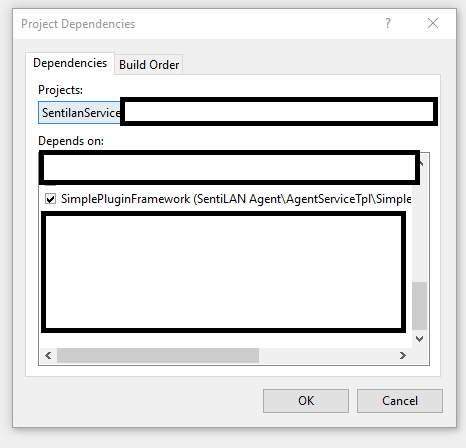
项目依赖:
回答 1
Stack Overflow用户
回答已采纳
发布于 2017-11-15 09:32:54
使用Project \ Project依赖项来定义Foo依赖于SimplePluginFramework。
使用解决方案配置(右键单击解决方案并选择属性)定义在解决方案级别上使用define的调试构建,但使用SimplePluginFramework的版本构建。
页面原文内容由Stack Overflow提供。腾讯云小微IT领域专用引擎提供翻译支持
原文链接:
https://stackoverflow.com/questions/47303666
复制相关文章
相似问题
腾讯云开发者

Copyright © 2013 - 2026 Tencent Cloud. All Rights Reserved. 腾讯云 版权所有
深圳市腾讯计算机系统有限公司 ICP备案/许可证号:粤B2-20090059  粤公网安备44030502008569号
腾讯云计算(北京)有限责任公司 京ICP证150476号 | 京ICP备11018762号