
VSCode HttpServer不是API的访问限制错误
VSCode HttpServer不是API的访问限制错误
提问于 2017-11-12 04:49:10
在带有Redhat语言支持的VSCode v1.18.0中,我在编辑器中获得错误通知,原因是使用了如下所示的com.sun.net.httpserver.*类
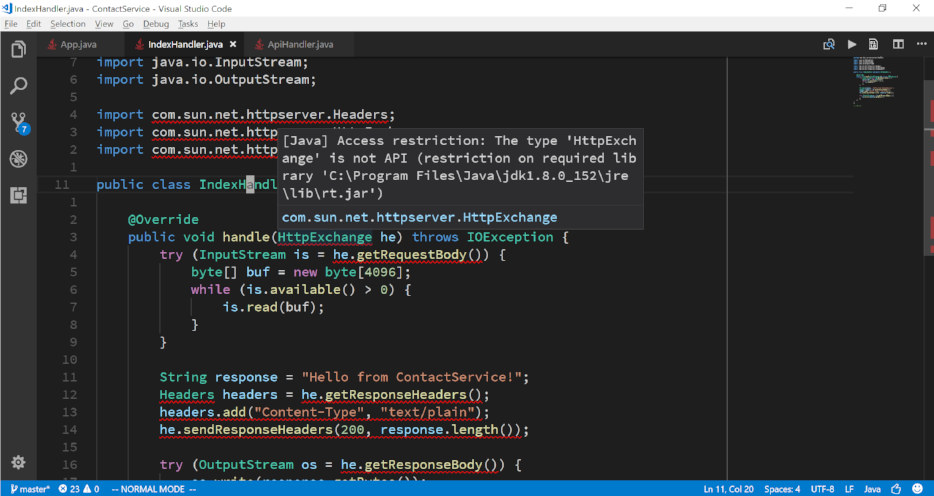
当我调整扩展名创建的.classpath文件时,所有的红色squigglies都消失了
...
<classpathentry kind="con" path="org.eclipse.jdt.launching.JRE_CONTAINER/org.eclipse.jdt.internal.debug.ui.launcher.StandardVMType/JavaSE-1.8/">
  <accessrules>
    <accessrule kind="accessible" pattern="com/sun/net/**"/>
  </accessrules>
</classpathentry>
...问题是,每当重新启动.classpath时,VSCode文件似乎就会被覆盖。
更新:、jdeps和jdeprscan都不抱怨编译后的jar
$ jdeps --version
9.0.1

$ jdeprscan --version
9.0.1

$ jdeps --jdk-internals ContactService-0.5.0.jar

$ jdeprscan ContactService-0.5.0.jar
Jar file ContactService-0.5.0.jar:有没有一种方法(例如,对扩展的java.jdt.ls.vmargs设置使用神奇的arg )?才能使这些编辑器错误通知永久消失?
回答 1
Stack Overflow用户
发布于 2019-11-05 19:11:03
我的VS代码不重置.classpath文件。可能是你的版本?
我在用:
Version: 1.39.2 (user setup)
Commit: 6ab598523be7a800d7f3eb4d92d7ab9a66069390
Date: 2019-10-15T15:35:18.241Z
Electron: 4.2.10
Chrome: 69.0.3497.128
Node.js: 10.11.0
V8: 6.9.427.31-electron.0
OS: Windows_NT x64 10.0.16299如果您使用的是gradle,您可以按照这里的建议做:https://github.com/redhat-developer/vscode-java/issues/120#issuecomment-450530640
import org.gradle.plugins.ide.eclipse.model.AccessRule

apply plugin: 'java'
apply plugin: 'eclipse'

eclipse {
    classpath {
        file {
            whenMerged {
                def jre = entries.find { it.path.contains 'org.eclipse.jdt.launching.JRE_CONTAINER' }
                jre.accessRules.add(new AccessRule('0', 'javafx/**'))
                jre.accessRules.add(new AccessRule('0', 'com/sun/javafx/**'))
            }
        }
    }
}
只要改变你的需要
页面原文内容由Stack Overflow提供。腾讯云小微IT领域专用引擎提供翻译支持
原文链接:
https://stackoverflow.com/questions/47245552
复制相关文章
相似问题
腾讯云开发者

Copyright © 2013 - 2026 Tencent Cloud. All Rights Reserved. 腾讯云 版权所有
深圳市腾讯计算机系统有限公司 ICP备案/许可证号:粤B2-20090059  粤公网安备44030502008569号
腾讯云计算(北京)有限责任公司 京ICP证150476号 | 京ICP备11018762号