
响应路由,刷新不呈现特定视图,而是重定向到父视图。
这是我们的父视图:http://localhost:8080/#/dashboard/
单击指向菜单导航:http://localhost:8080/#/dashboard/menu-navigation的链接
这将加载正确的menu-navigation视图,但是如果我刷新应用程序回到/dashboard而不是停留在menu-navigation上。
来自主Routes.js
const Routes = () => (
  <Provider store={store}>
    <ConnectedRouter history={history}>
      <Switch>
        <Route path="/login" exact component={Login} />
        <Route path="/redirect" component={FirebaseRedirector} />
        <Route path="/restricted-access" component={RestrictedAccess} />
        <Route path="/change-password/:hash?" component={ChangePassword} />
        <Route path="/reset-password" exact component={ResetPassword} />
        <Route path="/" component={Main} />
        <Route path="*" component={NotFound} />
      </Switch>
    </ConnectedRouter>
  </Provider>
);

export default Routes;注意,一旦您登录到主组件中,就会加载上面的主组件:
render() {
  return (
    <Main
      user={this.props.user}
      signOut={this.signOut}
    >
      <Switch>
        <Route
          path="/dashboard/categories/unmatched-api/:id?"
          component={CategoriesUnmatchedApi}
          notExact
        />
        <Route path="/dashboard/menu-navigation" exact component={MenuNavigation} />
        <Route path="/dashboard/home-screen" exact component={HomeScreen} />
        <Route path="/dashboard/categories/product-config" component={CategoryProductConfig} />
        <Route path="/dashboard/categories/:category?" component={Categories} />
        <Route path="/dashboard/playground" exact component={Playground} />
        <Route path="/dashboard" exact component={Drafts} />
        <Route path="/" exact component={Drafts} />
        <Route path="*" component={NotFound} />
      </Switch>
    </Main>
  );
}
以下是导航到MenuNavigation路由后的状态
然后刷新后的状态
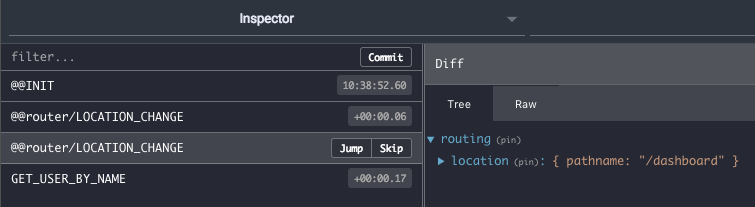
似乎反应路由器不尊重<Route path="/dashboard/menu-navigation"?
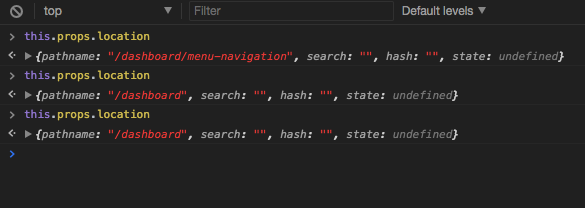
我在刷新后确实注意到,Main.js路由部分被击中3次,第一次this.props.location是正确的,但是接下来的2次只是/dashboard
回答 1
Stack Overflow用户
发布于 2017-11-13 20:55:15
弄明白了!我们每次都要重定向到/dashboard。
在我们的登录操作中,我们有:
onAuthStateChange -> checkAuth,包含以下内容:
dispatch(push(authDasboardView));
删除到authDashboardView的调度后,这个问题就解决了!
https://stackoverflow.com/questions/47227424
复制相似问题
腾讯云开发者

Copyright © 2013 - 2026 Tencent Cloud. All Rights Reserved. 腾讯云 版权所有
深圳市腾讯计算机系统有限公司 ICP备案/许可证号:粤B2-20090059  粤公网安备44030502008569号
腾讯云计算(北京)有限责任公司 京ICP证150476号 | 京ICP备11018762号