
如何将所有选定的复选框附加到span中
如何将所有选定的复选框附加到span中
提问于 2017-11-10 09:00:56
请帮帮忙。
我创建了两个下拉列表,显示带有图标的选中复选框。问题是,这两次跌落并不是独立行动。
如果我在下拉列表2(空间有什么安全性)中更改了一些内容,那么下拉列表1中的所有内容也会被添加进来。
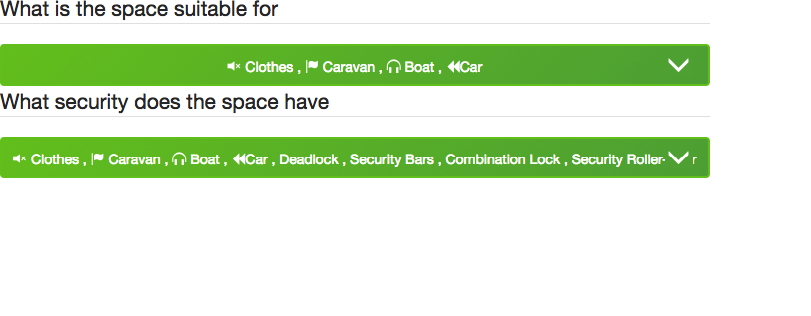
我需要下拉功能来处理多个下拉列表。
注意:我需要在选中的复选框中添加我的图标。在显示所选复选框的下拉-切换div中的ie :)
此外,所选复选框没有立即显示。我需要再次单击它,以显示选中的复选框。
https://jsfiddle.net/gilbertlucas46/szyz4031/4/
function getValueUsingClass(){
    $(".checkbox-list li label").click(function() {
       /* declare an checkbox array */
    var features_checkedBox = []
    /* look for all checkboes that have a class 'chk' attached to it and check if it was checked */
        $(" .checkbox-list li input:checked  + label").each(function() {
            allChecked = $(this).html();
            features_checkedBox.push(allChecked);
            $(this).parents('.dropdown').find('.dropdown-toggle').html('<span class="selections">' + features_checkedBox + '<i class="glyphicon glyphicon-menu-down"> </i> </span>');
        });
    })
}

getValueUsingClass();
$('.dropdown-menu').on('click', function(e) {
      if($(this).hasClass('checkbox-list')) {
          e.stopPropagation();
      }
});.dropdown-select .dropdown-toggle {
background: #71c621;
background: linear-gradient(135deg, #71c621 0%, #5bab41 100%);
filter: progid:DXImageTransform.Microsoft.gradient( startColorstr='#71c621', endColorstr='#5bab41',GradientType=1 );
width: 100%;
height: 42px;
line-height: 42px;
padding: 0;
font-size: 14px !important;
font-weight: normal;
border: 2px solid #71c621;
position: relative;
overflow: hidden;
}
.dropdown-select .dropdown-menu {
display: none;
}
.dropdown-select {
position: relative;
}
.dropdown-select.open .dropdown-menu {
display: block !important;
width: 100%;
top: 50px;
}
label {
cursor: pointer;
display: block;
border-bottom: 1px solid gray;
width: 100%;
}
input {
position: absolute;
}<script src="https://ajax.googleapis.com/ajax/libs/jquery/2.1.1/jquery.min.js"></script>
<script src="https://maxcdn.bootstrapcdn.com/bootstrap/3.3.7/js/bootstrap.min.js"></script>
<link rel="stylesheet" media="screen" href="https://maxcdn.bootstrapcdn.com/bootstrap/3.3.7/css/bootstrap.min.css" />
<div class="row">
<div class="col col-md-6">
<fieldset data-form-field="required-group" class="suitability">
<legend>What is the space suitable for </legend>
<div class="button-group dropdown dropdown-select checkDropdowns">
<a class="btn btn-primary dropdown-toggle" data-toggle="dropdown" href="#">Suitable for? <i class="glyphicon glyphicon-menu-down"> </i></a>
<ul class="checkbox-list dropdown-menu">
<li>
<input type="checkbox" id="transactable-storage-purpose-clothes" value="Clothes" data-required-group="storage_purpose" data-storage-purpose="">
<label for="transactable-storage-purpose-clothes">
<i class="glyphicon glyphicon-volume-off"></i> Clothes
</label>
</li>
<li>
<input type="checkbox" id="transactable-storage-purpose-caravan" value="Caravan" data-required-group="storage_purpose" data-storage-purpose="">
<label for="transactable-storage-purpose-caravan">
<i class="glyphicon glyphicon-flag"></i> Caravan
</label>
</li>
<li>
<input type="checkbox" id="transactable-storage-purpose-boat" value="Boat" data-required-group="storage_purpose" data-storage-purpose="">
<label for="transactable-storage-purpose-boat">
<i class="glyphicon glyphicon-headphones"></i> Boat
</label>
</li>
<li>
<input type="checkbox" id="transactable-storage-purpose-car" value="Car" data-required-group="storage_purpose" data-storage-purpose="">
<label for="transactable-storage-purpose-car">
<i class="glyphicon glyphicon-backward"></i>Car
</label>
</li>
<li>
<input type="checkbox" id="transactable-storage-purpose-furniture" value="Furniture" data-required-group="storage_purpose" data-storage-purpose="">
<label for="transactable-storage-purpose-furniture">
<i class="glyphicon glyphicon-resize-small"></i> Furniture
</label>
</li>
<li>
<input type="checkbox" id="transactable-storage-purpose-docs" value="Office Docs" data-required-group="storage_purpose" data-storage-purpose="">
<label for="transactable-storage-purpose-docs">
<i class="glyphicon glyphicon-plane"></i> Office Docs
</label>
</li>
<li>
<input type="checkbox" id="transactable-storage-purpose-trailer" value="Trailer" data-required-group="storage_purpose" data-storage-purpose="">
<label for="transactable-storage-purpose-trailer">
<i class="glyphicon glyphicon-magnet"></i> Trailer
</label>
</li>
<li>
<input type="checkbox" id="transactable-storage-purpose-workshop" value="Workshop" data-required-group="storage_purpose" data-storage-purpose="">
<label for="transactable-storage-purpose-workshop">
<i class="icon icon-workshop"></i> Workshop
</label>
</li>
<li>
<input type="checkbox" id="transactable-storage-purpose-container" value="Container" data-required-group="storage_purpose" data-storage-purpose="">
<label for="transactable-storage-purpose-container">
<i class="glyphicon glyphicon-leaf
glyphicon "></i> Container
</label>
</li>
</ul>
</div>
</fieldset>
</div>
</div>
<div class="row">
<div class="col col-md-6">
<fieldset class="security">
<legend>What security does the space have <a href="#" data-toggle="popover" data-content="Let prospective renters know what security features your space has. You can select multiple options.">
<i class="fa fa-question-circle"></i></a></legend>
<div class="button-group dropdown dropdown-select checkDropdowns detailsDrop">
<a class="btn btn-primary dropdown-toggle" data-toggle="dropdown" href="#">Select Security Features <i class="glyphicon glyphicon-menu-down"> </i></a>
<ul class="checkbox-list dropdown-menu">
<li data-value="<i class='icon icon-alarm'">
<input type="checkbox" id="transactable-security-alarm" value="4750" data-security="">
<label for="transactable-security-alarm">
<i class="icon icon-alarm"></i> <span class="title">Alarm</span>
</label>
</li>
<li data-value="<i class='icon icon-cctv'">
<input type="checkbox" id="transactable-security-cctv" value="4751" data-security="">
<label for="transactable-security-cctv">
<i class="icon icon-cctv"></i> <span class="title">CCTV</span>
</label>
</li>
<li data-value="<i class='icon icon-deadlock'">
<input type="checkbox" id="transactable-security-deadlock" value="4752" data-security="">
<label for="transactable-security-deadlock">
<i class="icon icon-deadlock"></i> <span class="title">Deadlock</span>
</label>
</li>
<li data-value="<i class='icon icon-security-bars'">
<input type="checkbox" id="transactable-security-security-bars" value="5960" data-security="">
<label for="transactable-security-security-bars">
<i class="icon icon-security-bars"></i> <span class="title">Security Bars</span>
</label>
</li>
<li data-value="<i class='icon icon-lock'">
<input type="checkbox" id="transactable-security-combination-lock" value="4753" data-security="">
<label for="transactable-security-combination-lock">
<i class="icon icon-lock"></i> <span class="title">Combination Lock</span>
</label>
</li>
<li data-value="<i class='icon icon-roller-door'">
<input type="checkbox" id="transactable-security-security-roller-door" value="4754" data-security="">
<label for="transactable-security-security-roller-door">
<i class="icon icon-roller-door"></i> <span class="title">Security Roller-door</span>
</label>
</li>
</ul><!-- checkbox-list dropdown-menu -->
</div>
</fieldset>
</div>
</div>
回答 1
Stack Overflow用户
回答已采纳
发布于 2017-11-10 09:19:41
代码的问题是,$(" .checkbox-list li input:checked + label")并不取决于调用处理程序的下拉列表。此外,由于输入的click-event of the label and thechange`之间的离散性,第一个值无法识别。
我稍微修改了你的代码:
$('.checkbox-list input').on('change', function() {
  var $this = $(this).parents('.checkbox-list');
  var features_checkedBox = [];

  $this.find('input:checked').each(function() {

    allChecked = $(this).next('label').html();
    features_checkedBox.push(allChecked);
    $(this).parents('.dropdown').find('.dropdown-toggle').html('<span class="selections">' + features_checkedBox + '<i class="glyphicon glyphicon-menu-down"> </i> </span>');

  });

});您可能希望优化该示例以满足您的需要。
页面原文内容由Stack Overflow提供。腾讯云小微IT领域专用引擎提供翻译支持
原文链接:
https://stackoverflow.com/questions/47219025
复制相关文章
相似问题
腾讯云开发者

Copyright © 2013 - 2026 Tencent Cloud. All Rights Reserved. 腾讯云 版权所有
深圳市腾讯计算机系统有限公司 ICP备案/许可证号:粤B2-20090059  粤公网安备44030502008569号
腾讯云计算(北京)有限责任公司 京ICP证150476号 | 京ICP备11018762号