
在CRM中从OData查询中获取选项集文本
https://example.com/crm/api/data/v8.2/accounts?$select=custom_optionset上面的查询选择CRM中选项集字段中的所有值。返回数据如下所示:
{
    {
        "@odata.etag":"W/\"112607639\"","custom_optionset":285960000,"accountid":"a08f0bd1-e2c4-e111-8c9a-00155d0aa573"
    },
    {
        "@odata.etag":"W/\"112615384\"","custom_optionset":285960010,"accountid":"a18f0bd1-e2c4-e111-8c9a-00155d0aa573"
    }
}
我不想要选项集的价值。我要相关的文本标签。我怎么弄到这个?
回答 3
Stack Overflow用户
发布于 2017-11-09 12:00:28
若要使用webapi获取选项集文本,请在请求头中使用下面的代码段。
req.setRequestHeader("Prefer", "odata.include-annotations=OData.Community.Display.V1.FormattedValue");这将返回类似于查找FormattedValue的选择列表文本。
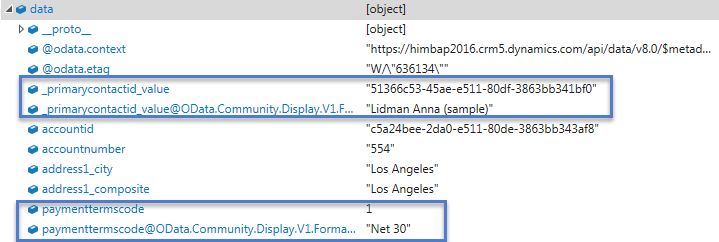
整个代码示例:
function retrieveEntity(entityName, Id, columnSet) {
    var serverURL = Xrm.Page.context.getClientUrl();
    var Query = entityName + "(" + Id + ")" + columnSet;
    var req = new XMLHttpRequest();
    req.open("GET", serverURL + "/api/data/v8.2/" + Query, true);
    req.setRequestHeader("Accept", "application/json");
    req.setRequestHeader("Content-Type", "application/json; charset=utf-8");
    req.setRequestHeader("OData-MaxVersion", "4.0");
    req.setRequestHeader("OData-Version", "4.0");
    req.setRequestHeader("Prefer", "odata.include-annotations=OData.Community.Display.V1.FormattedValue");
    req.onreadystatechange = function() {
        if (this.readyState == 4 /* complete */ ) {
            req.onreadystatechange = null;
            if (this.status == 200) {
                var data = JSON.parse(this.response);
                if (data != null {
                        alert(data["_primarycontactid_value@OData.Community.Display.V1.FormattedValue"]); //for lookup text
                        alert(data["paymenttermscode@OData.Community.Display.V1.FormattedValue"]); //for optionset text
                    }
                } else {
                    var error = JSON.parse(this.response).error;
                    alert(error.message);
                }
            }
        };
        req.send();
}参考文献。
Stack Overflow用户
发布于 2017-11-09 12:02:16
如果使用Jason的CRM RESTBuilder解决方案,它将创建一个类似于此的查询,其中包括标题req.setRequestHeader("Prefer", "odata.include-annotations=\"*\"");:
var req = new XMLHttpRequest();
req.open("GET", Xrm.Page.context.getClientUrl() + "/api/data/v8.2/accounts(674D7FDC-47AE-E711-8108-5065F38A3BA1)?$select=accountid,industrycode", true);
req.setRequestHeader("OData-MaxVersion", "4.0");
req.setRequestHeader("OData-Version", "4.0");
req.setRequestHeader("Accept", "application/json");
req.setRequestHeader("Content-Type", "application/json; charset=utf-8");
req.setRequestHeader("Prefer", "odata.include-annotations=\"*\"");
req.onreadystatechange = function() {
    if (this.readyState === 4) {
        req.onreadystatechange = null;
        if (this.status === 200) {
            var result = JSON.parse(this.response);
            var accountid = result["accountid"];
            var industrycode = result["industrycode"];
            var industrycode_formatted = result["industrycode@OData.Community.Display.V1.FormattedValue"];
        } else {
            Xrm.Utility.alertDialog(this.statusText);
        }
    }
};
req.send();
结果包括选项集标签:
{
@odata.context:"https://myorg.crm.dynamics.com/api/data/v8.2/$metadata#accounts(accountid,industrycode)/$entity",
@odata.etag:"W/"1959756"",
accountid:"674d7fdc-47ae-e711-8108-5065f38a3ba1",
industrycode@OData.Community.Display.V1.FormattedValue:"Accounting",
industrycode:1
}Stack Overflow用户
发布于 2017-11-10 08:09:02
我发现使用XrmQuery在客户关系管理中调用Web是最容易的(完全公开:我为开发这一工具的公司工作)。不需要手动修改标头和XMLHttpRequests,而且您可以获得对您自己的CRM中的实体和字段的完全强类型支持。
例如,检索特定帐户并选择industrycode字段如下所示:
    XrmQuery.retrieve(a => a.accounts, "5B86C6EB-DE6D-E611-80DF-C4346BADF080")
        .select(a => [a.industrycode])
        .includeFormattedValues()
        .execute(a => {
            console.log("Industry is: " + a.industrycode_formatted);
});自动添加.includeFormattedValues()使您可以访问一个简单称为industrycode_formatted的字段。
对于具有下列选项集值的帐户:

以上代码将返回:
行业:广播印刷出版
https://stackoverflow.com/questions/47198130
复制相似问题
腾讯云开发者

Copyright © 2013 - 2026 Tencent Cloud. All Rights Reserved. 腾讯云 版权所有
深圳市腾讯计算机系统有限公司 ICP备案/许可证号:粤B2-20090059  粤公网安备44030502008569号
腾讯云计算(北京)有限责任公司 京ICP证150476号 | 京ICP备11018762号