
该脚本运行良好,但在“google-apps script”中则不然。
function main() {

    var data = [['test1', 'element1', 'price1'], ['', 'element2', 'price2'], ['', 'element3', 'price3'], ['','' ,'' ], ['test2', 'anotherele1', 'anotherprice1'], ['', 'anotherele2', 'anotherprice2'], ['', 'anotherele3', 'anotherprice3'], ['', '', ''], ['test3', 'aaa', 123.0], ['', 'bbb', 345.0], ['', 'ccc', 678.0], ['', '', ''], ['','' , '']]

    var test = parseData(data)
    Logger.log(test)
}


function isBlank(line) {
    return line[0].trim() === '' && line[1].trim() === '';
}


function parseData(data) {

    const output = {};
    let currentGroupName = '';

    data.forEach(line => {
        if (isBlank(line)){
            return;
        }

        if (line[0].trim().length > 0) {
            currentGroupName = line[0].trim();
        }

        output[currentGroupName] = output[currentGroupName] || {};

        output[currentGroupName][line[1]] = line[2];
    });

    return output;
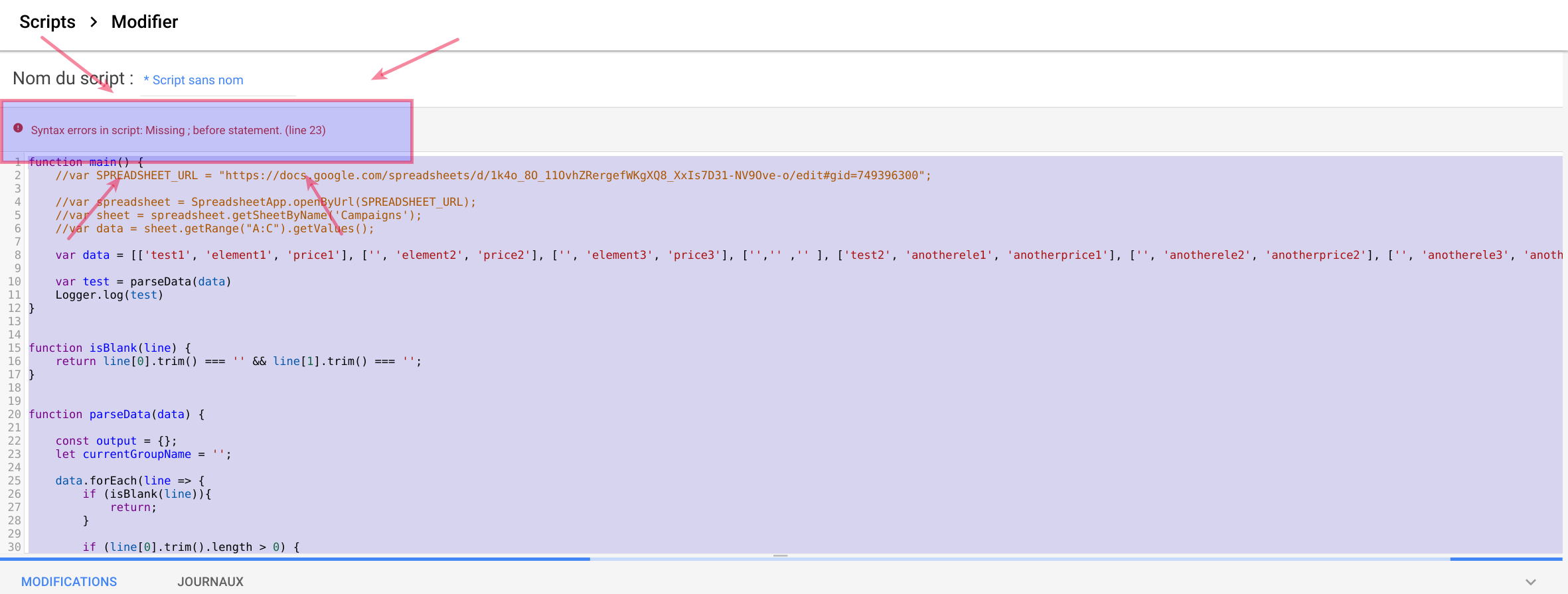
}下面的JS脚本在我的计算机上运行时运行的非常好。但是,如果我试图在Adword上以Preview(某种程度上是Adwords console)的形式运行,就会得到一个synthax错误Syntax errors in script: Missing ; before statement. (line 23)。请注意,第23行只是let currentGroupName = '';。有没有干净的方法来解决这个问题?这段代码可以在你自己的电脑上进行测试,也可以用谷歌应用程序脚本进行测试。
下面是我的问题的一张图片:
回答 2
Stack Overflow用户
发布于 2017-11-08 22:37:17
如果您想在Google脚本中使用此脚本,则不能使用let和箭头操作符。那么下面的修改如何?
修改要点:
- 从
let替换为var。 - 从
data.forEach(line => {替换为data.forEach(function(line){。
修改脚本:
function main() {
    var data = [['test1', 'element1', 'price1'], ['', 'element2', 'price2'], ['', 'element3', 'price3'], ['','' ,'' ], ['test2', 'anotherele1', 'anotherprice1'], ['', 'anotherele2', 'anotherprice2'], ['', 'anotherele3', 'anotherprice3'], ['', '', ''], ['test3', 'aaa', 123.0], ['', 'bbb', 345.0], ['', 'ccc', 678.0], ['', '', ''], ['','' , '']]
    var test = parseData(data)
    Logger.log(test)
}

function isBlank(line) {
    return line[0].trim() === '' && line[1].trim() === '';
}

function parseData(data) {
    const output = {};
    var currentGroupName = '';
    data.forEach(function(line){
        if (isBlank(line)){
            return;
        }
        if (line[0].trim().length > 0) {
            currentGroupName = line[0].trim();
        }
        output[currentGroupName] = output[currentGroupName] || {};
        output[currentGroupName][line[1]] = line[2];
    });
    return output;
}
结果:
{
  "test1": {
    "element1": "price1",
    "element2": "price2",
    "element3": "price3"
  },
  "test2": {
    "anotherele1": "anotherprice1",
    "anotherele2": "anotherprice2",
    "anotherele3": "anotherprice3"
  },
  "test3": {
    "aaa": 123,
    "bbb": 345,
    "ccc": 678
  }
}
参考资料:
如果我误解了你的问题,我很抱歉。
Stack Overflow用户
发布于 2017-11-08 22:48:55
田奈克的解决方案应该能解决你的问题。但请允许我再补充一些背景资料。Google脚本从2009年开始出现,它是Ecmascript 5的一个实现。let语句和箭头操作符只支持Ecmascript 6和更高版本。
有一个功能要求应用程序脚本支持EcmaScript 6的谷歌问题跟踪器。在Apps脚本社区中,我们很多人一直在大声要求Ecmascript 6支持。你可以为这件事出谋划策。
https://stackoverflow.com/questions/47190499
复制相似问题
腾讯云开发者

Copyright © 2013 - 2026 Tencent Cloud. All Rights Reserved. 腾讯云 版权所有
深圳市腾讯计算机系统有限公司 ICP备案/许可证号:粤B2-20090059  粤公网安备44030502008569号
腾讯云计算(北京)有限责任公司 京ICP证150476号 | 京ICP备11018762号