
MigraDoc截面宽度
MigraDoc截面宽度
提问于 2017-11-08 10:23:14
我想要一个在MigraDoc中设置相对列宽度的方法,然后我找到了关于这个主题的this post。问题是,这对我不起作用。我抄袭了那篇文章的确切代码:
Section section = document.AddSection();
section.PageSetup.PageFormat = PageFormat.A4;

int sectionWidth = (int)(section.PageSetup.PageWidth - section.PageSetup.LeftMargin - section.PageSetup.RightMargin);
int columnWidth = sectionWidth / 2;但是,如果我在代码中插入一个断点(就在int columnWidth = ...之后),它将声明节页宽度为零:
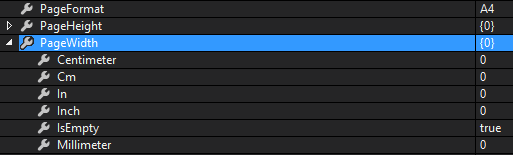
所以很明显,从截面宽度导出的所有东西,也都变成了零。但是为什么呢?如您所见,PageFormat被正确地设置为"A4“。我不明白..。
回答 1
Stack Overflow用户
回答已采纳
发布于 2017-11-08 11:57:19
我设法找到了一个解决办法(有点巧合)。这篇文章描述了section.PageSetup中一个类似的问题。解决方案是在修改默认页面设置之前创建默认页面设置的克隆。新代码如下所示:
Section section = document.AddSection();
section.PageSetup = document.DefaultPageSetup.Clone(); // <-- This has been added
section.PageSetup.PageFormat = PageFormat.A4;

int sectionWidth = (int)(section.PageSetup.PageWidth - section.PageSetup.LeftMargin - section.PageSetup.RightMargin);
int columnWidth = sectionWidth / 2;页面原文内容由Stack Overflow提供。腾讯云小微IT领域专用引擎提供翻译支持
原文链接:
https://stackoverflow.com/questions/47177154
复制相关文章
相似问题
腾讯云开发者

Copyright © 2013 - 2026 Tencent Cloud. All Rights Reserved. 腾讯云 版权所有
深圳市腾讯计算机系统有限公司 ICP备案/许可证号:粤B2-20090059  粤公网安备44030502008569号
腾讯云计算(北京)有限责任公司 京ICP证150476号 | 京ICP备11018762号