
Python路径目录
Python路径目录
提问于 2017-11-06 15:40:50
我目前在学校使用Windows电脑。我的问题是如何在命令行中找到运行Python的确切路径变量。我尝试过多个目录,但它们都一直在显示"'python‘不被识别为内部或外部命令、可操作的程序或批处理文件。“找到这个有简单的方法吗?
回答 1
Stack Overflow用户
回答已采纳
发布于 2017-11-06 15:50:29
如果安装正常的话。您可以使用python,打开命令提示符窗口并导航到您的Python目录(默认为C:\Python27)。从这个位置键入python来启动Python解释器。
Microsoft Windows [Version 6.2.9200]
(c) 2012 Microsoft Corporation. All rights reserved.

C:\Users\Username> cd C:\Python27

C:\Python27> python
Python 2.7.8 (default, Jun 30 2014, 16:03:49) [MSC v.1500 32 bit (Intel)] on win32
Type "help", "copyright", "credits" or "license" for more information.
>>>另一种方法是跟踪安装教程。
您可以从任何位置运行Python,而不必经常引用完整的安装路径名。
这可以通过将Python安装路径添加到Windows的PATH ENVIRONMENT VARIABLE来实现。
*在Windows 7和Windows 8中,只需搜索“环境变量”即可向Edit the system environment variables__提供选项。这将打开System Properties / Advanced选项卡。
*在Windows中,右键单击My Computer->Properties打开System Properties,然后单击Advanced选项卡。
- 在
System Properties / Advanced选项卡上,单击Environment Variables打开User Variables和System Variables - 创建一个新的
System Variable,名为变量名称:PYTHON_HOME和变量值:c:\Python27(或任何安装路径)
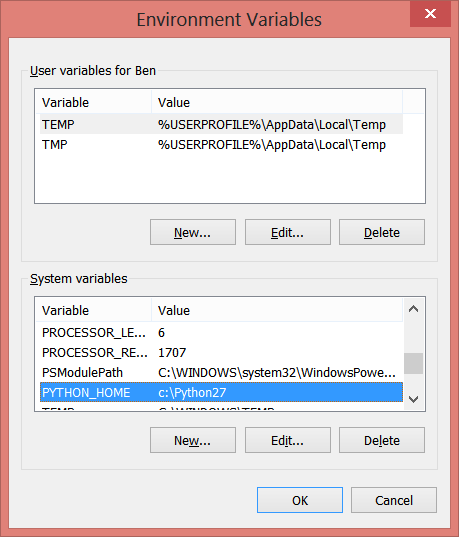
- 找到名为
Path的系统变量,然后单击Edit
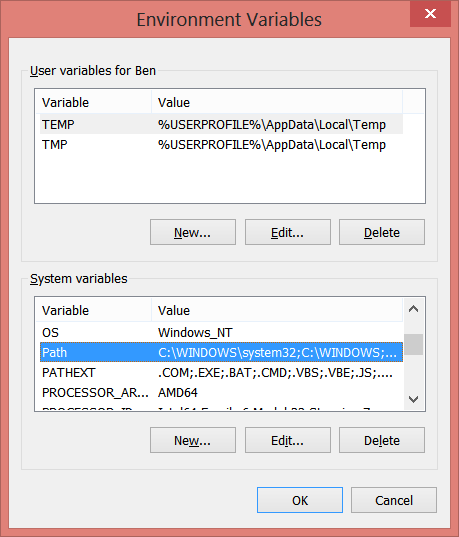
- 将以下文本添加到变量值的末尾:
;%PYTHON_HOME%\;%PYTHON_HOME%\Scripts\
- 通过打开一个新的命令提示符窗口来验证一个成功的环境变量更新(重要!)并从任何位置输入
python。
页面原文内容由Stack Overflow提供。腾讯云小微IT领域专用引擎提供翻译支持
原文链接:
https://stackoverflow.com/questions/47140580
复制相关文章
相似问题
腾讯云开发者

Copyright © 2013 - 2026 Tencent Cloud. All Rights Reserved. 腾讯云 版权所有
深圳市腾讯计算机系统有限公司 ICP备案/许可证号:粤B2-20090059  粤公网安备44030502008569号
腾讯云计算(北京)有限责任公司 京ICP证150476号 | 京ICP备11018762号