
在Kotlin-js上样式化HTML元素
如何在使用Kotlinx-html时对HTML元素进行样式设计,我的应用程序运行得很好,然后我尝试使用AZA-Kotlin添加样式,但是一旦导入了azadev.kotlin,就会出现错误,生成完整的代码如下所示:
Main.kt
import azadev.kotlin.css.Stylesheet
import azadev.kotlin.css.color
import azadev.kotlin.css.dimens.px
import azadev.kotlin.css.opacity
import azadev.kotlin.css.width

import kotlinx.html.*
import kotlinx.html.js.*
import kotlinx.html.dom.create
import kotlin.browser.*
import kotlinx.html.dom.append
import org.w3c.dom.HTMLButtonElement

fun main(args: Array<String>) {
    println("Hello JavaScript!")

    val myDiv = document.create.div("panel") {   // class = "panel"
        p {
            +"Here is "
            a("http://kotlinlang.org") { +"official Kotlin site" }
        }
    }

     val button = BUTTON()
     button!!.innerText = "Click me"
     button!!.onclick = { println("Button clicked!") }

    val btn = document.create.button {
       text("click me")
       onClickFunction = { _ -> window.alert("Kotlin!")   }
       Stylesheet {
           color = 0xffffff
           width = 10.px
           opacity = .8
           hover {
               color = 0xf2cacf
           }
      }
    }


    document.getElementById("container")!!.appendChild(myDiv)
    document.getElementById("container")!!.appendChild(btn)
    document.getElementById("container")!!.appendChild(button)

    document.getElementById("container")!!.append {
        div {
            +"added it"
        }
    }
}

fun BUTTON(): HTMLButtonElement {return document.create.button()}我的gradle.build是:
group 'org.example'
version '1.0-SNAPSHOT'

buildscript {
    ext.kotlin_version = '1.1.51'
    ext.kotlinx_html_version = '0.6.4'
    ext.aza_kotlin_css = '1.0'
    ext.web_dir = 'web'
    repositories {
        mavenCentral()
    }
    dependencies {
        classpath "org.jetbrains.kotlin:kotlin-gradle-plugin:$kotlin_version"
    }
}

apply plugin: 'kotlin2js'

repositories {
    mavenCentral()
    jcenter()
}

dependencies {
    compile "org.jetbrains.kotlin:kotlin-stdlib-js:$kotlin_version"
    compile "org.jetbrains.kotlinx:kotlinx-html-js:$kotlinx_html_version"
    compile "azadev.kotlin:aza-kotlin-css:$aza_kotlin_css"
}

compileKotlin2Js {
    kotlinOptions.outputFile = "${projectDir}/web/scripts/main.js"
    kotlinOptions.moduleKind = "umd"
    kotlinOptions.sourceMap = true
}

clean.doFirst() {
    delete("${web_dir}")
}

build.doLast() {
    // Copy kotlin.js and kotlin-meta.js from jar into web directory
    configurations.compile.each { File file ->
        copy {
            includeEmptyDirs = false

            from zipTree(file.absolutePath)
            into "${projectDir}/${web_dir}/lib"
            include { fileTreeElement ->
                def path = fileTreeElement.path
                path.endsWith(".js") && (path.startsWith("META-INF/resources/") || !path.startsWith("META-INF/"))
            }
        }
    }

    // Copy scripts to web directory
    copy {
        includeEmptyDirs = false
        from new File("build/classes/main")
        into "${web_dir}/lib"
    }

        // Copy resources to web directory
    copy {
        includeEmptyDirs = false
        from new File("src/main/kotlin/resources")
        into "${web_dir}"
    }
}我的index.html是:
<html>
    <head>
        <meta charset="UTF-8">
        <title>Sample Default</title>

    </head>
    <body id="BODY">
    <h1>Kotlin 1.1 Example</h1>
    <div id="container"/>
    <input type="text" name="email" id="email"/>
    <script type="text/javascript" src="lib/kotlin.js"></script>
    <script type="text/javascript" src="lib/kotlinx-html-js.js"></script>
    <script type="text/javascript" src="scripts/main.js"></script>
   </body>
</html>
我的应用程序结构:
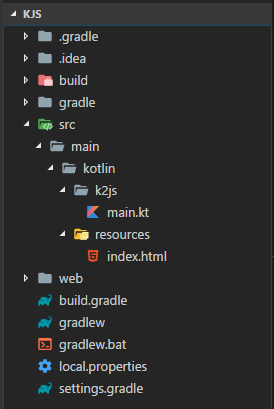
无论使用Aza-kotlin或任何其他方式,我如何对元素进行样式化。
回答 2
Stack Overflow用户
发布于 2018-02-16 20:48:37
到今天为止,aza_kotlin_css和应用程序出现了问题,具体步骤如下所示:)
已安装Homebrew as:/usr/bin/ruby -e "$(curl -fsSL https://raw.githubusercontent.com/Homebrew/install/master/install)"
已安装gradle as:brew install gradle
通过运行brew info gradle找到已安装的路径
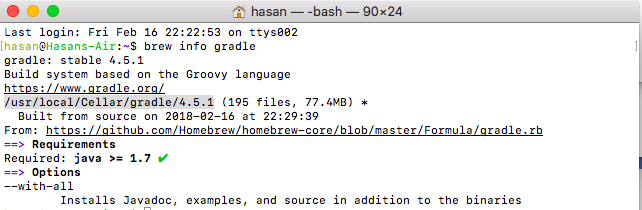
手动将分级添加到“Added /Preferences”

创建投影文件夹,并在cd myapp中移动
以gradle init --type java-library的形式启动新的java gradle项目
删除了src/main和src/test文件夹
创建src/kotlin和src/resources文件夹
将build.gradle文件的内容替换为:
buildscript {
    ext.kotlin_version = '1.2.21'
    ext.web_dir = 'web'
    repositories {
        mavenCentral()
    }
    dependencies {
        classpath "org.jetbrains.kotlin:kotlin-gradle-plugin:$kotlin_version"   // for gradle build
    }
}
apply plugin: 'kotlin2js'

repositories {     jcenter()    }

dependencies {
    def kotlinx_html_version = "0.6.8"
    // for interacting with the DOM
    compile "org.jetbrains.kotlin:kotlin-stdlib-js:$kotlin_version"
    // for DOM creation in the client sie
    compile "org.jetbrains.kotlinx:kotlinx-html-js:${kotlinx_html_version}"
    // for DOM creation in the server sie
    // compile "org.jetbrains.kotlinx:kotlinx-html-jvm:${kotlinx_html_version}"
}

sourceSets.main {
   kotlin.srcDirs += 'src/kotlin'
   resources.srcDirs += 'src/resources'
}

compileKotlin2Js.kotlinOptions {
   outputFile = "${projectDir}/web/scripts/main.js"
   moduleKind = "commonjs"  // can be other options, commonjs is the one that works with Nodejs
   sourceMap = true
}

clean.doFirst() {
    delete("${web_dir}")
}

build.doLast() {
    // Copy kotlin.js and kotlin-meta.js from jar into web directory
    configurations.compile.each { File file ->
        copy {
            includeEmptyDirs = false

            from zipTree(file.absolutePath)
            into "${projectDir}/${web_dir}/lib"
            include { fileTreeElement ->
                def path = fileTreeElement.path
                path.endsWith(".js") && (path.startsWith("META-INF/resources/")
                        || !path.startsWith("META-INF/"))
            }
        }
    }

    // Copy scripts to web directory
    copy {
        includeEmptyDirs = false
        from new File("build/classes/main")
        into "${web_dir}/lib"
    }

    // Copy resources to web directory
    copy {
        includeEmptyDirs = false
        from new File("src/resources")
        into "${web_dir}"
    }
}创建具有以下内容的src/kotlin/Main.Kt文件:
import kotlinx.html.*
import kotlinx.html.js.*
import kotlinx.html.dom.create
import kotlin.browser.*
import kotlinx.html.dom.append
import org.w3c.dom.HTMLButtonElement

fun main(args: Array<String>) {
    println("Hello JavaScript!, do you know that fib(5) = ${fib(5)}")

    val myDiv = document.create.div("panel") {   // class = "panel"
        p {
            +"Here is "
            a("http://kotlinlang.org") { +"official Kotlin site" }
        }
    }

    val email = document.getElementById("email") as HTMLInputElement
    email.value = "hadi@jetbrains.com"

    val button = BUTTON()
    button!!.innerText = "Click me"
    button!!.onclick = { println("Button clicked!") }

    val btn = document.create.button {
        text("click me")
        onClickFunction = { _ -> window.alert("Kotlin!")   }
        style = """
             color: 0xffffff;
             width: 10.px;
             opacity: .8;
             hover {
                color : 0xf2cacf
            }
            """
    }

   /*
    // OR use one of the bew to load the style from the .css file
      val btn = document.create.button(classes = "container left tree") {
          ... }
      //or
         val btn = document.create.button {
            classes = setOf("container", "left", "tree")
            classes += "siteHeader"
          ... }
     */

    document.getElementById("container")!!.appendChild(myDiv)
    document.getElementById("container")!!.appendChild(btn)
    document.getElementById("container")!!.appendChild(button)

    document.getElementById("container")!!.append {
        div {
            +"added it"
        }
    }
}

fun BUTTON(): HTMLButtonElement {return document.create.button()}创建了另一个具有以下内容的文件src/kotlin/Fib.tk,该文件是从Main.kt文件调用的,所有编译的文件都是single JavaScript文件:
fun fib(n: Int):Int {
    return when (n) {
        0,1 -> 1
        else -> fib(n - 1) + fib(n - 2)
    }
}创建具有以下内容的src/resources/index.html文件:
<html>
<head>
    <meta charset="UTF-8">
    <title>Sample Default</title>
    <link rel="stylesheet" href="styles/main.css">
</head>
<body id="BODY">
    <h1>Kotlin 1.1 Example</h1>
    <div id="container"/>
    <input type="text" name="email" id="email"/>
    <script type="text/javascript" src="lib/kotlin.js"></script>
    <script type="text/javascript" src="lib/kotlinx-html-js.js"></script>
    <script type="text/javascript" src="scripts/main.js"></script>
</body>
</html>创建具有以下内容的src/resources/styles/main.css文件:
#panel {background-color: powderblue;}
h1   {color: blue;}
p {color: red;}使用gradle build构建了该项目,并运行良好。
应用程序结构如下:
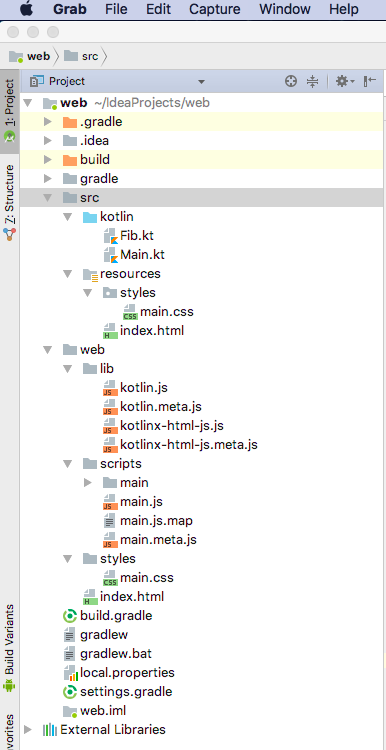
这个应用程序和我一起运行的是:

对于服务器端的工作,我有一个关于创建服务器端的here、here和here的问题,希望您发现它是有用的,也是对它的补充。
Stack Overflow用户
发布于 2017-11-04 17:38:17
我在kotlinx-html内部找到了解决方案,方法是将style使用为:
val btn = document.create.button {
   text("click me")
   onClickFunction = { _ -> window.alert("Kotlin!")   }
    style = """
             color: 0xffffff;
             width: 10.px;
             opacity: .8;
             hover {
                color : 0xf2cacf
            }
            """
}另一个已知选项是使用css文件,并为元素附加所需的类,如下所示:
val btn = document.create.button(classes = "container left tree") { ... }
//or
val btn = document.create.button {
    classes = setOf("container", "left", "tree")
    classes += "siteHeader"  //
... }https://stackoverflow.com/questions/47110276
复制相似问题
腾讯云开发者

Copyright © 2013 - 2026 Tencent Cloud. All Rights Reserved. 腾讯云 版权所有
深圳市腾讯计算机系统有限公司 ICP备案/许可证号:粤B2-20090059  粤公网安备44030502008569号
腾讯云计算(北京)有限责任公司 京ICP证150476号 | 京ICP备11018762号