
“`rightBarButtonItem`”不垂直对齐
“`rightBarButtonItem`”不垂直对齐
提问于 2017-11-01 16:34:36
我的UIViewController中的问题是,rightBarButtonItem不垂直对齐。我想把按钮向下移动10个像素。
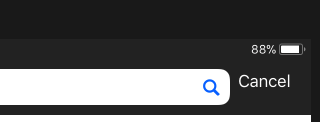
let cancelButton = UIBarButtonItem(title: "Cancel", style: .plain, target: self, action: #selector(didPressCancelButton))
navigationItem.setRightBarButton(cancelButton, animated: true)
navigationItem.rightBarButtonItem?.setBackgroundVerticalPositionAdjustment(12, for: .default) navigationItem.rightBarButtonItem?.setTitlePositionAdjustment(UIOffset(horizontal: 0, vertical: 12), for: .default)我还尝试在viewDidLayoutSubviews()中移动代码,但没有做什么。
当前配置:iOS 11
回答 1
Stack Overflow用户
回答已采纳
发布于 2017-11-01 17:20:40
您可以使用自定义视图创建UIBarButtonItem。这个自定义视图将是一个UIView,实际的UIButton (作为子视图)从顶部放置x像素(要向下移动的像素的x=the数)。
下面是如何这样做的一个例子:
var button = UIButton(type: .custom)
button.setTitle("Settings", for: .normal)
button.titleLabel?.font = UIFont.systemFont(ofSize: 14.0)
button.setTitleColor(UIColor(red: 179.0 / 255.0, green: 40.0 / 255.0, blue: 18.0 / 255.0, alpha: 1), for: .normal)
button.frame = CGRect(x: 0, y: 0, width: 50, height: 20)
button.addTarget(self, action: #selector(self.yourCustomSelectorHere), for: .touchUpInside)

var backButtonView = UIView(frame: CGRect(x: 0, y: 0, width: 63, height: 33))
    backButtonView.bounds = backButtonView.bounds.offsetBy(dx: -14, dy: -7)
    backButtonView.addSubview(button)
    var barBtnItem = UIBarButtonItem(customView: backButtonView)
    navigationItem?.rightBarButtonItem = barBtnItem
您只需要稍微配置代码,使其在视图中处于正确的位置。
页面原文内容由Stack Overflow提供。腾讯云小微IT领域专用引擎提供翻译支持
原文链接:
https://stackoverflow.com/questions/47059533
复制相关文章
相似问题
腾讯云开发者

Copyright © 2013 - 2026 Tencent Cloud. All Rights Reserved. 腾讯云 版权所有
深圳市腾讯计算机系统有限公司 ICP备案/许可证号:粤B2-20090059  粤公网安备44030502008569号
腾讯云计算(北京)有限责任公司 京ICP证150476号 | 京ICP备11018762号