
只有两个意图工作‘主’和‘文本’。
我正在尝试用actions-on-google / google-assistant-sdk构建我的第一个应用程序,我想开始使用三个意图,主要是响应输入文本,以及用户可以随时调用的HELP:
action.json是:
{
  "actions": [
    {
      "description": "Default Welcome Intent",
      "name": "MAIN",
      "fulfillment": {
        "conversationName": "conversation_1"
      },
      "intent": {
        "name": "actions.intent.MAIN"
      }
    },

    {
      "description": "Help Intent",
      "name": "Help",
      "fulfillment": {
        "conversationName": "conversation_1"
      },
      "intent": {
        "name": "app.StandardIntents.HELP",
        "trigger": {
           "queryPatterns": [
            "Help",
            "HELP",
            "help"
        ]
      }
    }
    }

  ],
  "conversations": {
    "conversation_1": {
      "name": "conversation_1",
      "url": "https://us-central1-sillytest-16570.cloudfunctions.net/sayNumber",
      "fulfillmentApiVersion": 2
    }
  }
}
The index.js
'use strict';

process.env.DEBUG = 'actions-on-google:*';

const ActionsSdkApp = require('actions-on-google').ActionsSdkApp;
const functions = require('firebase-functions');

const NO_INPUTS = [
  'I didn\'t hear that.',
  'If you\'re still there, say that again.',
  'We can stop here. See you soon.'
];

exports.sayNumber = functions.https.onRequest((request, response) => {
  const app = new ActionsSdkApp({request, response});

  function mainIntent (app) {
    console.log('mainIntent');
    let inputPrompt = app.buildInputPrompt(true, '<speak>Hi! <break time="1"/> ' +
      'I can read out an ordinal like ' +
      '<say-as interpret-as="ordinal">123</say-as>. Say a number.</speak>', NO_INPUTS);
    app.ask(inputPrompt);
  }

  function rawInput (app) {
    console.log('rawInput');
    if (app.getRawInput() === 'bye') {
      app.tell('Goodbye!');
    } else {
      let inputPrompt = app.buildInputPrompt(true, '<speak>You said, <say-as interpret-as="ordinal">' +
        app.getRawInput() + '</say-as></speak>', NO_INPUTS);
      app.ask(inputPrompt);
    }
  }

  function helpHandler (app) {
    console.log('rawInput');
    app.ask('<speak>What kind of help do you need?</speak>');
  }

  let actionMap = new Map();
  actionMap.set(app.StandardIntents.MAIN, mainIntent);
  actionMap.set(app.StandardIntents.TEXT, rawInput);
  actionMap.set(app.StandardIntents.HELP, helpHandler);

  app.handleRequest(actionMap);
});我把firebase推到:
firebase deploy --only functions并推动谷歌的行动如下:
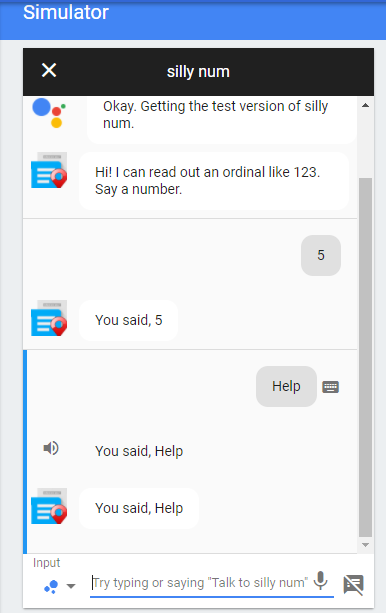
gactions update --action_package action.json --project <YOUR_PROJECT_ID>在测试助手这里时,它以一种很好的方式启动,重复我输入的号码,等待另一个号码,等等,但是当我输入help时,它就终止了,没有响应!
更新
我试过以下几种方法,但没有起作用:
actionMap.set("app.StandardIntents.HELP", helpHandler);我希望这个应用程序“你需要什么样的帮助?”当我输入/说“帮助”,但所发生的只是重写它,就像它对任何其他数字一样。
回答 2
Stack Overflow用户
发布于 2017-10-23 12:10:04
Stack Overflow用户
发布于 2017-10-21 23:39:49
您的actionMap正在寻找app.StandardIntents.HELP,但它并不存在。您可以在标准意图回购中查看所有的GitHub。
app.StandardIntents.MAIN返回另一个字符串,该字符串对应于“actions.intent.MAIN”。它不会读取action.json并生成新意图。因此,app.StandardIntents.HELP实际上返回undefined,并且从未被调用。
您的映射应该使用字符串作为帮助意图,因为它在app对象中不能作为常量使用。
actionMap.set("app.StandardIntents.HELP", helpHandler);
这应该能解决你的问题。如果没有的话请告诉我。
https://stackoverflow.com/questions/46856948
复制相似问题
腾讯云开发者

Copyright © 2013 - 2026 Tencent Cloud. All Rights Reserved. 腾讯云 版权所有
深圳市腾讯计算机系统有限公司 ICP备案/许可证号:粤B2-20090059  粤公网安备44030502008569号
腾讯云计算(北京)有限责任公司 京ICP证150476号 | 京ICP备11018762号