
Mkmap iOS11集群不分裂后,最大缩放,如何设置它?
首先,我的代码正在完美地运行。我已经很好地设置和mapView.register了我的注释标记和集群。
当我按照集群视图中的预期缩小注释融合时,当我放大时,除了在某个点之外,效果也是一样的。当太多的注释彼此太近时,集群视图不再被分割成我的两个注释视图。
因此,我寻找一种方法,能够设置这个“缩放级别”,这将使我的两个注解出现,即使彼此之间真的很近。
下面是我在地图上放大的集群视图:
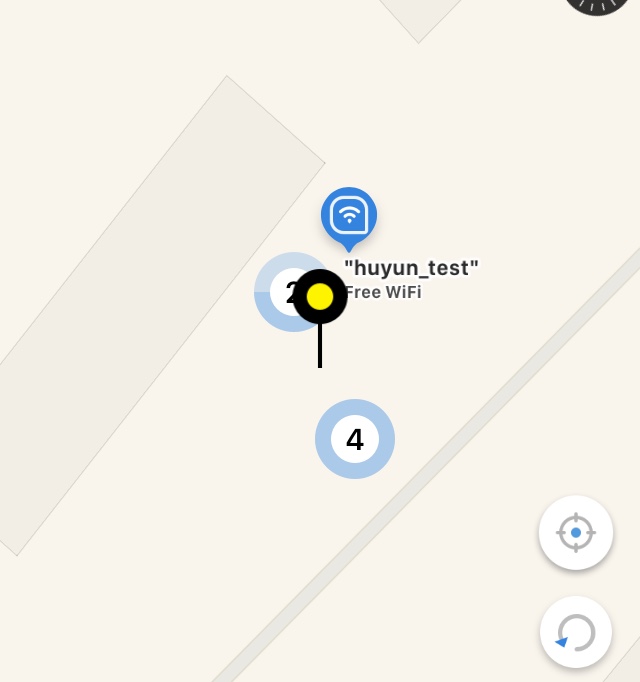
在这里,如果我放大到最大值:嗯,其中一个集群视图分裂成两个,但没有显示4个注释。
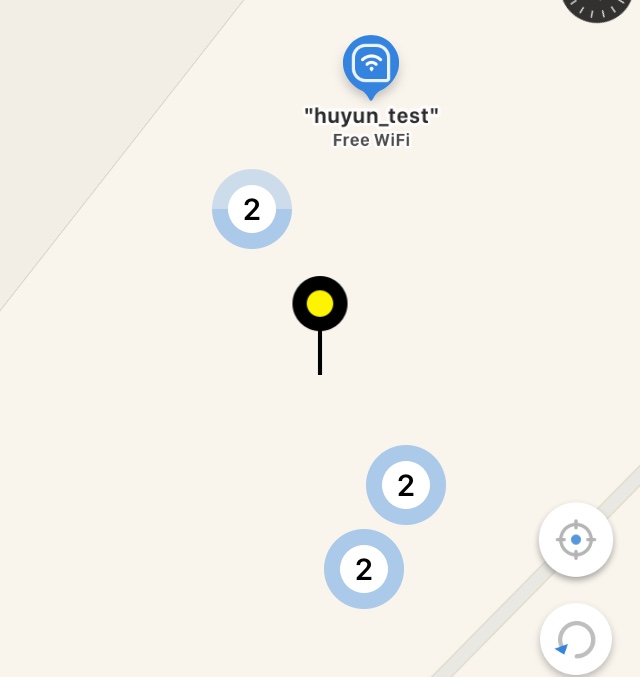
我还尝试为我的两个注释设置更高的displayPriority,而不是集群视图,但结果仍然相同。有什么想法吗?
回答 2
Stack Overflow用户
发布于 2018-03-06 02:15:19
您需要跟踪地图的缩放级别,并在跨越指定的缩放级别时重新加载注释。
private let maxZoomLevel = 9
private var previousZoomLevel: Int?
private var currentZoomLevel: Int?  {
    willSet {
        self.previousZoomLevel = self.currentZoomLevel
    }
    didSet {
        // if we have crossed the max zoom level, request a refresh
        // so that all annotations are redrawn with clustering enabled/disabled
        guard let currentZoomLevel = self.currentZoomLevel else { return }
        guard let previousZoomLevel = self.previousZoomLevel else { return }
        var refreshRequired = false
        if currentZoomLevel > self.maxZoomLevel && previousZoomLevel <= self.maxZoomLevel {
            refreshRequired = true
        }
        if currentZoomLevel <= self.maxZoomLevel && previousZoomLevel > self.maxZoomLevel {
            refreshRequired = true
        }
        if refreshRequired {
            // remove the annotations and re-add them, eg
            let annotations = self.mapView.annotations
            self.mapView.removeAnnotations(annotations)
            self.mapView.addAnnotations(annotations)
        }
    }
}

private var shouldCluster: Bool {
    if let zoomLevel = self.currentZoomLevel, zoomLevel <= maxZoomLevel {
        return false
    }
    return true
}

func mapView(_ mapView: MKMapView, regionDidChangeAnimated animated: Bool) {
    // https://stackoverflow.com/a/40616239/883413
    let zoomWidth = mapView.visibleMapRect.size.width
    let zoomLevel = Int(log2(zoomWidth))
    self.currentZoomLevel = zoomLevel
}

func mapView(_ mapView: MKMapView, viewFor annotation: MKAnnotation) -> MKAnnotationView? {
    // for me, annotation reuse doesn't work with clustering
    let annotationView = CustomAnnotationView(annotation: annotation)
    if self.shouldCluster {
        annotationView.clusteringIdentifier = "custom-id"
    } else {
        annotationView.clusteringIdentifier = nil
    }
    return annotationView
}Stack Overflow用户
发布于 2018-04-27 07:00:56
就我而言,!每次!我没有更新clusteringIdentifier
在"func mapView(_ mapView: MKMapView,viewFor注释: MKAnnotation)“中
当mapView.dequeueReusableAnnotationView(withIdentifier:“标识符”用于:注释)重用MKAnnotationView时,clusteringIdentifier将是nil。(重置)
这就是为什么星系团不能工作的原因。
AnnotationView.swift
import MapKit

// MARK: - Define
struct AnnotationViewInfo {
    static let identifier = "AnnotationView"
}


final class AnnotationView: MKAnnotationView {

// MARK: - Initializer
override init(annotation: MKAnnotation!, reuseIdentifier: String!) {
    super.init(annotation: annotation, reuseIdentifier: reuseIdentifier)
    setView()
}

required init?(coder aDecoder: NSCoder) {
    super.init(coder: aDecoder)
    setView()
}

// MARK: - Value
// MARK: Public
override var annotation: MKAnnotation? {
    willSet { update(annotation: newValue) }
}


// MARK: - Function
// MARK: Private
private func setView() {
    if #available(iOS 11.0, *) {
        collisionMode        = .rectangle
        clusteringIdentifier = AnnotationViewInfo.identifier
    }

    canShowCallout = true
    image = #imageLiteral(resourceName: "pin01").resizedImage(size: CGSize(width: #imageLiteral(resourceName: "pin01").size.width/4.0, height: #imageLiteral(resourceName: "pin01").size.height/4.0), scale: 1.0)
}


private func update(annotation: MKAnnotation?) {
    if #available(iOS 11.0, *) {
        clusteringIdentifier = AnnotationViewInfo.identifier
    }

    // TODO: Update the annotationView

  }
}
MKMapViewDelegate
func mapView(_ mapView: MKMapView, viewFor annotation: MKAnnotation) -> MKAnnotationView? {
if #available(iOS 11.0, *) {
    switch annotation {
    case is PointAnnotation:         return mapView.dequeueReusableAnnotationView(withIdentifier: AnnotationView1Info.identifier,       for: annotation)
    case is MKClusterAnnotation:     return mapView.dequeueReusableAnnotationView(withIdentifier: ClusterAnnotationViewInfo.identifier, for: annotation)
    case is MKUserLocation:          return nil
    default:                         return nil
    }

   } else {
      return nil
   }
}
关键点(每次都必须更新"clusteringIdentifier“)。
 private func update(annotation: MKAnnotation?) {
    if #available(iOS 11.0, *) {
        clusteringIdentifier = AnnotationViewInfo.identifier
    }

    // TODO: Update the annotationView

  }
}https://stackoverflow.com/questions/46827353
复制相似问题
腾讯云开发者

Copyright © 2013 - 2026 Tencent Cloud. All Rights Reserved. 腾讯云 版权所有
深圳市腾讯计算机系统有限公司 ICP备案/许可证号:粤B2-20090059  粤公网安备44030502008569号
腾讯云计算(北京)有限责任公司 京ICP证150476号 | 京ICP备11018762号