
无法切换TabNavigator中的选项卡(反应导航)
无法切换TabNavigator中的选项卡(反应导航)
提问于 2017-10-19 08:30:54
我正在使用react-navigation构建嵌套的TabNavigator。
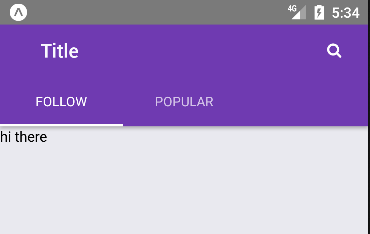
我的问题是,在单击search按钮之前,我无法导航到其他选项卡。这太奇怪了。
(UPDATE)我刚刚发现,当我更改选项卡时,它只会更改“跟随”或“流行”的标题。它不会呈现第二个选项卡'Popular',也不会切换该选项卡。
下面是第一个StackNavigator (附在根上)
export default StackNavigator ({
  Feedo: {
    screen: FeedMainTabNavigator,
    navigationOptions: {
      title: 'Title',
    },
  },
  Searcho: {
    screen: SearchScreen, // if I click second tab, it doesn't show the second tab.
           //But then I navigate to SearchScreen and goback to FeedScreen,
           //I can see the second tab was selected.
  }
}, {
    lazy: true
});
这是FeedMainTabNavigator
export default TabNavigator({
  UserFeed: {
    screen: UserFeedScreen
  },
  PopularPost: {
    screen: PopularPostScreen
  },
}, {
    tabBarOptions: {
      style: {
        backgroundColor: "#7E50CE",
        overflow: "hidden"
      },
      activeTintColor: "white",
      inactiveTintColor: "white",
      tabStyle: { width: 120 },
      indicatorStyle: { backgroundColor: 'white' }
    }
  }
);
这是UserFeedScreen (也许这里有问题?)
import {withRkTheme, RkText} from 'react-native-ui-kitten'
let ThemedNavigationBar = withRkTheme(NavBar);
import { FontAwesome } from '../../assets/icons'

class UserFeedScreen extends Component {
  static navigationOptions = ({navigation}) => ({
    title: 'Follow',
    headerRight: (
      <RkText
        rkType='awesome small'
        style={{color: 'white'}}
        onPress={() => {navigation.navigate('Searcho')}}>{FontAwesome.search}</RkText>
    ),
    header: (headerProps) => {
      return <ThemedNavigationBar navigation={navigation} headerProps={headerProps}/>
    },
})回答 1
Stack Overflow用户
回答已采纳
发布于 2017-10-20 15:04:54
您需要重置,因为Searcho在较高的级别。尝尝这个
import { NavigationActions } from 'react-navigation';将onPress={() => {navigation.navigate('Searcho')}}替换为
  onPress={() => {
    const resetAction = NavigationActions.reset({
      index: 0,
      actions: [
        NavigationActions.navigate({ routeName: 'Searcho'})
      ]
    });
    navigation.dispatch(resetAction);
}}页面原文内容由Stack Overflow提供。腾讯云小微IT领域专用引擎提供翻译支持
原文链接:
https://stackoverflow.com/questions/46825683
复制相关文章
相似问题
腾讯云开发者

Copyright © 2013 - 2026 Tencent Cloud. All Rights Reserved. 腾讯云 版权所有
深圳市腾讯计算机系统有限公司 ICP备案/许可证号:粤B2-20090059  粤公网安备44030502008569号
腾讯云计算(北京)有限责任公司 京ICP证150476号 | 京ICP备11018762号