
在Eclipse中使用Java 9可以使用没有类和主方法的sysout吗?
由于Java9引入了JShell的概念,它使我们能够在不创建类和方法的情况下编写代码,那么在eclipse中使用Java9的这个特性是否可行呢?
回答 3
Stack Overflow用户
发布于 2017-10-18 16:04:46
如果这不是Eclipse的一个特性,那么您可以想出一个非常基本的存根:
public static void main(String[] args) throws Exception {
     jdk.jshell.tool.JavaShellToolBuilder.builder().run();
}
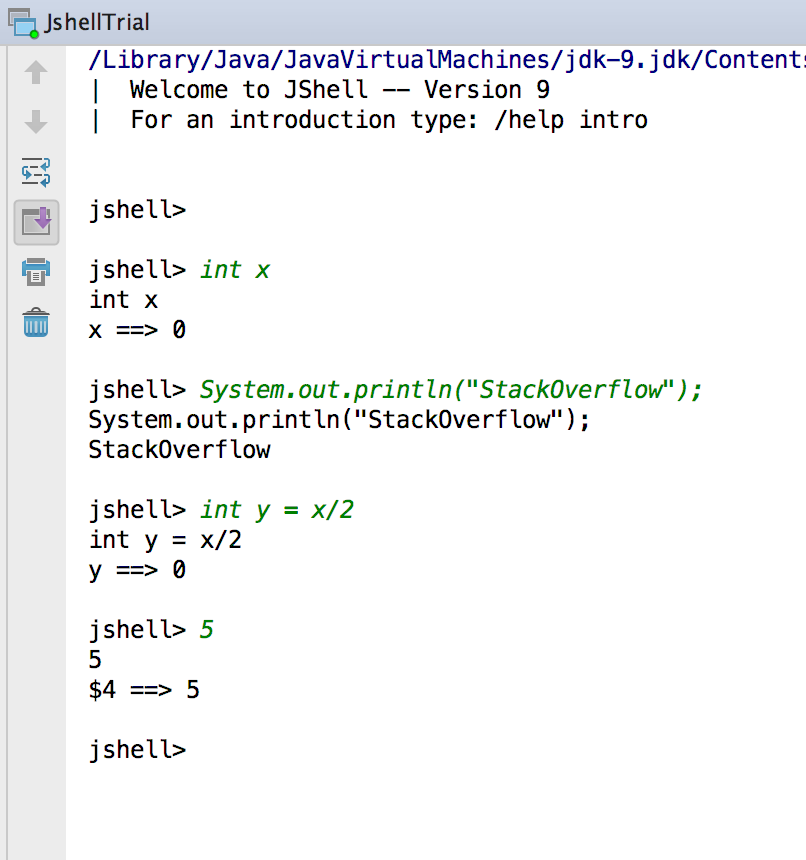
执行此操作时,可以在IDE中进一步将调试控制台作为JShell使用。
示例屏幕截图:
Stack Overflow用户
发布于 2020-06-20 09:37:14
如果您喜欢使用JShell (来自Eclipse或终端)来尝试代码,那么一个非常好的选择是使用Maven JShell插件,然后从相应的(虚拟)项目运行mvn (在Eclipse中:右键单击项目并以-> Maven构建的方式运行)。
在这种情况下,JShell知道项目依赖项中指定的所有库。
我在这里使用的是:http://www.finmath.net/finmath-experiments/montecarlo-blackscholes/
使用一些库的小型pom.xml (JavaFX、Apache、finmath )可能如下所示:
<project xmlns="http://maven.apache.org/POM/4.0.0"
    xmlns:xsi="http://www.w3.org/2001/XMLSchema-instance"
    xsi:schemaLocation="http://maven.apache.org/POM/4.0.0 http://maven.apache.org/xsd/maven-4.0.0.xsd">
    <modelVersion>4.0.0</modelVersion>

    <groupId>net.finmath</groupId>
    <artifactId>finmath-experiments</artifactId>
    <version>0.1.1-SNAPSHOT</version>

    <properties>
        <project.build.sourceEncoding>UTF-8</project.build.sourceEncoding>
    </properties>

    <build>
        <defaultGoal>clean install jshell:run</defaultGoal>
        <finalName>${project.artifactId}-${project.version}</finalName>
        <plugins>
            <plugin>
                <artifactId>maven-compiler-plugin</artifactId>
                <version>3.8.1</version>
                <configuration>
                    <release>11</release>
                    <source>11</source>
                    <target>11</target>
                </configuration>
            </plugin>
        </plugins>

        <pluginManagement>
            <plugins>
                <plugin>
                    <groupId>com.github.johnpoth</groupId>
                    <artifactId>jshell-maven-plugin</artifactId>
                    <version>1.2</version>
                </plugin>
            </plugins>
        </pluginManagement>
    </build>

    <dependencies>
        <!-- Java FX -->
        <!-- https://mvnrepository.com/artifact/org.openjfx/javafx-base -->
        <dependency>
            <groupId>org.openjfx</groupId>
            <artifactId>javafx-base</artifactId>
            <version>11</version>
        </dependency>
        <dependency>
            <groupId>org.openjfx</groupId>
            <artifactId>javafx-controls</artifactId>
            <version>11</version>
        </dependency>
        <dependency>
            <groupId>org.openjfx</groupId>
            <artifactId>javafx-swing</artifactId>
            <version>11</version>
        </dependency>

        <!-- finmath-lib -->
        <dependency>
            <groupId>net.finmath</groupId>
            <artifactId>finmath-lib</artifactId>
            <version>5.0.2</version>
        </dependency>

        <dependency>
            <groupId>net.finmath</groupId>
            <artifactId>finmath-lib-plot-extensions</artifactId>
            <version>0.3.9</version>
        </dependency>

        <dependency>
            <groupId>org.apache.commons</groupId>
            <artifactId>commons-math3</artifactId>
            <version>3.6.1</version>
        </dependency>
        <dependency>
            <groupId>org.apache.commons</groupId>
            <artifactId>commons-lang3</artifactId>
            <version>3.10</version>
        </dependency>
    </dependencies>

</project>
注意:就我个人而言,我更喜欢在macOS中的终端上运行它,因为JShell支持那里的“TAB-自动完成”,在从Eclipse运行时似乎缺少这种功能。
Stack Overflow用户
发布于 2020-11-28 22:03:41
正如其他答案所解释的那样,有多种方法可以做到这一点。但是,我想告诉您一个插件,它将提供更多的功能,而不仅仅是从Eclipse启动一个普通的JShell。
检查这个Eclipse QuickShell
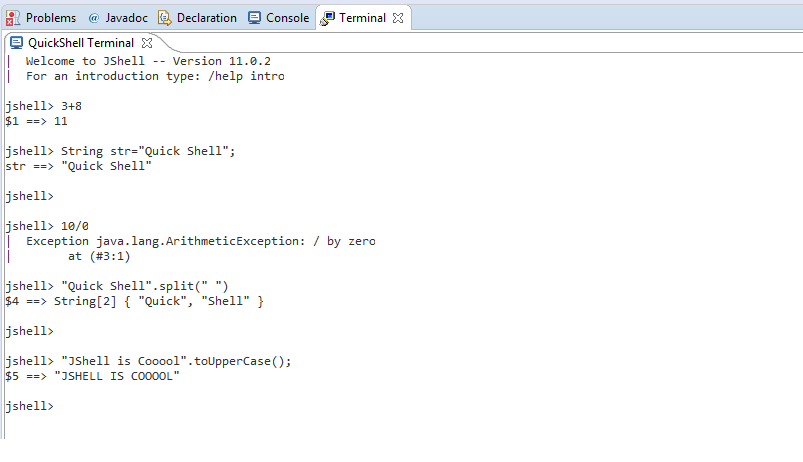
此插件将在Eclipse终端中启动JShell。如下所示:
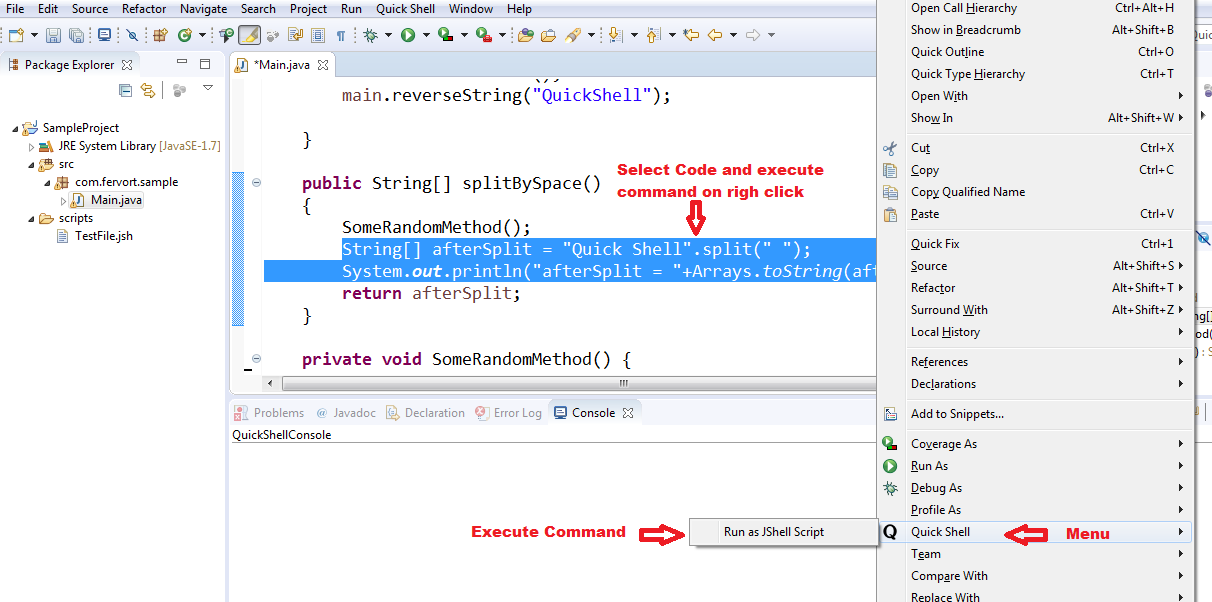
您还可以选择现有的java源代码,并将其作为JShell脚本运行。例如:
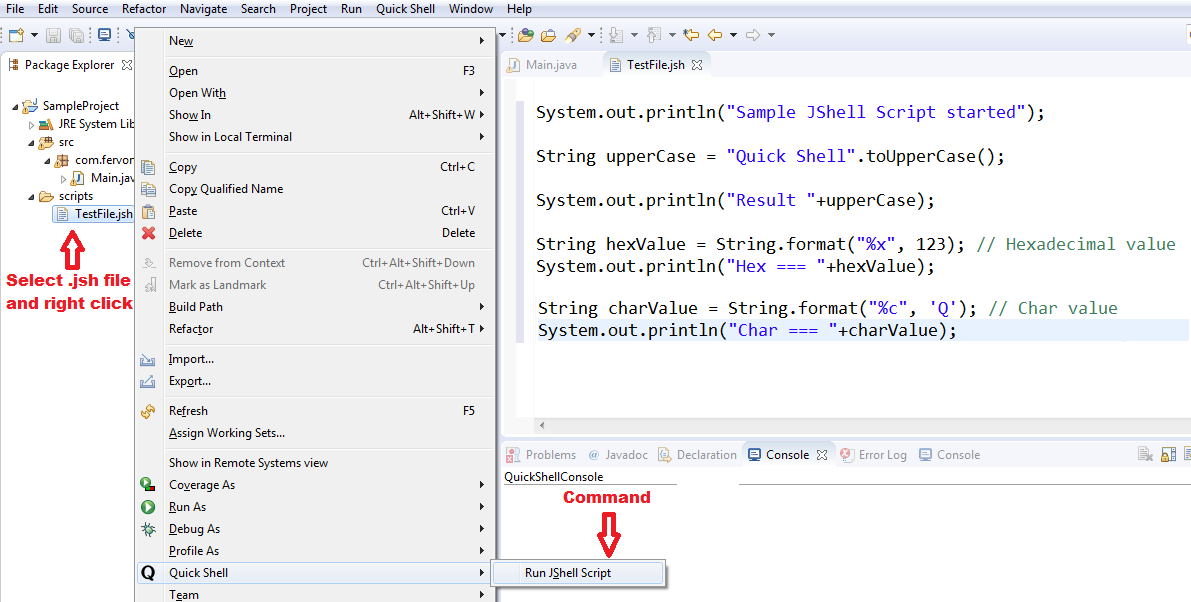
.jsh和.jpage文件可以直接从Eclipse运行。
PS:我是这个插件的作者。
https://stackoverflow.com/questions/46805687
复制相似问题
腾讯云开发者

Copyright © 2013 - 2026 Tencent Cloud. All Rights Reserved. 腾讯云 版权所有
深圳市腾讯计算机系统有限公司 ICP备案/许可证号:粤B2-20090059  粤公网安备44030502008569号
腾讯云计算(北京)有限责任公司 京ICP证150476号 | 京ICP备11018762号