
选择的ListBoxItem样式
编辑:
<Window x:Class="test_project.MainWindow"
        xmlns="http://schemas.microsoft.com/winfx/2006/xaml/presentation"
        xmlns:x="http://schemas.microsoft.com/winfx/2006/xaml"
        xmlns:d="http://schemas.microsoft.com/expression/blend/2008"
        xmlns:mc="http://schemas.openxmlformats.org/markup-compatibility/2006"
        xmlns:local="clr-namespace:test_project"
        mc:Ignorable="d"
        Title="MainWindow" Height="350" Width="525">

    <Grid>
        <ListBox>
            <ListBox.Resources>
                <SolidColorBrush x:Key="{x:Static SystemColors.HighlightBrushKey}" Color="Red" />
                <SolidColorBrush x:Key="{x:Static SystemColors.HighlightTextBrushKey}" Color="White" />

                <SolidColorBrush x:Key="{x:Static SystemColors.InactiveSelectionHighlightBrushKey}" Color="Yellow" Opacity="0.6" />
                <SolidColorBrush x:Key="{x:Static SystemColors.InactiveSelectionHighlightTextBrushKey}" Color="White" />
            </ListBox.Resources>
            <ListBox.Items>
                <ListBoxItem Content="Hello"/>
                <ListBoxItem Content="Hello"/>
            </ListBox.Items>
        </ListBox>
    </Grid>
</Window>我想要样式的ListBoxItem,以便它有一个蓝色的背景与白色的文本时,选择。我在网上看过很多答案,他们似乎都给出了自相矛盾的意见,但到目前为止,没有一个对我有用。这是我的ListBox
<ListBox Grid.Row="1" Margin="5" ItemContainerStyle="{StaticResource BlueItemStyle}"
            BorderBrush="#06658D"
            ItemsSource="{Binding UsersView}">
    <ListBox.ItemTemplate>
        <DataTemplate>
            <TextBlock Text="{Binding Name}"/>
        </DataTemplate>
    </ListBox.ItemTemplate>
</ListBox>
这是我至今所使用的风格,但却一无所获:
<!--ListBoxItem-->
<Style TargetType="{x:Type ListBoxItem}" x:Key="BlueItemStyle">
    <Setter Property="Height" Value="40"/>
    <Style.Triggers>
        <Trigger Property="IsSelected" Value="True">
            <Setter Property="Foreground" Value="White"/>
            <Setter Property="Background" Value="#06658D"/>
        </Trigger>
    </Style.Triggers>
</Style>然而,这并不是以任何方式设置ListBoxItem的样式。简单地说,我的问题将是选择ListBoxItem样式的最简单方法,因此ListBox如下所示:
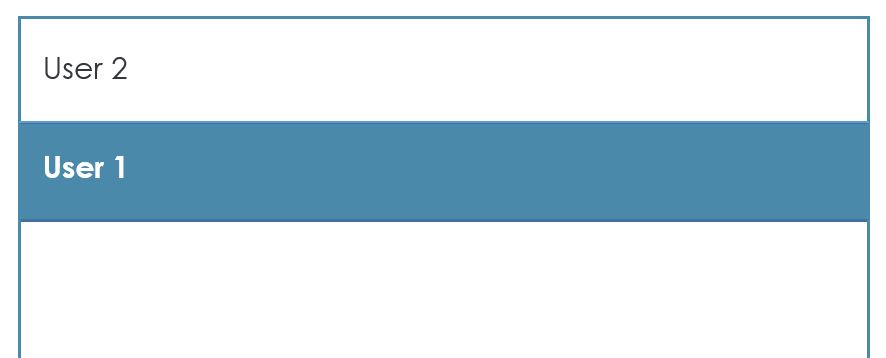
回答 1
Stack Overflow用户
发布于 2017-10-16 15:18:27
这个解决方案在Windows 10上不起作用,这意味着它根本不适合向前看。谢谢微软。
据我所知,这将意味着替换ListBoxItem控件模板。处理这一案件的两个问题:
不能以这种方式更改所选项目的背景色;对于选择状态,ListBoxItem的ListBoxItem属性不会更改。相反,ListBoxItem的默认控制模板使用Background作为未选择的控件,并具有一个触发器,当IsSelected是true时,该触发器将某些模板子模板的实际背景刷替换为{DynamicResource {x:Static SystemColors.HighlightBrushKey}}。
您也可以对您的DataTemplate的子级进行同样的操作,也可以替换Template,但是只需重写资源就更容易了。
为了获得一致的外观,您也可以全局覆盖相同的资源。
<ListBox
    Grid.Row="1"
    Margin="5"
    ItemContainerStyle="{StaticResource BlueItemStyle}"
    BorderBrush="#06658D"
    ItemsSource="{Binding UsersView}"
    >
    <ListBox.Resources>
        <SolidColorBrush x:Key="{x:Static SystemColors.HighlightBrushKey}" Color="#06658D" />
        <SolidColorBrush x:Key="{x:Static SystemColors.HighlightTextBrushKey}" Color="White" />

        <!--
        The default inactive selection color in Win7 is much too pale for my taste;
        our older users are unable to distinguish it from white on most monitors.
        -->
        <SolidColorBrush x:Key="{x:Static SystemColors.InactiveSelectionHighlightBrushKey}" Color="#06658D" Opacity="0.6" />
        <SolidColorBrush x:Key="{x:Static SystemColors.InactiveSelectionHighlightTextBrushKey}" Color="White" />
    </ListBox.Resources>
    <ListBox.ItemTemplate>
        <DataTemplate>
            <TextBlock Text="{Binding Name}"/>
        </DataTemplate>
    </ListBox.ItemTemplate>
</ListBox>https://stackoverflow.com/questions/46773393
复制相似问题
腾讯云开发者

Copyright © 2013 - 2026 Tencent Cloud. All Rights Reserved. 腾讯云 版权所有
深圳市腾讯计算机系统有限公司 ICP备案/许可证号:粤B2-20090059  粤公网安备44030502008569号
腾讯云计算(北京)有限责任公司 京ICP证150476号 | 京ICP备11018762号