
如何下划线和粗体工具提示图js
我有一个问题,在我的网站上的图表:我想把一些文字在粗体和下划线上的工具提示,如这张图片。
图片:
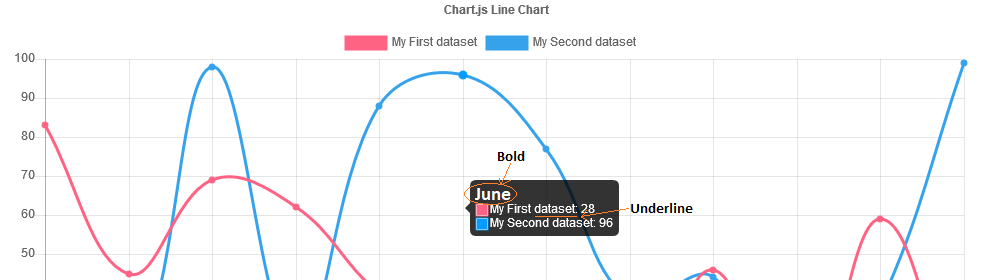
我发现这是有可能的: tooltipTitleFontStyle:“粗体”或titleFontStyle:‘大胆’,但都没有效果。
你有办法给我解决吗?
回答 2
Stack Overflow用户
发布于 2022-10-26 16:54:59
这对我起了作用:
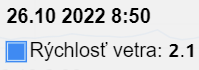
我已经将字符串转换为粗体unicode字符,并将它们传递给label回调中的工具提示。我只需要在标签上大胆一点。在我的例子中,我只需要编号0123456789 -> --这些是unicode粗体字符,所以我创建了简单的映射,或者您可以使用库作为转换示例:我找到的转换库(没有测试)。你可以做这样的其他文本效果。我使用这种方法是因为chartjs中的标准工具提示足以完成我的任务,而且我不想仅仅因为粗体文本而从头编写外部工具提示。用ES6测试。
下面是一些方便的工具,如果您想制作自己的地图,如本例所示:
unicodeValueMap: {
            0: '\u{1D7EC}',
            1: '\u{1D7ED}',
            2: '\u{1D7EE}',
            3: '\u{1D7EF}',
            4: '\u{1D7F0}',
            5: '\u{1D7F1}',
            6: '\u{1D7F2}',
            7: '\u{1D7F3}',
            8: '\u{1D7F4}',
            9: '\u{1D7F5}'
        }
在label回调中,我刚刚用存储在map对象中的unicodes替换了普通的字符串字符。
var options = {
  callbacks: {
    label: (item) => {
      let boldValue = "";
      [...item.formattedValue].forEach((char) => {
        if (char in unicodeValueMap) {
          boldValue += unicodeValueMap[char];
        } else {
          boldValue += char;
        }
      });
      return `${item.dataset.label}: ${boldValue}`
    };
  }
}
结果:
希望这能帮上忙
Stack Overflow用户
发布于 2017-10-10 16:51:09
嗨,您可以构建您自己的工具提示,以便它在任何您想返回的地方返回,即自定义html。
http://www.chartjs.org/docs/latest/configuration/tooltip.html#external-custom-tooltips
对于粗体字体,titleFontStyle的选项必须在options.tooltips中:
var options = {
  type: 'line',
  data: {
    labels: ["Red", "Blue", "Yellow", "Green", "Purple", "Orange"],
    datasets: [
        {
          label: '# of Votes',
          data: [12, 19, 3, 5, 2, 3],
        borderWidth: 1
        },
            {
                label: '# of Points',
                data: [7, 11, 5, 8, 3, 7],
                borderWidth: 1
            }
        ]
  },
  options: {
    scales: {
        yAxes: [{
        ticks: {
                    reverse: false
        }
      }]
    },
    tooltips: {
        titleFontStyle: 'bold',
      titleFontSize: 24
    }
  }
}

var ctx = document.getElementById('chartJSContainer').getContext('2d');
new Chart(ctx, options);
您可以在这里看到一个有用的示例:
https://jsfiddle.net/fpjzvh4m/
希望这能有所帮助。
P.D:我建议你在问这类问题时,包括你的一些代码。
https://stackoverflow.com/questions/46671184
复制相似问题
腾讯云开发者

Copyright © 2013 - 2026 Tencent Cloud. All Rights Reserved. 腾讯云 版权所有
深圳市腾讯计算机系统有限公司 ICP备案/许可证号:粤B2-20090059  粤公网安备44030502008569号
腾讯云计算(北京)有限责任公司 京ICP证150476号 | 京ICP备11018762号