
通过金牛座在Jenkins管道中设置Gatling报表名
我正在编写一个声明式jenkins管道,我面临着gatling报告方面的问题:
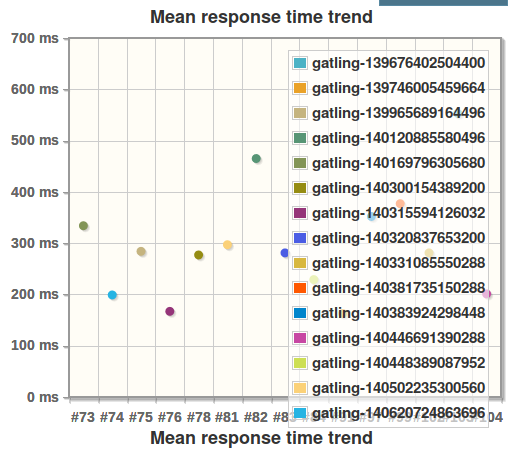
平均响应时间趋势是不正确的,有没有办法用曲线代替下面的点云?
我的Jenkinsfile的摘录:
stage('perf') {
  steps {
    bzt params: './taurus/scenario.yml', generatePerformanceTrend: false, printDebugOutput: true
    perfReport configType: 'PRT', graphType: 'PRT', ignoreFailedBuilds: true, modePerformancePerTestCase: true, modeThroughput: true, sourceDataFiles: 'results.xml'
    dir ("taurus/results") {
      gatlingArchive()
    }
  }
}
从我的scenario.yml中提取
modules:
  gatling:
    path:      ./bin/gatling.sh
java-opts: -Dgatling.core.directory.data=./data在scenario.yml中,我试图设置gatling.core.outputDirectoryBaseName:
java-opts: -Dgatling.core.directory.data=./data -Dgatling.core.outputDirectoryBaseName=./my_scenario在这种情况下,它只用my_scenario代替gatling,但是已经出现了大量的gatling。
回答 1
Stack Overflow用户
发布于 2017-10-12 06:48:10
我终于找到了解决这个问题的解决方案,但这并不简单,因为它涉及到金牛座代码的扩展。
问题是这里,位于金牛座gatling.py文件的第309行。它显式地添加了前缀“gatling -”来查找gatling报告。
但是,文件scenario.yml中的参数scenario.yml将此前缀更改为my_scenario。下面我将描述一种扩展金牛座的方法,以便快速扩展。
使用此代码创建一个文件./extensions/gatling.py 以扩展类GatlingExecutor:
from bzt.modules.gatling import GatlingExecutor, DataLogReader

class GatlingExecutorExtension(GatlingExecutor):
    def __init__(self):
        GatlingExecutor.__init__(self)

    def prepare(self):
        # From method bzt.modules.gatling.GatlingExecutor:prepare, copy code before famous line 309
        # Replace line 309 by
        self.dir_prefix = self.settings.get('dir_prefix', 'gatling-%s' % id(self))
# From method bzt.modules.gatling.GatlingExecutor:prepare, copy code after famous line 309bzt**:** 创建一个文件 ./bztx.py 以包装命令
import signal
import logging
from bzt.cli import main, signal_handler

if __name__ == "__main__":
    signal.signal(signal.SIGINT, signal_handler)
    signal.signal(signal.SIGTERM, signal_handler)
    main()
使用新的设置属性( scenario.yml dir_prefix )更新文件,并定义新的executor类:
modules:
  gatling:
    path:       ./bin/gatling.sh
    class:      extensions.GatlingExecutorExtension
    dir_prefix: my_scenario
java-opts: -Dgatling.core.directory.data=./data -Dgatling.core.outputDirectoryBaseName=./my_scenario最后,通过调用新文件bztx.py替换 bzt 调用来更新Jenkinsfile
stage('perf') {
  steps {
    sh 'python bztx.py ./taurus/scenario.yml'
    perfReport configType: 'PRT', graphType: 'PRT', ignoreFailedBuilds: true, modePerformancePerTestCase: true, modeThroughput: true, sourceDataFiles: 'results.xml'
    dir ("taurus/results") {
      gatlingArchive()
    }
  }
}
仅此而已,这对我来说很管用。奖励:此解决方案提供了一种使用自己的插件轻松扩展金牛座的方法;-)
https://stackoverflow.com/questions/46663423
复制相似问题
腾讯云开发者

Copyright © 2013 - 2026 Tencent Cloud. All Rights Reserved. 腾讯云 版权所有
深圳市腾讯计算机系统有限公司 ICP备案/许可证号:粤B2-20090059  粤公网安备44030502008569号
腾讯云计算(北京)有限责任公司 京ICP证150476号 | 京ICP备11018762号