
元素不是可单击的错误Ruby / Watir
在我的测试中,我尝试点击etsy.com,进行搜索,点击结果,并将项目添加到我的购物车中。我可以做所有的事情,直到我尝试点击‘添加到购物车’按钮。下面的代码实际上是在IRB中工作的,因此我知道我的定位器是可靠的,但是当我运行测试时,得到的元素在点错误时是不可点击的。
C:/Ruby24-x64/lib/ruby/gems/2.4.0/gems/selenium-webdriver-3.6.0/lib/selenium/webdriver/remote/response.rb:71:in 'assert_ok': unknown error: Element is not clickable at point (930, 586) (Selenium::WebDriver::Error::UnknownError) (Session info: chrome=61.0.3163.100)
这是我的测试
require 'watir'

# test that a user can search for and add an item to shopping cart
b = Watir::Browser.new :chrome

begin
  b.goto "http://etsy.com"
  b.text_field(:id => 'search-query').set 'bacon is my spirit animal coaster'
  b.button(:value => 'Search').present?
  b.button(:value => 'Search').click
  b.p(:text => /Bacon Spirit Animal Coaster/).click
  b.select_list(:id => 'inventory-variation-select-0').option(:text => 'Single ($8.00)').select
  b.button(:text => /Add to cart/).click

  if b.text.include?("item in your cart")
    puts "Test passed!"
  else
    puts "Test failed!"
  end

ensure
  b.close
end
这是按钮的HTML页面。
<button class="btn-transaction" type="submit">
            <div class="btn-text">Add to cart</div>
            <div class="ui-toolkit">
                <div class="btn-spinner spinner spinner-small display-none"></div>
            </div>
</button>回答 1
Stack Overflow用户
发布于 2017-10-05 15:26:00
根据浏览器的宽度(可能还有其他因素),可能会有对话框在add to cart按钮上浮动。例如,当测试失败时,按钮顶部有一个get开始对话框。Chrome尝试按一个位置单击。如果另一个元素位于该位置的元素顶部,Chrome将抛出异常。
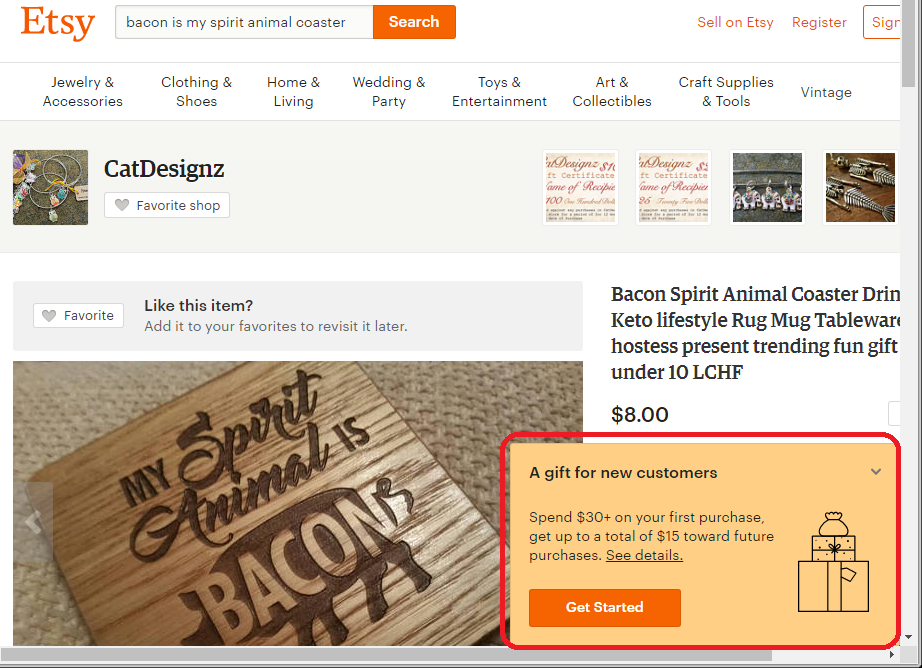
最简单的解决方案是直接触发click事件,从而绕过Chrome的检查:
# Watir > 6.8.0:
b.button(:text => /Add to cart/).click! # note the exclamation mark

# Watir < 6.8.0:
b.button(:text => /Add to cart/).fire_event(:onclick)
可能有条件工作的其他解决办法:
- 在单击按钮-
browser.window.maximize之前,最大限度地使用浏览器。这可以将浮动元素从按钮移开。 - 关闭浮动对话框。
https://stackoverflow.com/questions/46588791
复制相似问题
腾讯云开发者

Copyright © 2013 - 2026 Tencent Cloud. All Rights Reserved. 腾讯云 版权所有
深圳市腾讯计算机系统有限公司 ICP备案/许可证号:粤B2-20090059  粤公网安备44030502008569号
腾讯云计算(北京)有限责任公司 京ICP证150476号 | 京ICP备11018762号