
Heroku不加载procfile
我曾尝试过其他人的解决方案,以获得procfile的认可,但这对我来说并不管用。真搞不懂我怎么能让heroku认出我的Procfile!我把它移到不同的文件夹里什么的,但它就是认不出来。
web: waitress-serve --port=$PORT alex1.wsgi:application这是我的密码。它就在我的requirements.txt文件旁边,被heroku捡到了。使用echo创建文件,甚至回显都无法工作。
https://github.com/Hewlbern/Videography-Website/tree/master/Alex1 <--我试图从它部署到heroku的github链接。可以看到我把它放在哪里,等等,如果有人能帮忙的话!
这么伤心,很多人都疯了。
编辑,把它们放在目录的顶端-仍然不工作。
这是错误日志。
-----> Python app detected
 !     Warning: Your application is missing a Procfile. This file tells Heroku how to run your application.
 !     Learn more: https://devcenter.heroku.com/articles/procfile
-----> Installing requirements with pip
-----> $ python manage.py collectstatic --noinput
       63 static files copied to '/tmp/build_b9ce82b65ae441b651c56911a7474859/Hewlbern-ConsultingPage-1720e65/djreact/static/root'.
-----> Discovering process types
       Procfile declares types -> (none)
-----> Compressing...
       Done: 64.3M
-----> Launching...
       Released v19
       https://consultingpage.herokuapp.com/ deployed to Heroku
作为对迈克以下观点的回应,我通过了他的例子,我达到了这一点。
C:\Users\Holbinator\Desktop\Software Dev\Alexandria>git push heroku master fatal: 'heroku' does not appear to be a git repository fatal: Could not read from remote repository. 然后,我在根目录中重新执行Git Init,然后尝试从Github加载代码。,这导致了同样的问题。,我会把它放在我的编辑中。谢谢!我现在试着做你的方法,找出为什么在这种情况下我不能。
编辑两个
现在我意识到我需要删除一个额外的heroku应用程序。现在使用heroku加载文件。没有收到错误,不确定如何访问错误日志,但现在将尝试解决该问题。
回答 1
Stack Overflow用户
发布于 2017-10-04 11:49:43
我建议的第一点是将.idea目录放在.gitignore文件中。
我已经在heroku上上传了您的应用程序,因此-Procfile被成功地添加了。
步骤:
- 根目录中的
git add . git commit -m "init commit"heroku creategit push heroku master
这是我的结果,但您可能会看到类似的情况:

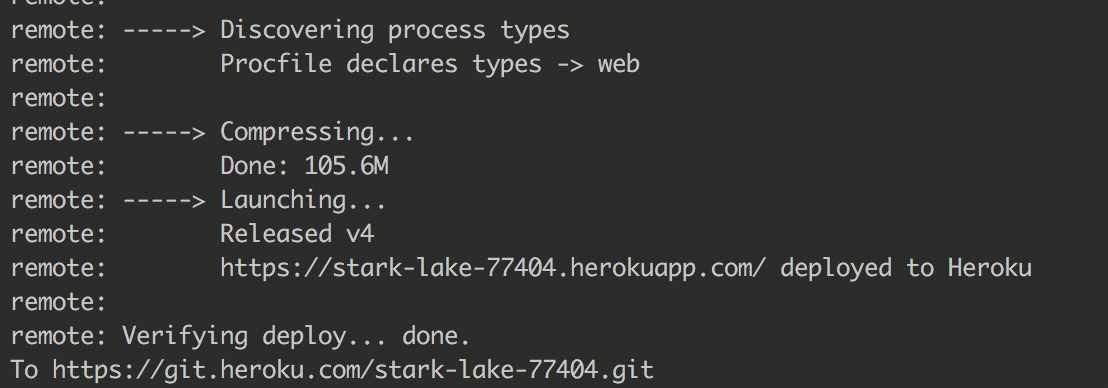
之后,我通过heroku open命令启动了您的应用程序,并收到了500错误。
原木截图

我希望这个答案是有用的,我也读过关于部署在heroku的文章。
UPD:请检查您是否在项目的根目录中使用git init
https://stackoverflow.com/questions/46562997
复制相似问题
腾讯云开发者

Copyright © 2013 - 2026 Tencent Cloud. All Rights Reserved. 腾讯云 版权所有
深圳市腾讯计算机系统有限公司 ICP备案/许可证号:粤B2-20090059  粤公网安备44030502008569号
腾讯云计算(北京)有限责任公司 京ICP证150476号 | 京ICP备11018762号