
通过蓝牙接收字符串数据
通过蓝牙接收字符串数据
提问于 2017-10-03 05:46:13
我正在创建一个简单的BLE应用程序,它可以与单个外围设备通信。电话起着中心作用。我有一个iPad,我正在使用它作为测试的外围设备。它安装了应用程序LightBlue来模拟外围设备。外围设备应该以这种格式发送一串数据。
透射电镜:25.11/ HUM:70,PM10:43
因此,我用一个服务在LightBlue中创建了一个空白虚拟外围设备。
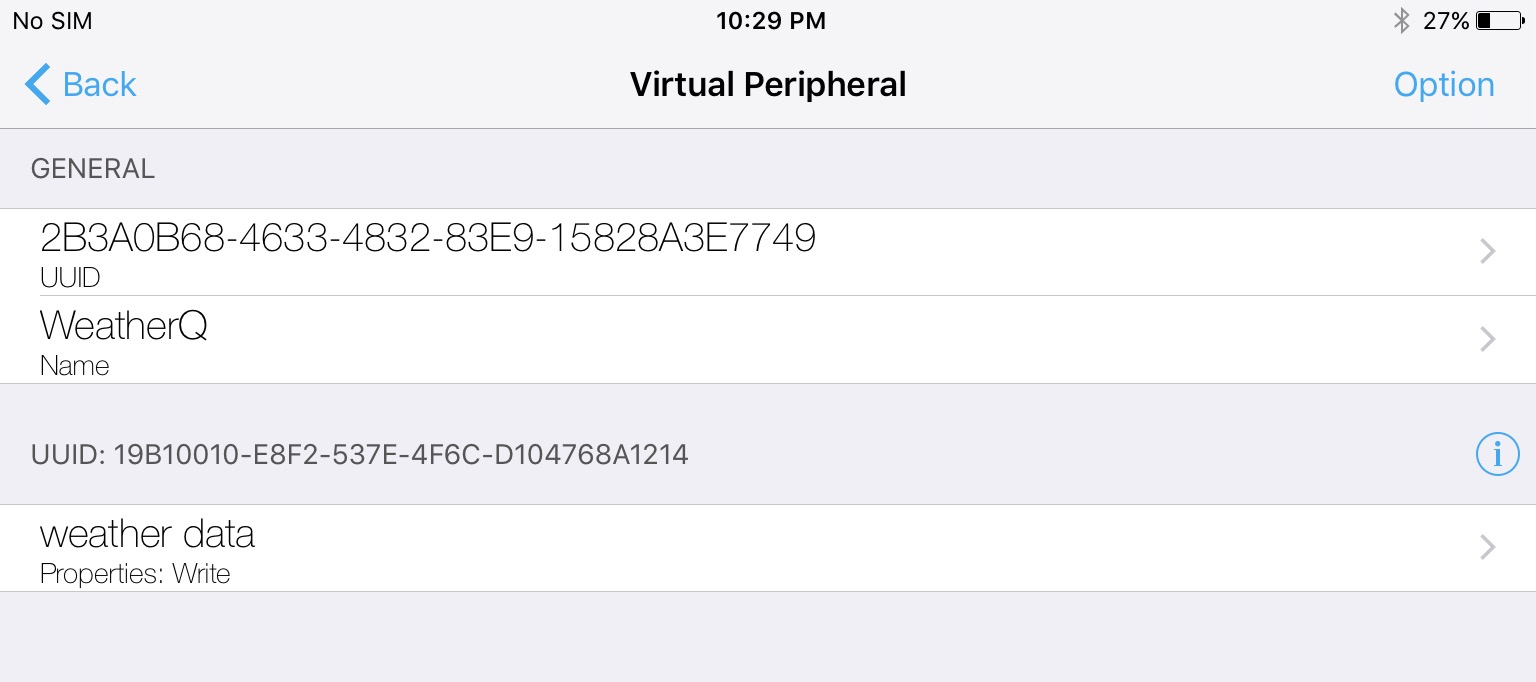
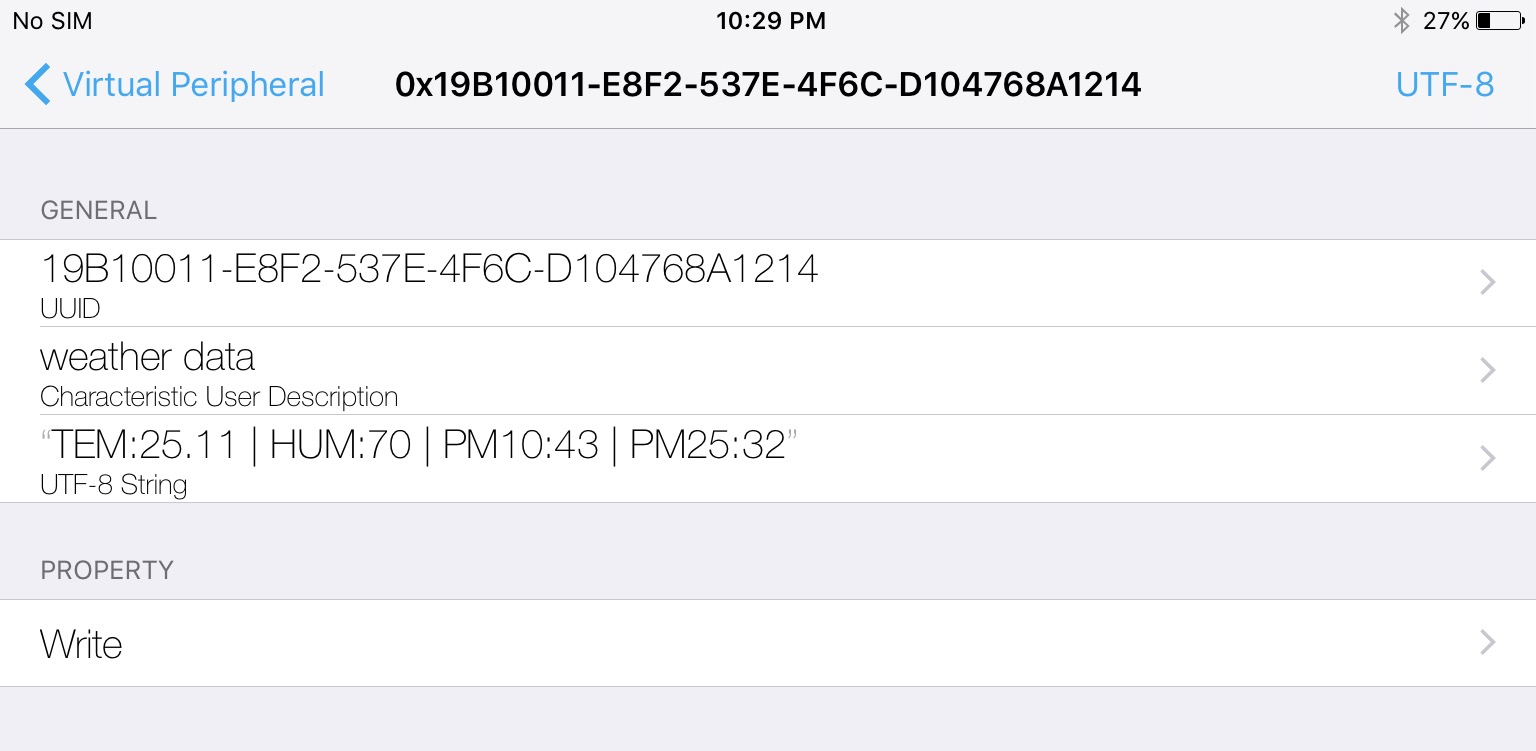
下面是我的蓝牙连接处理代码。
import UIKit
import CoreBluetooth

class ViewController: UIViewController {

    fileprivate let serviceUUID = CBUUID(string: "19B10010-E8F2-537E-4F6C-D104768A1214")
    fileprivate let characteristicUUID = CBUUID(string: "19B10011-E8F2-537E-4F6C-D104768A1214")

    fileprivate var manager: CBCentralManager!
    fileprivate var peripheral: CBPeripheral!
    fileprivate var characteristic: CBCharacteristic!

    override func viewDidLoad() {
        super.viewDidLoad()
        manager = CBCentralManager(delegate: self, queue: nil)
    }

    override func viewWillDisappear(_ animated: Bool) {
        super.viewWillDisappear(animated)
        stopScan()
    }

    fileprivate func startScan() {
        manager.scanForPeripherals(withServices: [serviceUUID], options: nil)
    }

    fileprivate func stopScan() {
        manager.stopScan()
    }

    fileprivate func disconnectFromDevice() {
        guard let peripheral = peripheral else { return }
        manager.cancelPeripheralConnection(peripheral)
    }

    fileprivate func restoreCentralManager() {
        manager.delegate = self
    }

}

// MARK: - CBCentralManagerDelegate
extension ViewController: CBCentralManagerDelegate {
    func centralManagerDidUpdateState(_ central: CBCentralManager) {
        switch central.state {
        case .unsupported:
            print("Unsupported")
        case .unauthorized:
            print("Unauthorized")
        case .poweredOn:
            print("Powered On")
            startScan()
        case .resetting:
            print("Resetting")
        case .poweredOff:
            print("Powered Off")
        case .unknown:
            print("Unknown")
        }
    }

    func centralManager(_ central: CBCentralManager, didDiscover peripheral: CBPeripheral, advertisementData: [String : Any], rssi RSSI: NSNumber) {
        print("Discovered \(String(describing: peripheral.name)) at \(RSSI)")

        if peripheral.name == nil || peripheral.name == "" {
            return
        }

        if self.peripheral == nil || self.peripheral.state == .disconnected {
            stopScan()

            self.peripheral = peripheral
            central.connect(peripheral, options: nil)
        }
    }

    func centralManager(_ central: CBCentralManager, didConnect peripheral: CBPeripheral) {
        peripheral.delegate = self
        peripheral.discoverServices([serviceUUID])
    }

    func centralManager(_ central: CBCentralManager, didDisconnectPeripheral peripheral: CBPeripheral, error: Error?) {

        self.peripheral = nil
        central.scanForPeripherals(withServices: nil, options: nil)
    }

    func centralManager(_ central: CBCentralManager, didFailToConnect peripheral: CBPeripheral, error: Error?) {
        self.peripheral = nil
    }

    func centralManager(_ central: CBCentralManager, willRestoreState dict: [String : Any]) {
    }
}

// MARK: - CBPeripheralDelegate
extension ViewController: CBPeripheralDelegate {
    func peripheral(_ peripheral: CBPeripheral, didDiscoverServices error: Error?) {
        guard let services = peripheral.services else { return }
        print("No. of services: \(services.count)")

        for service in services {
            print(service.uuid)
            if service.uuid == serviceUUID {
                peripheral.discoverCharacteristics(nil, for: service)
            }
        }
    }

    func peripheral(_ peripheral: CBPeripheral, didDiscoverCharacteristicsFor service: CBService, error: Error?) {
        guard let characteristics = service.characteristics else { return }

        for characteristic in characteristics {
            print("characteristic: \(characteristic.uuid)")
            if characteristic.uuid == characteristicUUID {
                self.characteristic = characteristic
                peripheral.setNotifyValue(true, for: characteristic)
                peripheral.readValue(for: characteristic)
            }
        }
    }

    func peripheral(_ peripheral: CBPeripheral, didWriteValueFor characteristic: CBCharacteristic, error: Error?) {
        print(error)
    }

    func peripheral(_ peripheral: CBPeripheral, didUpdateValueFor characteristic: CBCharacteristic, error: Error?) {
        if characteristic.uuid == characteristicUUID {
            print("Got reply from: \(characteristic.uuid)")
            print(characteristic.value)
            if let data = characteristic.value, let string = String(data: data, encoding: String.Encoding.utf8) {
                print(string)
            } else {
                print("No response!")
            }
        }
    }

}
发现和连接部分工作得很好。问题是我没有从外围接收数据字符串。
peripheral(_:didUpdateValueFor:error:)确实会被解雇。我得到的回复来自: 19B10011-E8F2-537E-4F6C-D104768A1214控制台输出。但是,当我试图通过打印characteristic.value来查看是否有任何数据时,它会返回nil。
不知道我的代码是不是出了什么问题。或者我把LightBlue上的外围设备配置错了。LightBlue会自动发送数据吗?我也没有看到任何发送按钮或任何东西。
我还上传了一个演示项目这里。
回答 1
Stack Overflow用户
回答已采纳
发布于 2017-10-03 07:19:05
您的LightBlue配置表明,您只能根据特定的特性写入值,您还必须使其读取。
页面原文内容由Stack Overflow提供。腾讯云小微IT领域专用引擎提供翻译支持
原文链接:
https://stackoverflow.com/questions/46537901
复制相关文章
相似问题
腾讯云开发者

Copyright © 2013 - 2026 Tencent Cloud. All Rights Reserved. 腾讯云 版权所有
深圳市腾讯计算机系统有限公司 ICP备案/许可证号:粤B2-20090059  粤公网安备44030502008569号
腾讯云计算(北京)有限责任公司 京ICP证150476号 | 京ICP备11018762号