
用OpenGL10 ES Android补偿不同的xdpi和ydpi
我已经使用OpenGL 10 ES渲染我的产品盒的三维照明:
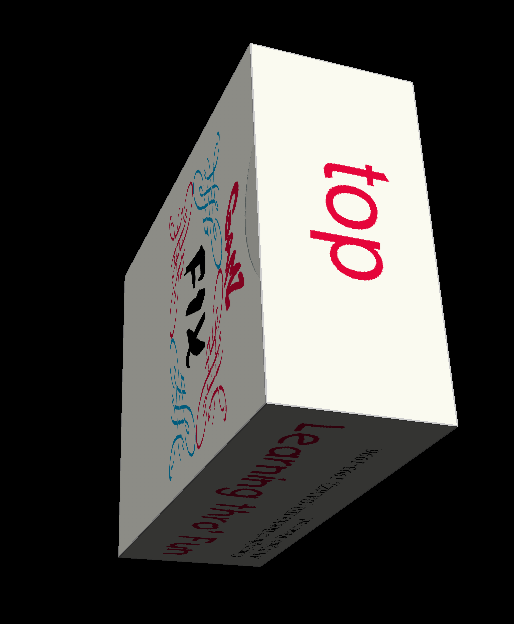
但现在我被困住了。我的箱子都在51:63:24的比例里。基于mm的物理设计。从像素的角度来看,这些比率保持不变,但在最后的屏幕2D渲染中,由于x和y屏幕分辨率的差异( mDisplayMetrics.xdpi and mDisplayMetrics.ydpi ),它们在不同程度上被扭曲,这取决于我使用的平板电脑:
我可以看到,对盒子的每一面进行最后的演奏是通过以下方式进行的:
gl.glDrawArrays(GL10.GL_TRIANGLE_STRIP, offset, 4); 我的问题是:如何用真实的感知坐标而不是直接的像素坐标将这张地图呈现到屏幕上?
通常,我使用2D android.graphics.Matrix来转换所有的路径,形状,图像等来补偿屏幕分辨率的各向异性,但是我看不出怎么做。没有它,所有的东西都会在y方向上被延伸/压缩,或者在x方向上成为景观。对于我目前使用的Android平板电脑,这个矩阵是Matrix{[1.0, 0.0, 0.0][0.0, 0.9469214, 0.0][0.0, 0.0, 1.0]}.。好的,这只是5.5%的均匀度,但如果我设计的盒子在51:63:24的比例,我有点喜欢看到他们保持这一比例,而不扭曲,因为他们旋转。我绝对相信OpenGL和我提供的脸位图做得很好。这只是我需要考虑的最后的2D投影。但是怎么做呢?
谁能告诉我我怎样才能做最后的转变?基本上,我如何缩放,任意,最终的2D渲染结果?
MainActivity代码:
public class MyGLActivity extends AppCompatActivity {
public static FaceGroup facegroup;
private GLSurfaceView glView;
private DisplayMetrics mDisplayMetrics;
private Display mDisplay;

// use GLSurfaceView
// Call back when the activity is started, to initialize the view
@Override
protected void onCreate(Bundle savedInstanceState) {
    super.onCreate(savedInstanceState);
    getWHscalefactor();
    **facegroup = new FaceGroup(this);**
    glView = new GLSurfaceView(this);           // Allocate a GLSurfaceView
    glView.setRenderer(new MyGLRenderer()); // Use a custom renderer
    this.setContentView(glView);                // This activity sets to GLSurfaceView
}

// Call back when the activity is going into the background
@Override
protected void onPause() {
    super.onPause();
    glView.onPause();
}

// Call back after onPause()
@Override
protected void onResume() {
    super.onResume();
    glView.onResume();
}

private void getWHscalefactor() {
    float unequalDPIscaleW, unequalDPIscaleH;
    Matrix m = new Matrix();
    mDisplayMetrics = new DisplayMetrics();
    mDisplay = getWindowManager().getDefaultDisplay();
    mDisplay.getMetrics(mDisplayMetrics);
    unequalDPIscaleW = 1;
    unequalDPIscaleH = xppi() / yppi();
    if (unequalDPIscaleH > 1) {
        unequalDPIscaleW = 1 / unequalDPIscaleH;
        unequalDPIscaleH = 1;
    }
    m.setScale(unequalDPIscaleW, unequalDPIscaleH);
    System.out.println("Anisotropy Matrix: " + m); }

public float xppi() { return mDisplayMetrics.xdpi; }

public float yppi() { return mDisplayMetrics.ydpi; }调用facegroup = new FaceGroup(this);简单地读取和解释从CorelDraw导出的SVG中提供的路径信息,在该导出中,生产盒的设计为打印、切割、折叠和粘贴做好了准备。它们是真正的东西:)。facegroup还通过呈现这些路径来创建所需的人脸位图。
MyGLRenderer代码:
 public class MyGLRenderer implements GLSurfaceView.Renderer {
private GAMZBox gamzBox;     // (NEW)
private static float angleCube = 0;     // rotational angle in degree for gamzBox
private static float speedCube = 0.25f; // rotational speed for gamzBox

// Constructor
public MyGLRenderer() {
    gamzBox = new GAMZBox();    // (NEW)
}

// Call back when the surface is first created or re-created.
@Override
public void onSurfaceCreated(GL10 gl, EGLConfig config) {
    gl.glClearColor(0.0f, 0.0f, 0.0f, 1.0f);  // Set color's clear-value to black
    gl.glClearDepthf(1.0f);            // Set depth's clear-value to farthest
    gl.glEnable(GL_DEPTH_TEST);   // Enables depth-buffer for hidden surface removal
    gl.glDepthFunc(GL10.GL_LEQUAL);    // The type of depth testing to do
    gl.glHint(GL10.GL_PERSPECTIVE_CORRECTION_HINT, GL10.GL_NICEST);  // nice perspective view
    gl.glShadeModel(GL_SMOOTH);   // Enable smooth shading of color
    gl.glDisable(GL10.GL_DITHER);      // Disable dithering for better performance

    // Setup Texture, each time the surface is created (NEW)
    gamzBox.loadTexture(gl);             // Load images into textures (NEW)
    gl.glEnable(GL10.GL_TEXTURE_2D);  // Enable texture (NEW)
}

// Call back after onSurfaceCreated() or whenever the window's size changes
@Override
public void onSurfaceChanged(GL10 gl, int width, int height) {
    if (height == 0) height = 1;   // To prevent divide by zero
    float aspect = (float)width / height;

    // Set the viewport (display area) to cover the entire window
    gl.glViewport(0, 0, width, height);

    // Setup perspective projection, with aspect ratio matches viewport
    gl.glMatrixMode(GL10.GL_PROJECTION); // Select projection matrix
    gl.glLoadIdentity();                 // Reset projection matrix
    // Use perspective projection
    GLU.gluPerspective(gl, 45, aspect, 0.1f, 100.f);

    gl.glMatrixMode(GL10.GL_MODELVIEW);  // Select model-view matrix
    gl.glLoadIdentity();                 // Reset

    // You OpenGL|ES display re-sizing code here
    // ......
}

// Call back to draw the current frame.
@Override
public void onDrawFrame(GL10 gl) {
    // Clear color and depth buffers
    float diffuseMaterial[] = { 0.5f, 0.5f, 0.5f, 1.0f };

    float mat_specular[] = { 1.0f, 1.0f, 1.0f, 1.0f };
    float light_position[] = { 0.0f, 1.0f, 2.0f, 0.0f };
    gl.glClear(GL10.GL_COLOR_BUFFER_BIT | GL10.GL_DEPTH_BUFFER_BIT);

    // ----- Render the Cube -----
    gl.glLoadIdentity();                  // Reset the model-view matrix
    gl.glShadeModel(GL_SMOOTH);
    gl.glEnable(GL_DEPTH_TEST);
    gl.glMaterialfv(GL_FRONT, GL_DIFFUSE, diffuseMaterial, 0);
    gl.glMaterialfv(GL_FRONT, GL_SPECULAR, mat_specular, 0);
    gl.glMaterialf(GL_FRONT, GL_SHININESS, 25f);
    gl.glLightfv(GL_LIGHT0, GL_POSITION, light_position, 0);
    gl.glEnable(GL_LIGHTING);
    gl.glEnable(GL_LIGHT0);

    //gl.glColorMaterial(GL_FRONT, GL_DIFFUSE);
    gl.glEnable(GL_COLOR_MATERIAL);
    gl.glTranslatef(0.0f, 0.0f, -5.0f);   // Translate into the screen
    gl.glRotatef(angleCube, 1f * (float)Math.sin(Math.toRadians(0.1 * angleCube)),
            4.0f * (float)Math.sin(Math.toRadians(0.05 * angleCube)), -0.3f); // Rotate
    gamzBox.draw(gl);

    // Update the rotational angle after each refresh.
    angleCube += speedCube;
}
}GAMZBox对象面板定义和抽屉在此代码中。在我的51:63:24的面部比例中,这本质上是一种3D.html)。bitmaps在FaceGroup中定义为public static Bitmap[] bitmaps = new Bitmap[6];.
public class GAMZBox {
    private FloatBuffer vertexBuffer;  // Vertex Buffer
    private FloatBuffer texBuffer;     // Texture Coords Buffer

    private int numFaces = 6;
    private int[] textureIDs = new int[numFaces];
//    private Bitmap[] bitmap = new Bitmap[numFaces];
    private float cubeHalfSize = 24f / 63f; //1.2f;

    // Constructor - Set up the vertex buffer
    public GAMZBox() {
        // Allocate vertex buffer. An float has 4 bytes
        ByteBuffer vbb = ByteBuffer.allocateDirect(12 * 4 * numFaces);
        vbb.order(ByteOrder.nativeOrder());
        vertexBuffer = vbb.asFloatBuffer();

        // Read images. Find the aspect ratio and adjust the vertices accordingly.
        for (int face = 0; face < numFaces; face++) {
            int imgWidth = bitmaps[face].getWidth();
            int imgHeight = bitmaps[face].getHeight();
            System.out.println(imgWidth + ", " + imgHeight);
            float faceWidth = 2.0f;
            float faceHeight = 2.0f;
            if (face > 3) {
                faceWidth *= 51f / 63f;
                faceHeight *= 51f / 63f;
            }
            // Adjust for aspect ratio
            if (imgWidth > imgHeight) {
                faceHeight = faceHeight * imgHeight / imgWidth;
            } else {
                faceWidth = faceWidth * imgWidth / imgHeight;
            }
            float faceLeft = -faceWidth / 2;
            float faceRight = -faceLeft;
            float faceTop = faceHeight / 2;
            float faceBottom = -faceTop;

            // Define the vertices for this face
            float[] vertices = {
                    faceLeft,  faceBottom, 0.0f,  // 0. left-bottom-front
                    faceRight, faceBottom, 0.0f,  // 1. right-bottom-front
                    faceLeft,  faceTop,    0.0f,  // 2. left-top-front
                    faceRight, faceTop,    0.0f,  // 3. right-top-front
            };
            vertexBuffer.put(vertices);  // Populate
        }
        vertexBuffer.position(0);    // Rewind

        // Allocate texture buffer. An float has 4 bytes. Repeat for 6 faces.
        float[] texCoords = {
                0.0f, 1.0f,  // A. left-bottom
                1.0f, 1.0f,  // B. right-bottom
                0.0f, 0.0f,  // C. left-top
                1.0f, 0.0f   // D. right-top
        };
        ByteBuffer tbb = ByteBuffer.allocateDirect(texCoords.length * 4 * numFaces);
        tbb.order(ByteOrder.nativeOrder());
        texBuffer = tbb.asFloatBuffer();
        for (int face = 0; face < numFaces; face++) {
            texBuffer.put(texCoords);
        }
        texBuffer.position(0);   // Rewind
    }

    // Render the shape
    public void draw(GL10 gl) {
        gl.glFrontFace(GL10.GL_CCW);

        gl.glEnableClientState(GL10.GL_VERTEX_ARRAY);
        gl.glEnableClientState(GL10.GL_TEXTURE_COORD_ARRAY);
        gl.glVertexPointer(3, GL10.GL_FLOAT, 0, vertexBuffer);
        gl.glTexCoordPointer(2, GL10.GL_FLOAT, 0, texBuffer);

        // front
        gl.glPushMatrix();
        gl.glTranslatef(0f, 0f, cubeHalfSize);
        gl.glBindTexture(GL10.GL_TEXTURE_2D, textureIDs[0]);
        gl.glDrawArrays(GL10.GL_TRIANGLE_STRIP, 0, 4);
        gl.glPopMatrix();

        // left
        gl.glPushMatrix();
        gl.glRotatef(270.0f, 0f, 1f, 0f);
        gl.glTranslatef(0f, 0f, 51f/63f); // cubeHalfSize);
        gl.glBindTexture(GL10.GL_TEXTURE_2D, textureIDs[1]);
        gl.glDrawArrays(GL10.GL_TRIANGLE_STRIP, 4, 4);
        gl.glPopMatrix();

        // back
        gl.glPushMatrix();
        gl.glRotatef(180.0f, 0f, 1f, 0f);
        gl.glTranslatef(0f, 0f, cubeHalfSize);
        gl.glBindTexture(GL10.GL_TEXTURE_2D, textureIDs[2]);
        gl.glDrawArrays(GL10.GL_TRIANGLE_STRIP, 8, 4);
        gl.glPopMatrix();

        // right
        gl.glPushMatrix();
        gl.glRotatef(90.0f, 0f, 1f, 0f);
        gl.glTranslatef(0f, 0f, 51f/63f); // cubeHalfSize);
        gl.glBindTexture(GL10.GL_TEXTURE_2D, textureIDs[3]);
        gl.glDrawArrays(GL10.GL_TRIANGLE_STRIP, 12, 4);
        gl.glPopMatrix();

        // top
        gl.glPushMatrix();
        gl.glRotatef(270.0f, 1f, 0f, 0f);
        gl.glTranslatef(0f, 0f, 1.0f); //cubeHalfSize);
        gl.glBindTexture(GL10.GL_TEXTURE_2D, textureIDs[4]);
        gl.glDrawArrays(GL10.GL_TRIANGLE_STRIP, 16, 4);
        gl.glPopMatrix();

        // bottom
        gl.glPushMatrix();
        gl.glRotatef(90.0f, 1f, 0f, 0f);
        gl.glTranslatef(0f, 0f, 1.0f); //cubeHalfSize);
        gl.glBindTexture(GL10.GL_TEXTURE_2D, textureIDs[5]);
        gl.glDrawArrays(GL10.GL_TRIANGLE_STRIP, 20, 4);
        gl.glPopMatrix();

        gl.glDisableClientState(GL10.GL_VERTEX_ARRAY);
        gl.glDisableClientState(GL10.GL_TEXTURE_COORD_ARRAY);
    }

    // Load images into 6 GL textures
    public void loadTexture(GL10 gl) {
        gl.glGenTextures(6, textureIDs, 0); // Generate texture-ID array for 6 IDs

        // Generate OpenGL texture images
        for (int face = 0; face < numFaces; face++) {
            gl.glBindTexture(GL10.GL_TEXTURE_2D, textureIDs[face]);
            gl.glTexParameterf(GL10.GL_TEXTURE_2D, GL10.GL_TEXTURE_MIN_FILTER, GL10.GL_NEAREST);
            gl.glTexParameterf(GL10.GL_TEXTURE_2D, GL10.GL_TEXTURE_MAG_FILTER, GL10.GL_LINEAR);
            // Build Texture from loaded bitmap for the currently-bind texture ID
            GLUtils.texImage2D(GL10.GL_TEXTURE_2D, 0, bitmaps[face], 0);
            bitmaps[face].recycle();
        }
    }
} 回答 1
Stack Overflow用户
发布于 2017-10-02 20:31:46
抱歉的。我在阅读了如何小心避免最终投影参考文献( ref:视口变换 )中的失真之后,解决了这个问题。
我将MyGLRenderer更改为下面的代码。getWHscalefactor计算所需的缩放因子(MScaleW和mScaleH)以补偿每英寸屏幕点的x/y各向异性,并将它们应用于:
gl.glViewport(0, 0, (int)(width * mScaleW), (int)(height * mScaleH));
在OnSurfaceChanged回调中,而aspect参数保持在以下位置:
GLU.gluPerspective(gl, 45, aspect, 0.1f, 100.f);
作为原始宽度与原始高度的比率。我的盒子现在看起来是对的。:)
这件事我很抱歉。如果你这么认为的话,这一切都可以删除。原谅一位老太太。顺便说一句,这不是个聪明的东西。这是因为在形成一个问题来问其他有见识的人,比如你,它帮助我组织我的想法,清楚地看到什么是真正的问题。谢谢。JosieH :)
  public class MyGLRenderer implements GLSurfaceView.Renderer {
private GAMZBox gamzBox;     // (NEW)
private static float angleCube = 0;     // rotational angle in degree for gamzBox
private static float speedCube = 0.25f; // rotational speed for gamzBox
private float mScaleW, mScaleH;

// Constructor
public MyGLRenderer() {
    gamzBox = new GAMZBox();    // (NEW)
}

// Call back when the surface is first created or re-created.
@Override
public void onSurfaceCreated(GL10 gl, EGLConfig config) {
    getWHscalefactor();
    gl.glClearColor(0.0f, 0.0f, 0.0f, 1.0f);  // Set color's clear-value to black
    gl.glClearDepthf(1.0f);            // Set depth's clear-value to farthest
    gl.glEnable(GL_DEPTH_TEST);   // Enables depth-buffer for hidden surface removal
    gl.glDepthFunc(GL10.GL_LEQUAL);    // The type of depth testing to do
    gl.glHint(GL10.GL_PERSPECTIVE_CORRECTION_HINT, GL10.GL_NICEST);  // nice perspective view
    gl.glShadeModel(GL_SMOOTH);   // Enable smooth shading of color
    gl.glDisable(GL10.GL_DITHER);      // Disable dithering for better performance

    // Setup Texture, each time the surface is created (NEW)
    gamzBox.loadTexture(gl);             // Load images into textures (NEW)
    gl.glEnable(GL10.GL_TEXTURE_2D);  // Enable texture (NEW)
}

// Call back after onSurfaceCreated() or whenever the window's size changes
@Override
public void onSurfaceChanged(GL10 gl, int width, int height) {
    if (height == 0) height = 1;   // To prevent divide by zero
    float aspect = (float)width / height;

    // Set the viewport (display area) to cover the entire window
    gl.glViewport(0, 0, (int)(width * mScaleW), (int)(height * mScaleH));

    // Setup perspective projection, with aspect ratio matches viewport
    gl.glMatrixMode(GL10.GL_PROJECTION); // Select projection matrix
    gl.glLoadIdentity();                 // Reset projection matrix
    // Use perspective projection
    GLU.gluPerspective(gl, 45, aspect, 0.1f, 100.f);

    gl.glMatrixMode(GL10.GL_MODELVIEW);  // Select model-view matrix
    gl.glLoadIdentity();                 // Reset
    // You OpenGL|ES display re-sizing code here
    // ......
}

// Call back to draw the current frame.
@Override
public void onDrawFrame(GL10 gl) {
    // Clear color and depth buffers
    float diffuseMaterial[] = { 0.5f, 0.5f, 0.5f, 1.0f };

    float mat_specular[] = { 1.0f, 1.0f, 1.0f, 1.0f };
    float light_position[] = { 0.0f, 1.0f, 2.0f, 0.0f };
    gl.glClear(GL10.GL_COLOR_BUFFER_BIT | GL10.GL_DEPTH_BUFFER_BIT);

    // ----- Render the Cube -----
    gl.glLoadIdentity();                  // Reset the model-view matrix
    gl.glShadeModel(GL_SMOOTH);
    gl.glEnable(GL_DEPTH_TEST);
    gl.glMaterialfv(GL_FRONT, GL_DIFFUSE, diffuseMaterial, 0);
    gl.glMaterialfv(GL_FRONT, GL_SPECULAR, mat_specular, 0);
    gl.glMaterialf(GL_FRONT, GL_SHININESS, 25f);
    gl.glLightfv(GL_LIGHT0, GL_POSITION, light_position, 0);
    gl.glEnable(GL_LIGHTING);
    gl.glEnable(GL_LIGHT0);

    //gl.glColorMaterial(GL_FRONT, GL_DIFFUSE);
    gl.glEnable(GL_COLOR_MATERIAL);
    gl.glTranslatef(0.0f, 0.0f, -5.2f);   // Translate into the screen
    gl.glRotatef(angleCube, 1f * (float)Math.sin(Math.toRadians(0.1 * angleCube)),
            4.0f * (float)Math.sin(Math.toRadians(0.05 * angleCube)), -0.3f); // Rotate
    gamzBox.draw(gl);

    // Update the rotational angle after each refresh.
    angleCube += speedCube;
}

public void getWHscalefactor() {
    DisplayMetrics dm = new DisplayMetrics();
    Display d = theApp.getWindowManager().getDefaultDisplay();
    d.getMetrics(dm);

    boolean portrait = dm.heightPixels >= dm.widthPixels;
    if (portrait) {
        mScaleW = 1;
        mScaleH = dm.xdpi / dm.ydpi;
        if (mScaleH > 1) {
            mScaleW = 1 / mScaleH;
            mScaleH = 1;
        }
    } else {
        mScaleW = dm.xdpi / dm.ydpi;
        mScaleH = 1;
        if (mScaleW > 1) {
            mScaleH = 1 / mScaleW;
            mScaleW = 1;
        }
    }
    System.out.println("DPI Scales {" + mScaleW + ", " + mScaleH + "}");
}
}https://stackoverflow.com/questions/46525628
复制相似问题
腾讯云开发者

Copyright © 2013 - 2026 Tencent Cloud. All Rights Reserved. 腾讯云 版权所有
深圳市腾讯计算机系统有限公司 ICP备案/许可证号:粤B2-20090059  粤公网安备44030502008569号
腾讯云计算(北京)有限责任公司 京ICP证150476号 | 京ICP备11018762号