
Debounce实现
Debounce实现
提问于 2017-10-02 07:49:04
我在落实房客方面遇到困难:
我试图做到这一点,这样我的输入字段就会触发我的检查,如果在击键结束后每秒钟而不是每秒钟都调用exist API。
(稍后我将分离updateInput函数,以便首先设置输入值,然后调用我应该创建的已取消的API方法。)
import React, { Component } from 'react';
import _ from 'lodash';
import { Input, Row, Col } from 'reactstrap';
import loading from '../../../../img/loading.gif';

class InputTypeComponent extends Component {

    constructor(props) {
        super(props);
        const initialValue = props.value;
        this.state = {
            ...initialValue,
        };
        this.updateInput = this.updateInput.bind(this);
        this.handleProviderChange = this.handleProviderChange.bind(this);
        this.updateInput = _.debounce(this.updateInput, 1000);
    }

componentWillMount() {
    this.setState({ inputIcon: this.props.icon.inputIcon });
}

componentWillReceiveProps(newProps) {
    const response = newProps.response;
    const old = this.props.response;
    const { id, onChange } = this.props;
    if (response !== old && response.objectIdentifier === id) {
        let number = 2;
        if (response.objectName === '') {
            number = 0;
        } else if (response.activ) {
            if (response.isthere) {
                number = 4;
            } else {
                number = 3;
            }
        }
        this.setState({ inputIcon: number });
        onChange({ icon: {
            ...this.props.icon,
            inputIcon: number,
        } }, this.props.id);
    }
}

onRemove = () => {
    this.props.onRemove(this.props.id);
};

onChange = () => {
    this.props.onChange(this.props.id);
};

updateInput(event) {
    const { onChange, exists } = this.props;
    const inputValue = event.target.value.toUpperCase();
    this.setState({ input: inputValue });
    onChange({ value: {
        ...this.state,
        input: inputValue,
    } }, this.props.id);
    const placeHolder = this.props.placeholder.toLowerCase();
    const objectIdentifier = this.props.id;
    const payload = {
        objectType: placeHolder,
        objectName: inputValue,
        objectIdentifier,
        objectFisrt: '',
    };
    exists(payload);
}

render() {
    const { placeholder, provider, size } = this.props;
    const { inputIcon } = this.state;
    this.type = placeholder;
    return (
        <Row>
            <Col xs="8">
                <Row>
                    <Col xs="11">
                        <Input
                            value={this.state.input}
                            onChange={this.updateInput}
                            placeholder={placeholder}
                        />
                    </Col>
                    <Col xs="1" className="margintop noPadding">
                        {{
                            0: (
                                <div />
                            ),
                            1: (
                                <img className="colorImgBlue" src={loading} alt="loading" />
                            ),
                            2: (
                                <i className="fa fa-times red iconsize" />
                            ),
                            3: (
                                <i className="fa fa-check text-success iconsize" />
                            ),
                            4: (
                                <i className="fa fa-check text-success iconsize" />
                            ),
                            default: (
                                <div />
                            ),
                        }[inputIcon]}
                    </Col>
                </Row>
           </Col>
      </Row>
   );
}
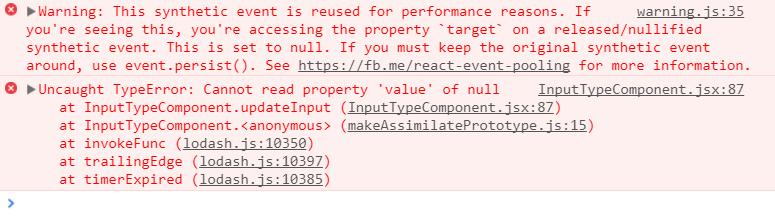
这破坏了我的代码,现在UpdateInput函数永远不会触发。
所有这一切的文档和博客都是稀奇古怪的,所以我没有其他地方可去。
回答 1
Stack Overflow用户
回答已采纳
发布于 2017-10-02 08:28:25
错误消息实际上是指向错误的原因:
警告:由于性能原因,此合成事件被重用。如果您看到这一点,您将在一个已释放/无效的合成事件上访问属性
target。这个设置为空..。请参阅Fb.me/react事件池
React为您管理所有DOM事件,作为其内部性能优化的一部分,它维护一个事件池,并在新事件出现时重新使用对象。但是,当完成React时,通过组件树传递事件时,它将空出所有字段。
当您推迟提交时,只有在updateInput清除了共享事件对象之后才调用updateInputs。
解决这个问题的方法是将你的方法分为两部分--第一部分是从合成事件中获取你需要的信息,第二个部分实际上是用来完成你想要的工作:
constructor() {
  this.onInput = this.onInput.bind(this);
  this.updateInput = _.debounce(this.updateInput.bind(this), 1000);
}
onInput(event) {
  const inputValue = event.target.value.toUpperCase();
  this.updateInput(inputValue);
}
updateInput(inputValue) {
  // Details omitted for brevity
}页面原文内容由Stack Overflow提供。腾讯云小微IT领域专用引擎提供翻译支持
原文链接:
https://stackoverflow.com/questions/46521430
复制相关文章
相似问题
腾讯云开发者

Copyright © 2013 - 2026 Tencent Cloud. All Rights Reserved. 腾讯云 版权所有
深圳市腾讯计算机系统有限公司 ICP备案/许可证号:粤B2-20090059  粤公网安备44030502008569号
腾讯云计算(北京)有限责任公司 京ICP证150476号 | 京ICP备11018762号